32 | UTM-1 Getting Started Guide
Console port – for managing the appliance using RS-232 serial communication. Use the
supplied serial cable.
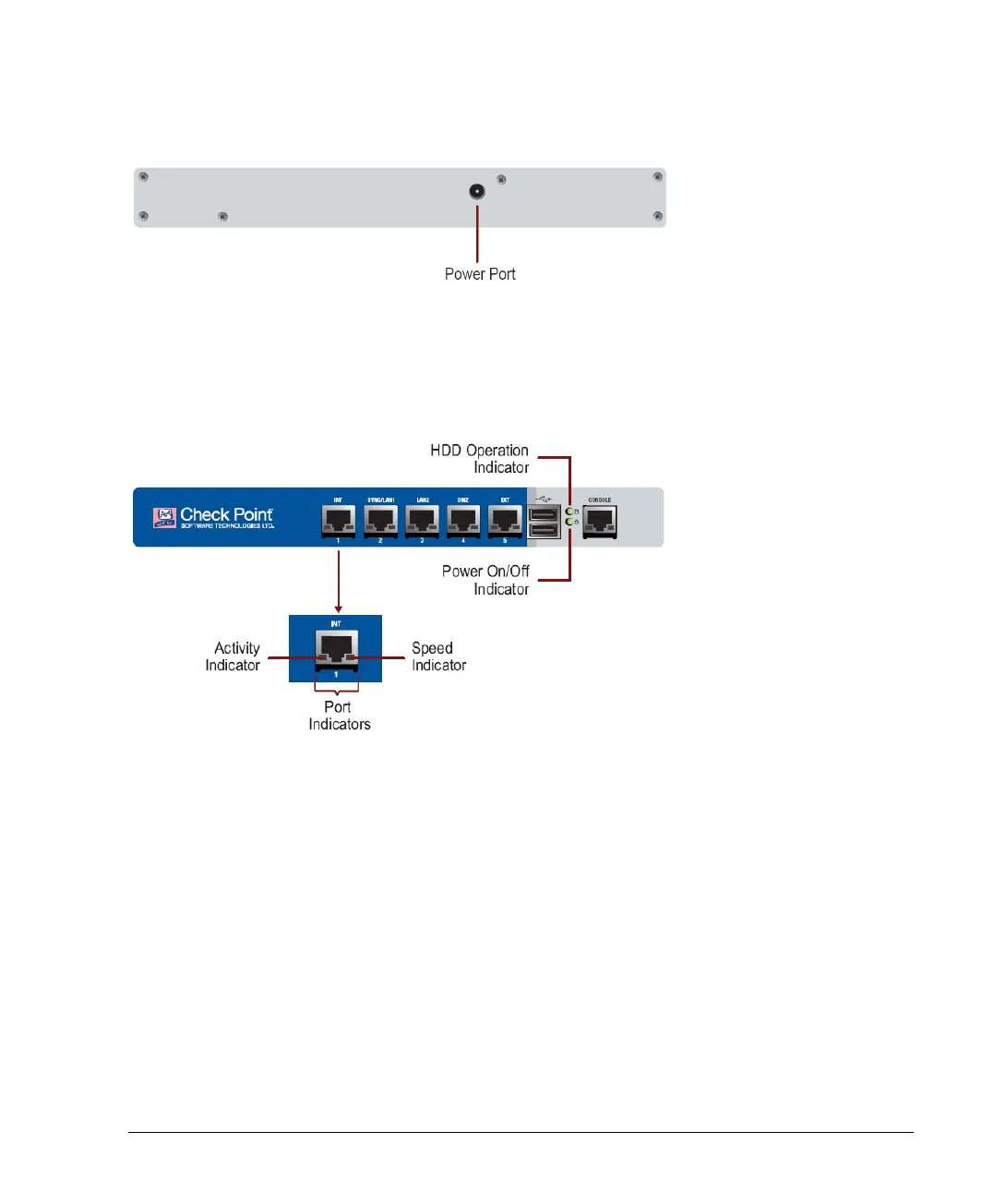
The UTM-1 appliance has a single power port at the rear:
Connect the power supply unit to this port.
LEDs on the UTM-1 130
The front of the UTM-1 130 appliance has many LEDs, as shown.
The purpose and meaning of the various LEDs are as follows:
Power On/Off Indicator: This green light is lit when the machine is ON. When the machine
is OFF, the light is off.
HDD Operation Indicator: An amber light that blinks when the hard drive is accessed.
Port Indicators: There are two lights at the bottom of each LAN port. When the port is
inactive, both are off.
Activity Indicator: This light is solid green when connected, and blinking green when
encountering traffic.
Speed Indicator: When this light is yellow or orange, the port speed is 1000 Mbps.
When it is green, the port speed is 100 Mbps.












 To Next Page