UTM-1 Getting Started Guide | 33
LEDs on all other UTM-1 Models
Note - This section does not apply to UTM-1 130
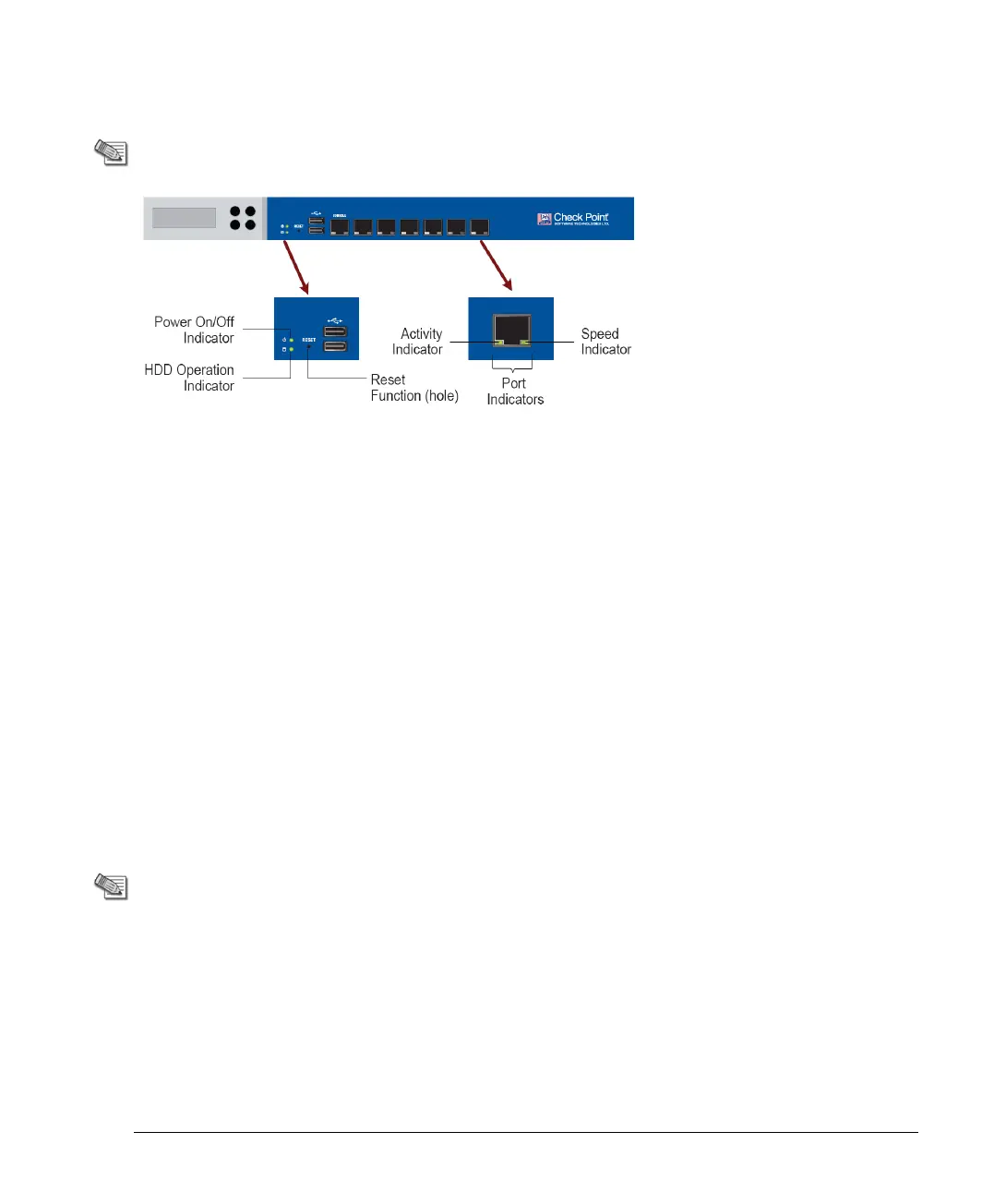
The purpose and meaning of the various LEDs are as follows:
Power On/Off Indicator: This green light is lit when the machine is ON. When the machine
is OFF, the light is off.
HDD Operation Indicator: When this green light is steady, the machine is ON and ready
for login. When it is blinking, the machine is booting and it is not possible to login.
Reset Function: This button forcibly reboots the appliance. The button is recessed into the
appliance chassis to prevent accidental reboot. This button does not light up.
Port Indicators: There are two lights at the bottom of each LAN port. When the port is
inactive, both are off.
Activity Indicator: This light is solid green when connected, and blinking green when
encountering traffic.
Speed Indicator: When this light is yellow or orange, the port speed is 1000 Mbps.
When it is green, the port speed is 100 Mbps.
Managing UTM-1 Using the LCD Panel
Note - This section does not apply to UTM-1 130 ,
which does not have an LCD panel
The appliance has an LCD panel that you can use to do basic management operations. You
can enable DHCP. You can configure the management IP address, netmask, and default
gateway of the appliance. You can reboot the appliance.












 To Next Page