Infotainment System 7-27
Recording from a CD to the
Hard Drive
The speed of the recording
increases if you are listening to
another source while recording.
To record all tracks from the disc:
1. Load a CD or press the
HDD/DVD/AUX button until
the Disc screen displays.
2. Press the
O REC button.
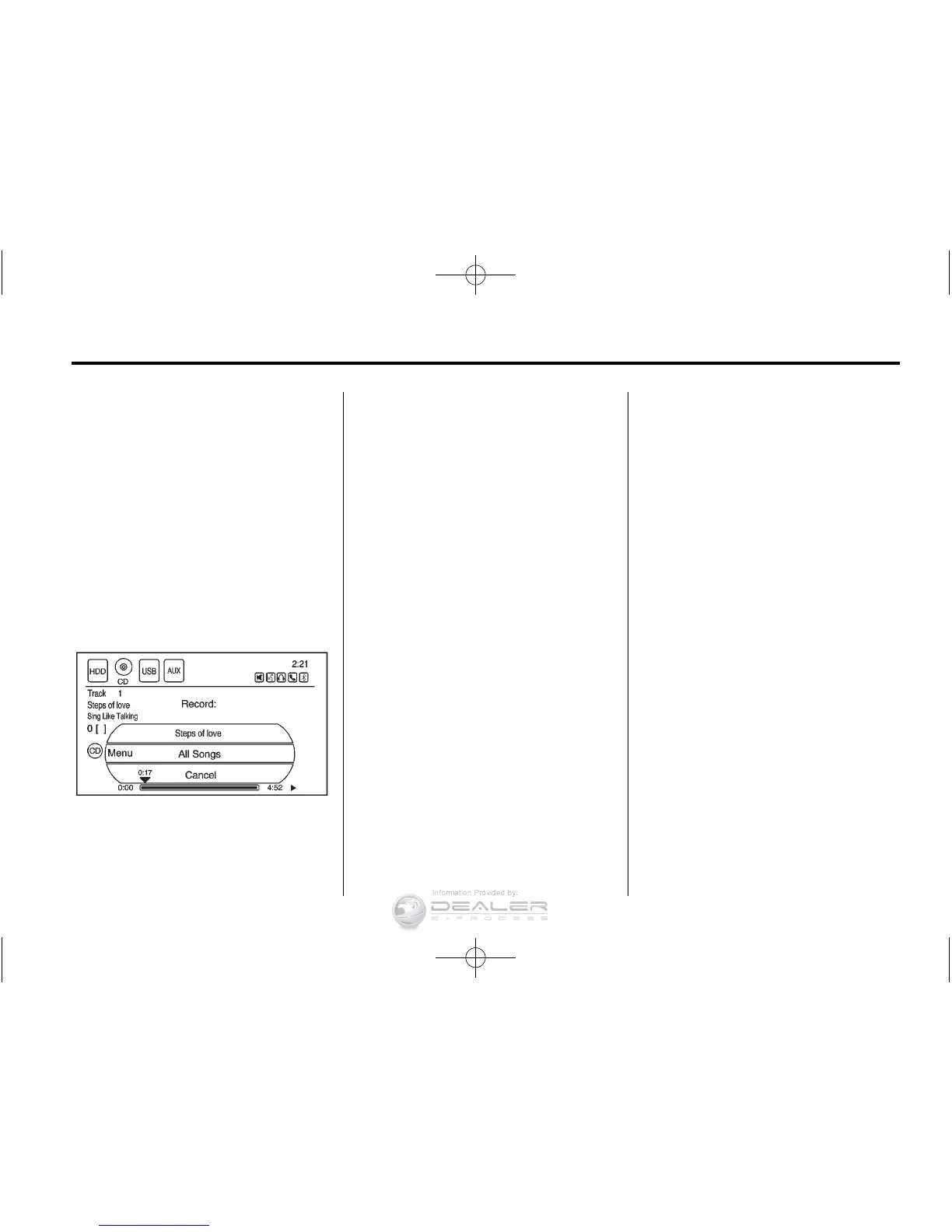
3. A confirmation displays.
4. Select All Songs to record all
tracks. A progress bar displays.
To record selected tracks from
the disc:
1. Load a CD or press the
HDD/DVD/AUX button until
the Disc screen displays.
2. Press
r SEEK/SEEK [ or the
CD/MP3 Music Menu to select a
song for recording.
3. Press the
O REC button.
4. A confirmation displays.
5. Select the song name to record.
A progress bar displays.
Recording from a USB Device
to the Hard Drive
To copy all tracks from the USB
device:
1. Connect a USB device or press
the HDD/DVD/AUX button until
the disc screen displays the
USB screen.
2. Press the
O REC button.
3. A confirmation displays.
4. Select All Songs to copy all
tracks. A progress bar displays.
To record selected tracks:
1. Connect a USB device or press
the HDD/DVD/AUX button until
the disc screen displays the
USB screen.
2. Use the
r SEEK/SEEK [ or
the Music Menu to select a song
for recording.
3. Press the
O REC button.
4. A confirmation displays.
5. Select the song name to record.
A progress bar displays.












 To Next Page