10-36 Vehicle Care
3. Turn the bulb socket
counterclockwise to remove it
from the bulb assembly.
4. Pull the bulb from the bulb
socket.
5. Push a new bulb straight into the
bulb socket.
6. Reinstall the bulb socket by
lining up the tabs in the lamp
assembly and turn it clockwise
to lock it into place.
7. Replace the two inboard screws
from the aero panel.
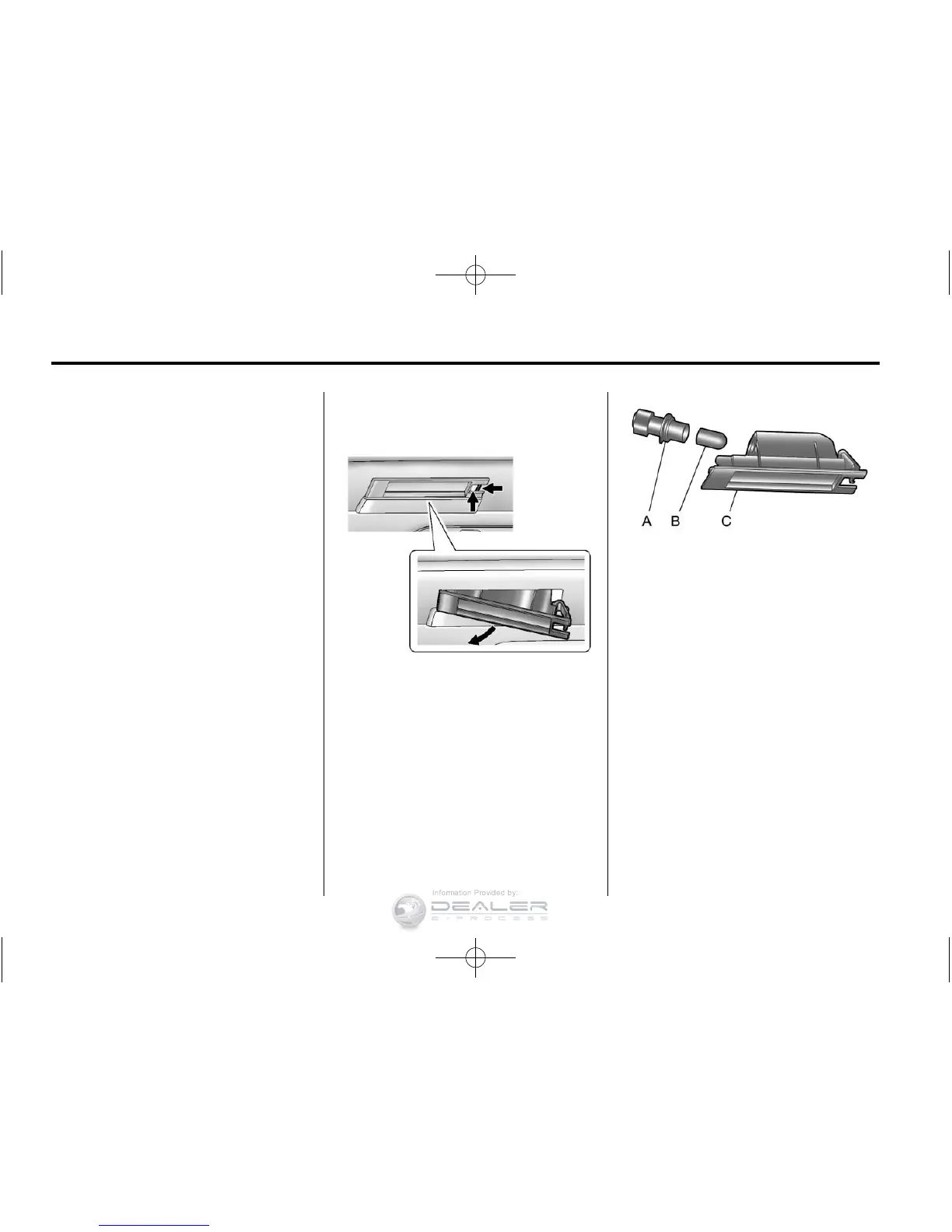
License Plate Lamp
To replace one of these bulbs:
Passenger Side Shown,
Driver Side Similar
1. Press the spring clip on the right
end of the lamp assembly to the
left to unlock the lamp assembly.
2. Pull down on the lamp assembly
to remove it from the fascia.
A. Bulb Socket
B. Bulb
C. Lamp Assembly
3. Turn the bulb socket (A)
counterclockwise to remove it
from the lamp assembly (C).
4. Pull the bulb (B) straight out of
the bulb socket (A).
5. Push the replacement bulb
straight into the bulb socket (A)
and turn the bulb socket (A)
clockwise to install into the
lamp assembly (C).












 To Next Page