Vehicle Care 10-35
Passenger Side Headlamps
To replace the high/low‐beam
headlamp:
1. Open the hood. See Hood on
page 10‑9.
2. Remove the air cleaner cover.
See Engine Air Cleaner/Filter on
page 10‑16.
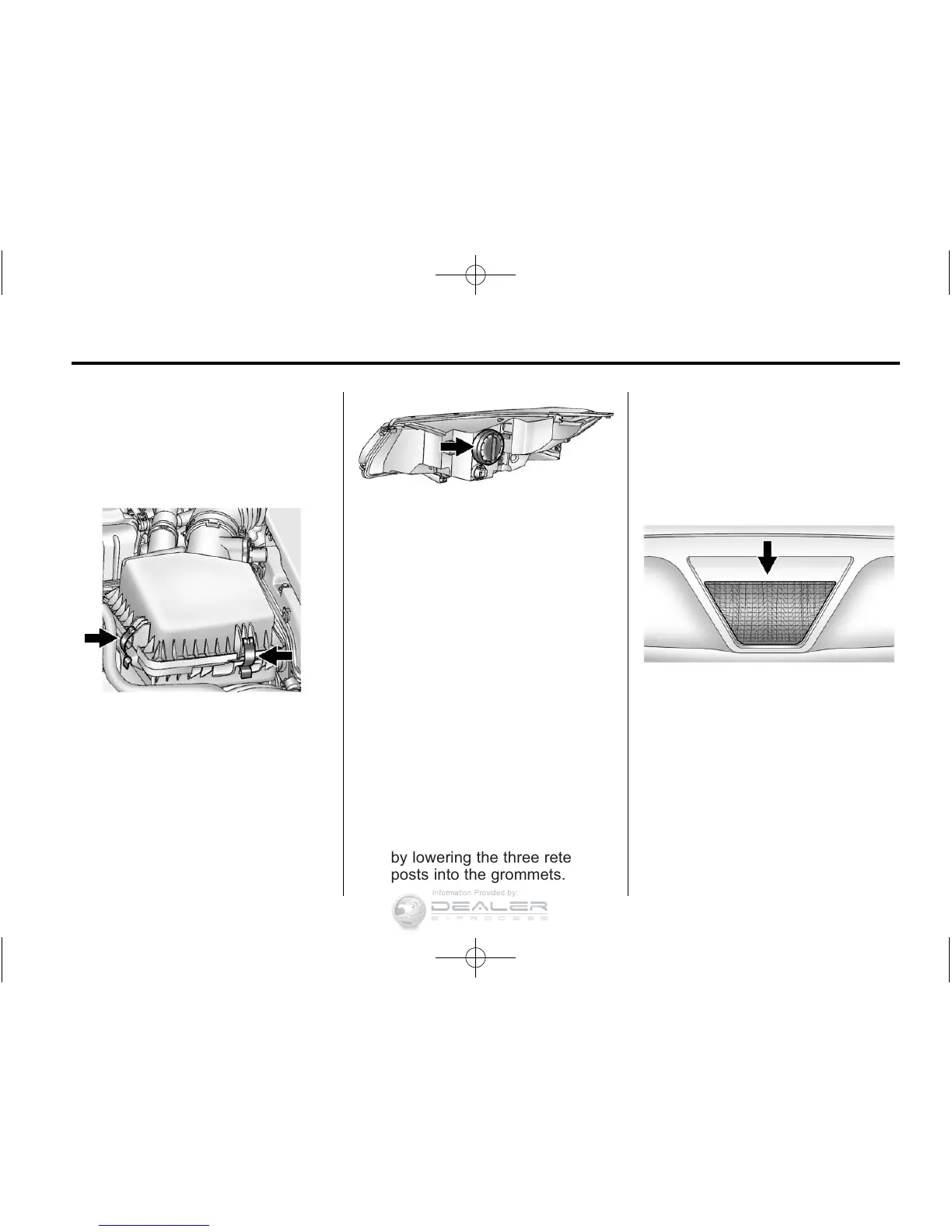
3. Remove the air cleaner
assembly by pulling up to
release the rear two retention
posts from the securing
grommets. Then pull it forward to
remove the remaining retention
post from the securing grommet.
4. Remove the cover from the back
of the headlamp assembly by
turning it counterclockwise.
5. Remove the bulb from the
headlamp assembly by turning
it counterclockwise.
6. Disconnect the bulb from the
wiring harness connector.
7. Install the new bulb in the
headlamp assembly by turning
it clockwise.
8. Reconnect the wiring harness
connector.
9. Install the cover on the back
of the headlamp assembly by
turning it clockwise.
10. Install the air cleaner assembly
by lowering the three retention
posts into the grommets.
11. Install the engine air
cleaner/filter assembly cover.
See Engine Air Cleaner/Filter
on page 10‑16.
Back-Up Lamps
The back-up lamp is in the rear
fascia.
To replace a bulb:
1. Remove the two inboard screws
from the aero panel located
under the rear fascia.
2. Push up on the aero panel to
locate the bulb socket.












 To Next Page