Driving and Operating 9-41
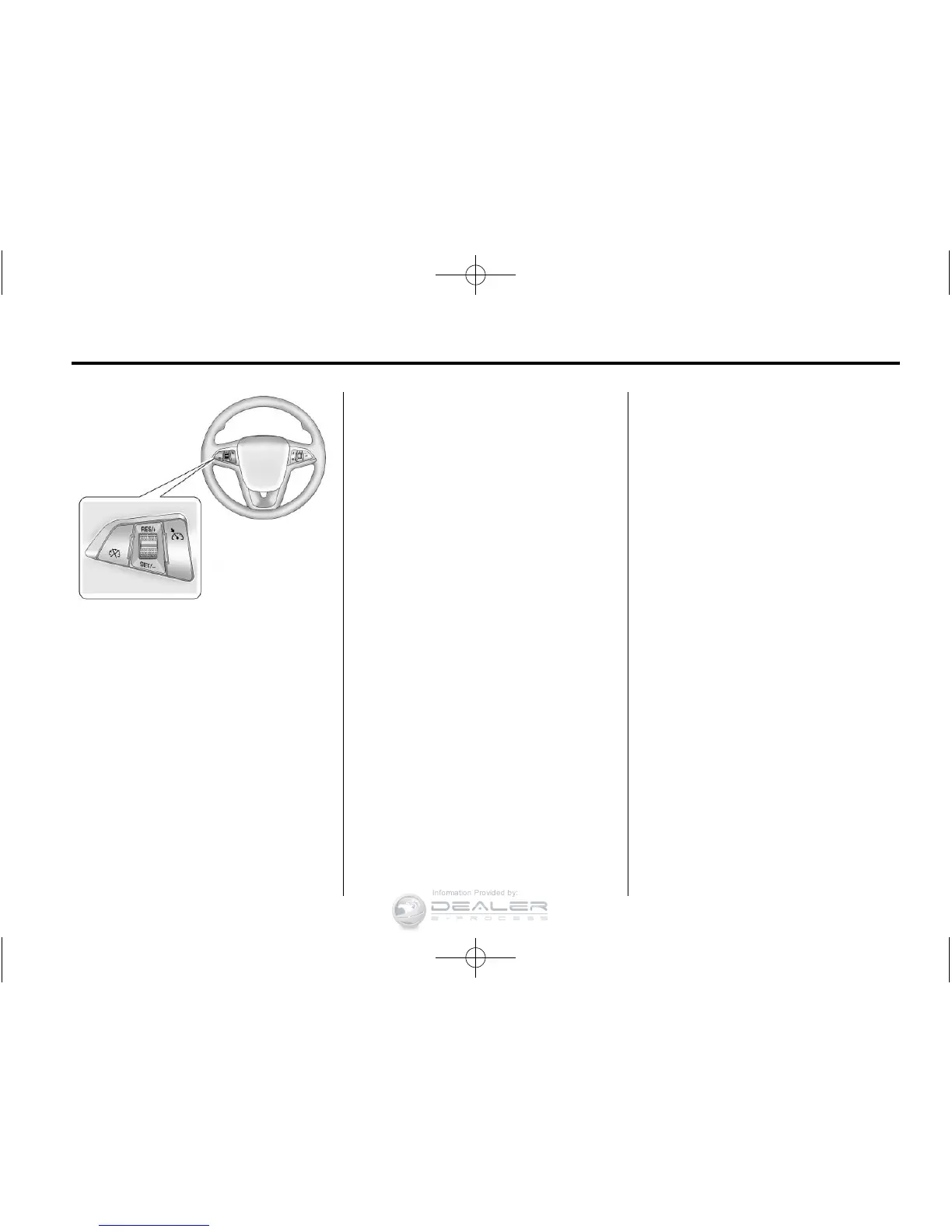
The cruise control buttons are on
the steering wheel.
1 (On/Off): Press to turn the
cruise control system on and off.
An indicator light will turn on or
off in the instrument cluster.
* (Cancel): Press to disengage
cruise control without erasing the
set speed from memory.
RES/+ (Resume/Accel): Move
the thumbwheel up to resume
to a previously set speed or to
accelerate.
SET/− (Set/Coast): Move the
thumbwheel down to set a speed
and activate cruise control or to
make the vehicle decelerate.
Setting Cruise Control
If the cruise button is on when not in
use, it could get bumped and go into
cruise when not desired. Keep the
cruise control button off when cruise
is not being used.
To set a speed:
1. Press
1 to turn cruise
control on.
2. Get up to the speed desired.
3. Move the thumbwheel down
toward SET/− and release it.
The desired set speed briefly
appears in the instrument
cluster.
4. Take your foot off the accelerator
pedal.
When the brakes are applied, the
cruise control shuts off.
Resuming a Set Speed
If the cruise control is set at a
desired speed and then the
brakes are applied, the cruise
control is disengaged without
erasing the set speed from memory.
Once the vehicle speed is about
40 km/h (25 mph) or greater,
move the thumbwheel up toward
RES/+ briefly and then release it.
The vehicle returns to the previously
set speed and stays there.










 To Next Page