Freeze-dryer Alpha 1-4 LSCplus
Freeze-dryer Alpha 2-4 LSCplus
Version 01/2011, Rev. 2.3 of 03/07/2017 • sb
Translation of the original operating manual
Access protection (4)
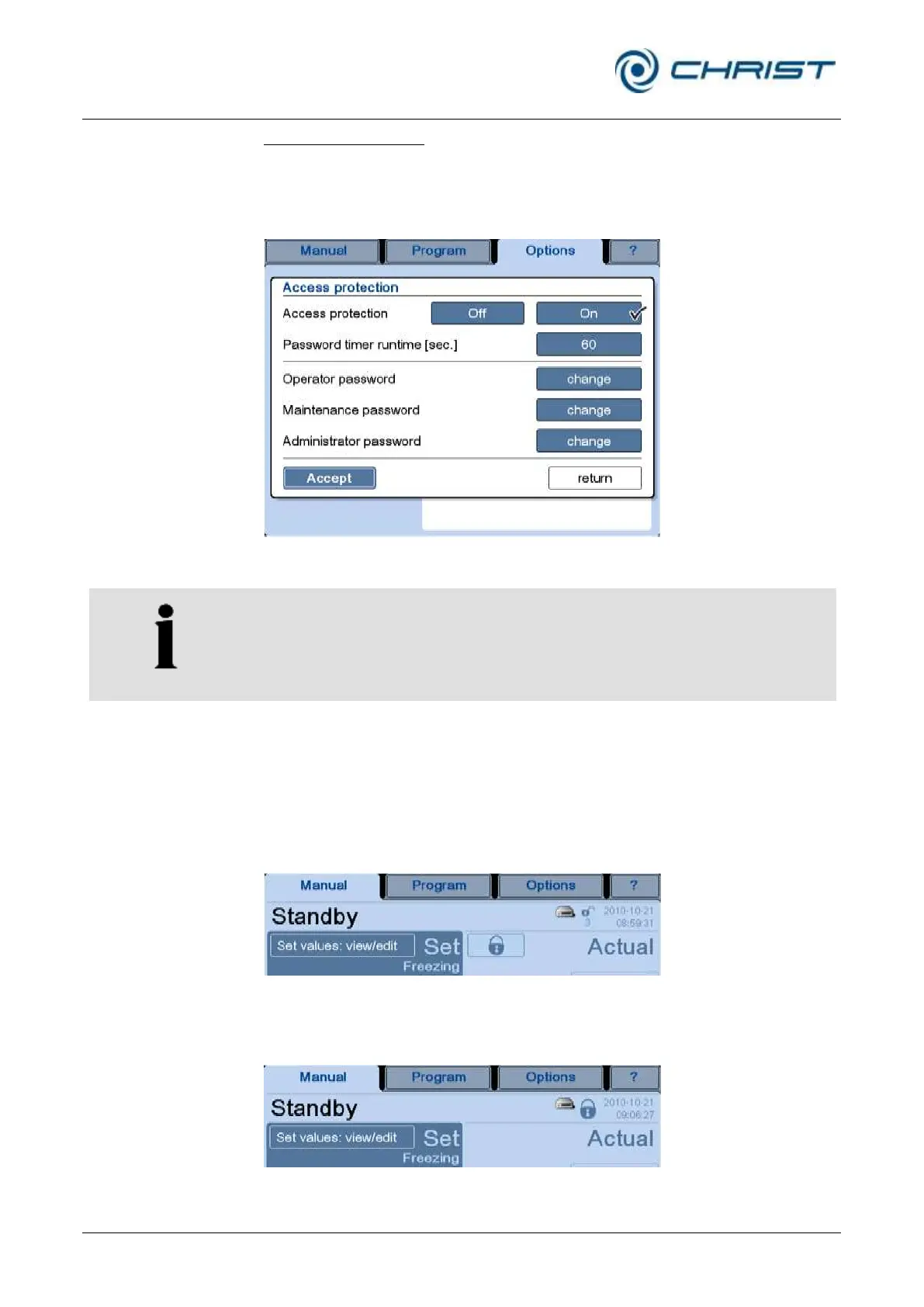
In this dialog box, the access rights can be managed on several levels and
they can be protected with a password.
In the factory setting with an activated access protection, data can be
viewed but not edited.
Fig. 42: Dialog box "Access protection"
The other buttons cannot be activated unless the access protection is
active.
Password timer runtime: In order to prevent unauthorised access, the
system will automatically switch back to the default setting after a pre-
defined period of time.
In this case, there is a small lock symbol in the status line and below this
symbol the remaining time until the lock will be active is counted down. At
the same time a button with a big lock symbol will be displayed in the actual
values field.
Fig. 43: Countdown of the password timer and the button with the lock symbol
• The button with the lock symbol blocks the access immediately and the
system switches to the default setting.
Fig. 44: Access blocked, the data cannot be edited



 To Next Page