Freeze-dryer Alpha 1-4 LSCplus
Freeze-dryer Alpha 2-4 LSCplus
Version 01/2011, Rev. 2.3 of 03/07/2017 • sb
Translation of the original operating manual
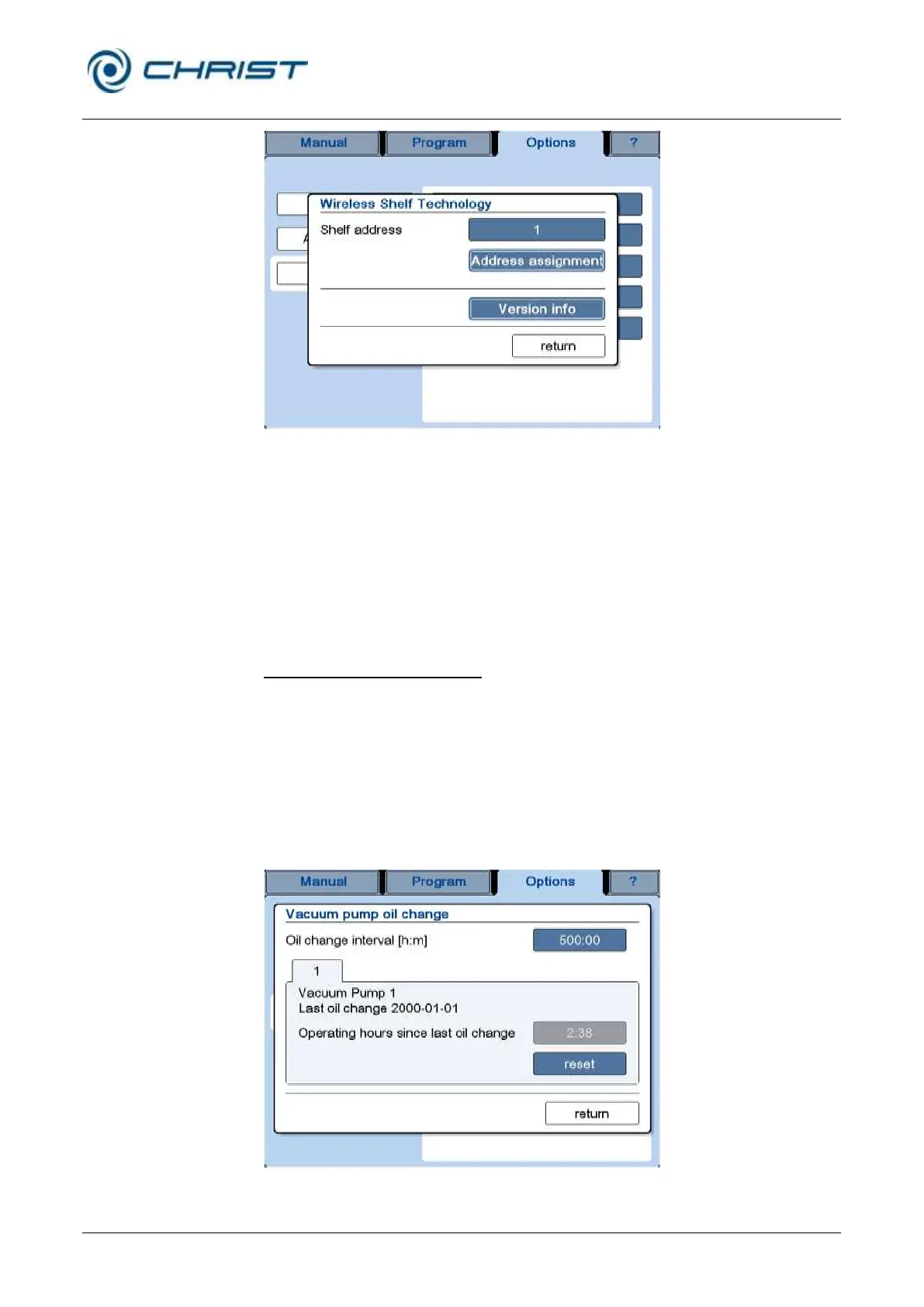
Fig. 50: Wireless shelf technology – assignment of shelf addresses
• In order to assign an address, open the dialog box "Wireless Shelf
Technology".
• Ensure that only the WST module to which an address is to be assigned
is connected. If several modules are connected, they will all receive the
same address, resulting in a communication conflict.
• Press the button "Address assignment", process the prompt, and
confirm the address assignment.
Vacuum pump oil change (4)
The system monitors the oil change interval of the vacuum pump.
The interval can be adapted to the vacuum pump model and utilisation.
When the end of an oil change interval is reached, a corresponding
message will be displayed.
• Acknowledge the message.
• Change the oil of the vacuum pump.
• Reset the operating hour counter in the dialog box “Vacuum pump oil
change” by pressing the “reset” button.
Fig. 51: Dialog box "Vacuum pump oil change"



 To Next Page