Freeze-dryer Beta 1-8 LSCbasic
Freeze-dryer Beta 2-8 LSCbasic
Version 03/2018, Rev. 1.5 of 09/03/2020 • sb-dc
Translation of the original operating manual
6.5 LSCbasic control system
The control system LSCbasic (Lyo Screen Control basic) was specifically
developed for the control of freeze-drying processes. The clear user
interface enables the intuitive operation of the unit.
Fig. 17: Start screen of the LSCbasic control unit (example)
6.5.1 User interface
The system is operated via a touch panel, i.e. by touching the buttons on
the display. Every button is marked by a frame. Pressing the button
activates the associated function. Depending on the function, a dialogue
box opens, a value can be changed, or a transaction can be confirmed.
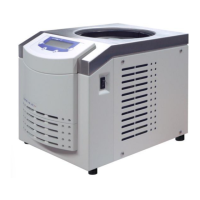
Fig. 18: User interface LSCbasic
The user interface is divided into three main windows that can be called up
by touching the corresponding buttons:


 To Next Page