E Series User Manual
020-000515-01 Rev. 2 (03-2013)
Section 4: Operation
4-10
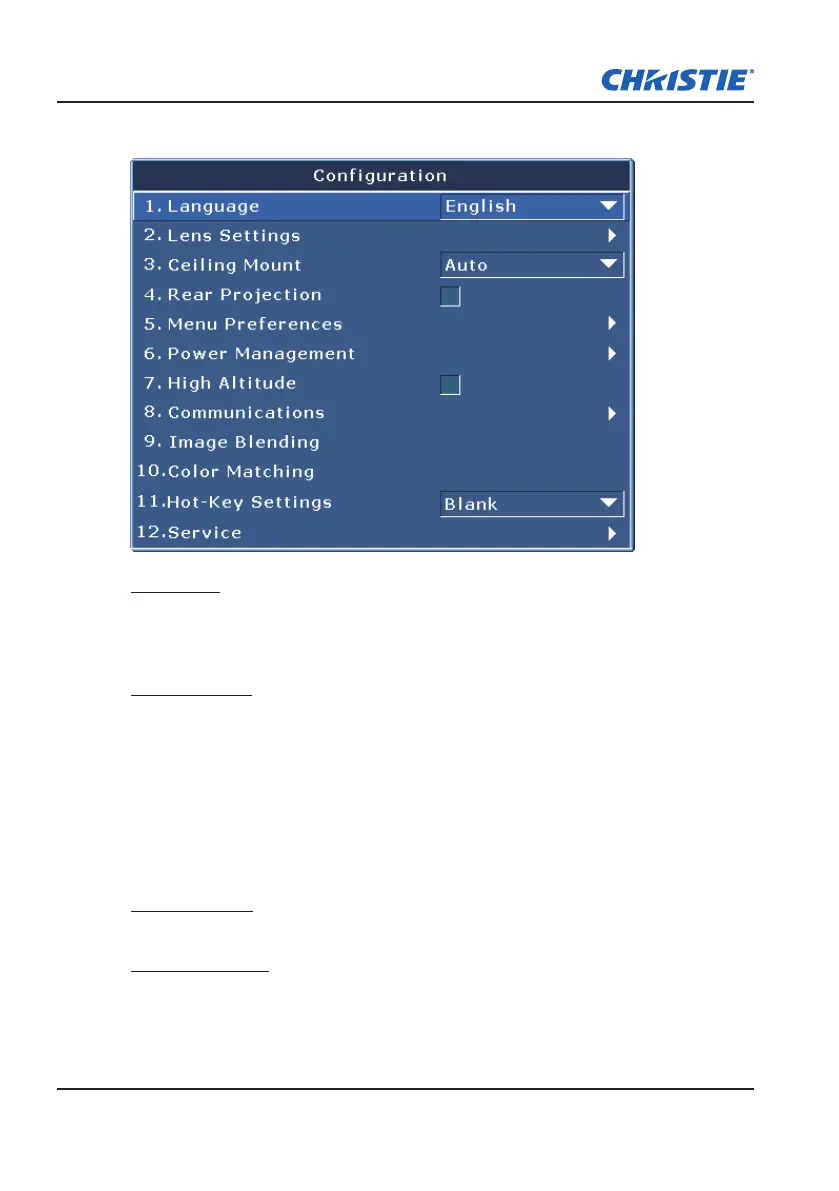
4.3 Conguration Menu
Language
Allows you to select an available language for the OSD display, from English,
French, German, Italian, Spanish, Chinese(simplied), Japanese, Korean, and
Russian.
Lens Settings
Focus and Zoom: Adjust the focus and zoom the image in or out.
y
Lens Shift: Shift the lens up and down or left and right.
y
Lock Lens Motors: Select this function to prevent all lens motors from
y
moving. It will disable the Zoom, Focus, Horizontal and Vertical Position
settings, effectively locking out any changes and overriding all other lens
features. This is particularly useful to prevent accidental lens position
changes in multi-projector installations.
Lens Calibration: Calibrate the lens center
y
Ceiling Mount
Turn the image upside down for ceiling-mounted projection.
Rear Projection
Reverse the image so you can project from behind a translucent screen.



 To Next Page