LED Overview 4-5
3916 Service Delivery Switch Hardware Installation and Start-up Manual
009-3226-001 Standard Revision E
Copyright
©
2013-2015 Ciena
®
Corporation July 2015
10/100/1000 Mbps Port LEDs
Each of the ports has two LEDs associated with it to indicate port status and
speed.
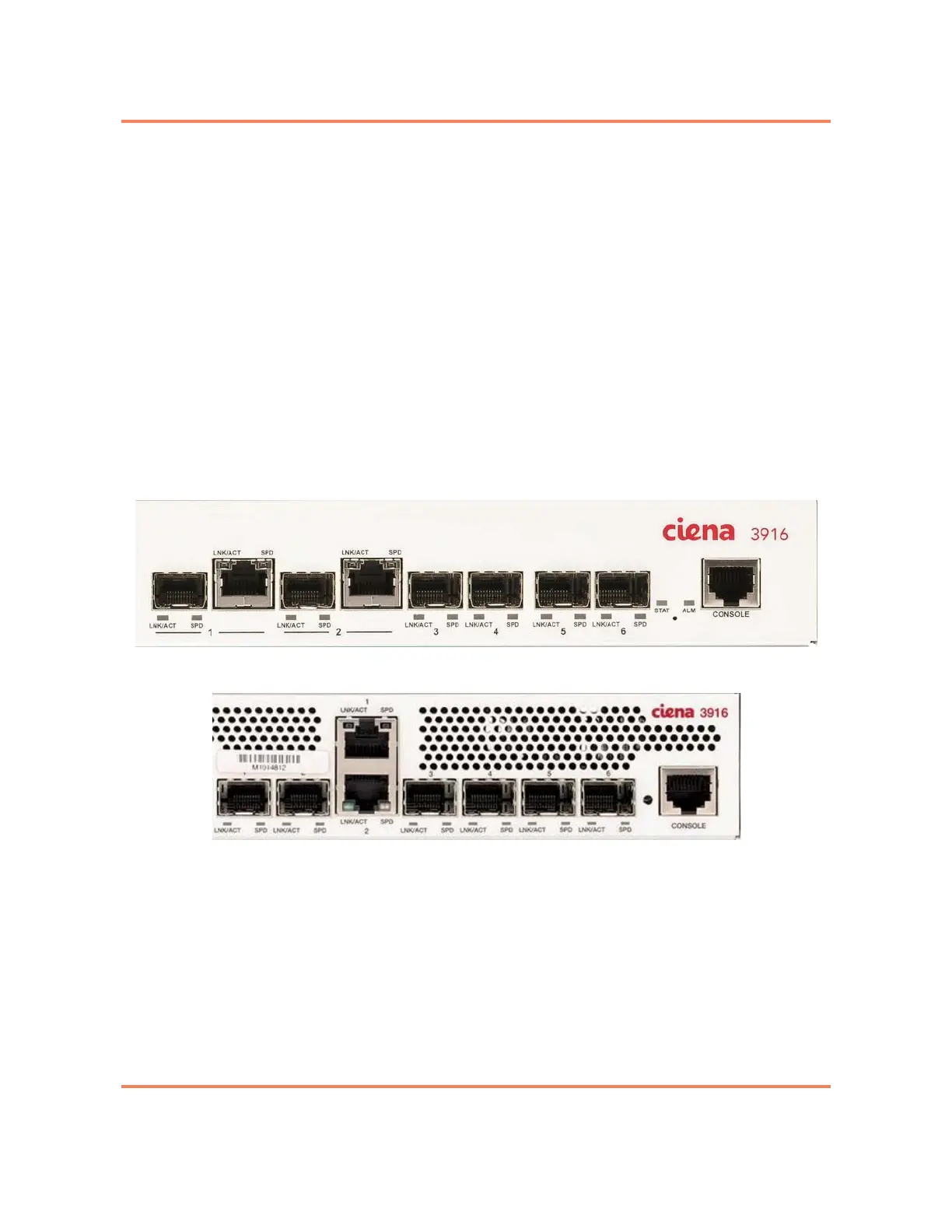
The optical 100/1000 Mbps ports are labeled Ports 1 to 6 on the faceplate.
Copper SFPs installed in ports 1 and 2, and 5 and 6 support 1G. Copper SFPs
installed in ports 3 and 4 support 10/100/1000 Mbps. The LEDs are located at
the bottom of the SFP connectors and are labeled LNK/ACT and SPD. See
Figure 4-5 and Figure 4-6.
The copper 10/100/1000 Mbps ports are Ports 1 and 2 on the faceplate of the
chassis. These ports also have two LEDs associated with each port. On the
standard chassis, the LEDs located above the connector as shown in Figure
4-5. On the mini chassis, the LEDs are located above or below the connector
as shown in Figure 4-6.
Figure 4-5
10/100/1000 Mbps Port LEDs (Standard chassis)
Figure 4-6
10/100/1000 Mbps Port LEDs (Mini chassis)



 To Next Page