5.0 HOW TO PRODUCE ONE PLATE
Before starting your first plate you have to set up the machine. Install the Powertag software
if you will be using it.
5.1 SETTING UP THE MACHINE
Before production you need to adjust the internal devices to the plate sizes. The quality and quantity
of the produced plates depends on the correct adjustment of the mechanical units.
Loader
Unloader
Embosser
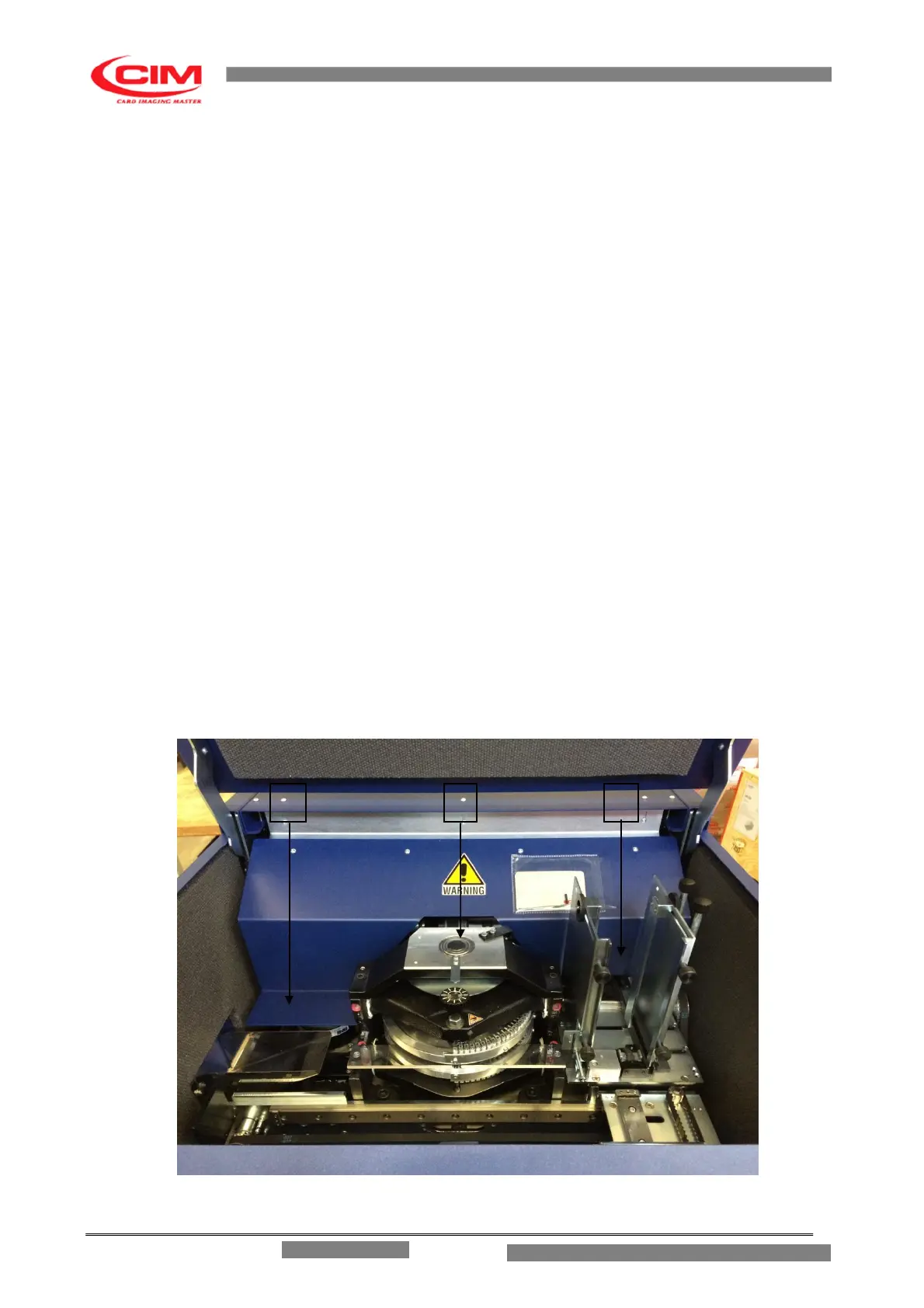
Open the front panel using the key supplied with the METAL EMBOSSER as shown in figure 5.1.
1. PLATES LOADER
2. EMBOSSER PRESSURE
3. PLATES UNLOADER
Verify the state of the above mentioned units at the beginning of every work cycle. The machine should
be switched off and the power supply should be disconnected when it is necessary to access any of the
internal parts of the machine. The safety protection devices have been constructed to block the
machine cycle during that adjustment phase if the preceding standards are not respected.
Fig. 5.1
ME 1500 – Operators Manual


 To Next Page