E-2
Cisco Nexus 2000 Series Hardware Installation Guide
Appendix E LEDs
Chassis and Module LEDs for the Cisco Nexus Fabric Extenders
Chassis and Module LED Descriptions
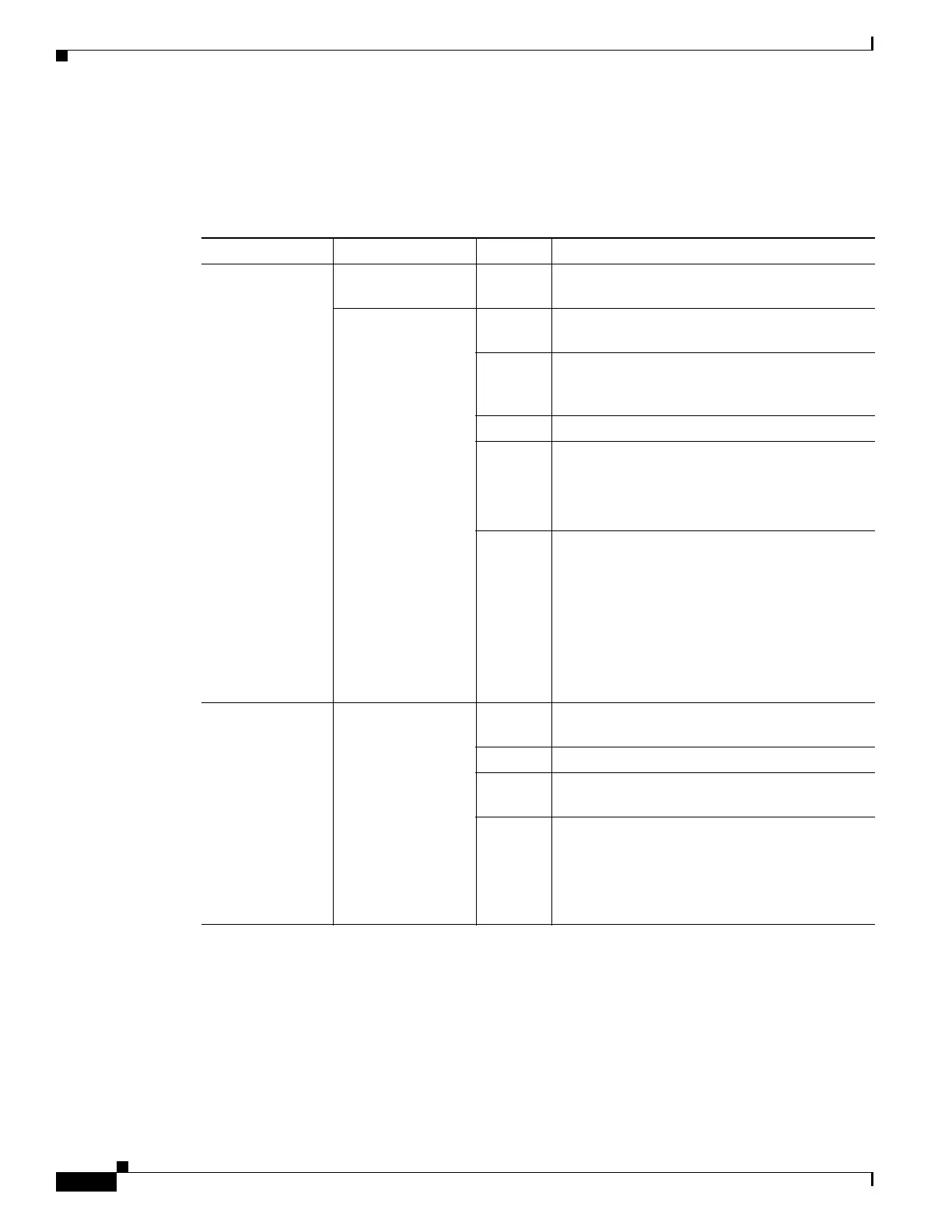
Table E-1 describes the chassis LEDs for the Cisco Nexus Fabric Extenders.
Table E-1 LEDs for the Cisco Nexus Fabric Extenders
Component LED Status Description
Chassis
(port side exhaust
and back)
ID On
(blue)
Identifies the chassis receiving the beacon signal.
Status Solid on
(green)
All diagnostics pass. The module is operational.
Blinking
(green)
The module is cold booting, or is operational but
the network interface ports are not connected to a
parent switch.
Off The module is not receiving power.
On
(amber)
The module is booting or running diagnostics.
An overtemperature condition has occurred. The
temperature threshold has been exceeded by a
small value during environmental monitoring.
Blinking
(amber)
An overtemperature condition has occurred. The
temperature threshold has been exceeded by a
large value during environmental monitoring.
If the module fails during initial reset, the LED
continues to blink and the module does not come
online.
The module has a runtime failure and is brought
offline.
Fan and fan tray
(port side exhaust
of chassis)
Status Solid on
(green)
All diagnostics pass. The module is operational.
Off The module is not receiving power.
Solid on
(amber)
The module is booting or running diagnostics.
Blinking
(amber)
If the module fails during initial reset, the LED
continues to blink and the module does not come
online.
The module has a runtime failure and is brought
offline.


 To Next Page