E-3
Cisco Nexus 2000 Series Hardware Installation Guide
Appendix E LEDs
Chassis and Module LEDs for the Cisco Nexus Fabric Extenders
For a description of the two power supply status, see the “Power Supply Status” section on page E-3.
Power Supply Status
This section describes the power supply LED indicators for the Cisco Nexus Fabric Extenders. Table E-2
describes the status indicated by the Cisco Nexus 2332TQ, Cisco Nexus 2348TQ, Cisco Nexus
2348TQ-E, Cisco Nexus 2348UPQ, Cisco Nexus 2248TP-E, Cisco Nexus 2248TP, 2232PP, and 2224TP
power supply LEDs. Table E-3 describes the status indicated by the Cisco Nexus 2148T power supply
LEDs.
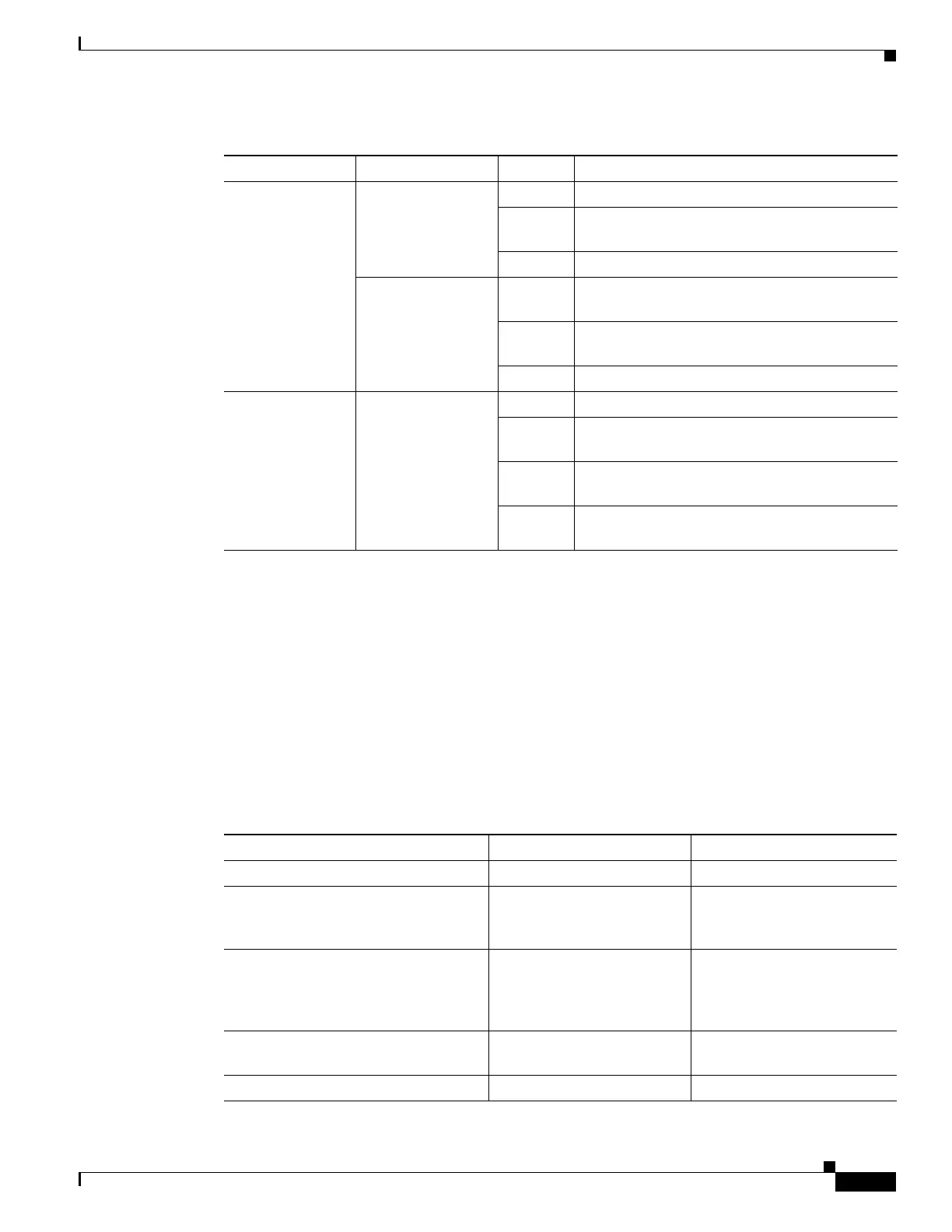
Power supply
(port side exhaust
of chassis)
OK (green) Solid on Power supply is on and okay.
Blinking 12 voltage standby (VSB) is on but the power
supply unit is not powering the other modules.
Off No AC power to the power supply.
FAULT (amber) Solid on Power supply failures, over-voltage,
over-current, or over temperature has occurred.
Blinking AC is present, 12 VSB on, and the power supply
is off.
Off Operating normally.
Port LED Indicates LED
status
Off The port is not active or the link is not connected.
Solid on
(green)
The port is active. The link is connected and
operational.
Solid on
(amber)
The module or port is disabled through the CLI
command or the module is initializing.
Blinking
(amber)
The port is faulty and has been disabled.
Table E-1 LEDs for the Cisco Nexus Fabric Extenders (continued)
Component LED Status Description
Table E-2 Power Supply LED Indicators for the Cisco Nexus 2332TQ, 2348TQ-E/TQ, 2348UPQ,
2248TP-E/TP, 2232PP, and 2224TP
Condition OK LED Status (Green) FAIL LED Status (Amber)
No AC power to the power supplies Off Off
Power supply failure (includes
overvoltage, overcurrent,
overtemperature, and fan failure)
Off On
Power supply warning events where the
power supply continues to operate
(high temperature, high power, and
slow fan)
Off 1 blinking
AC present /voltage standby (VSB) on,
and power supply unit off
blinking Off
Power supply On and OK On Off


 To Next Page