D-4
Cisco ME 2400 Ethernet Access Switch Hardware Installation Guide
OL-7678-01
Appendix D Configuring the Switch with the CLI-Based Setup Program
Starting the Terminal-Emulation Software
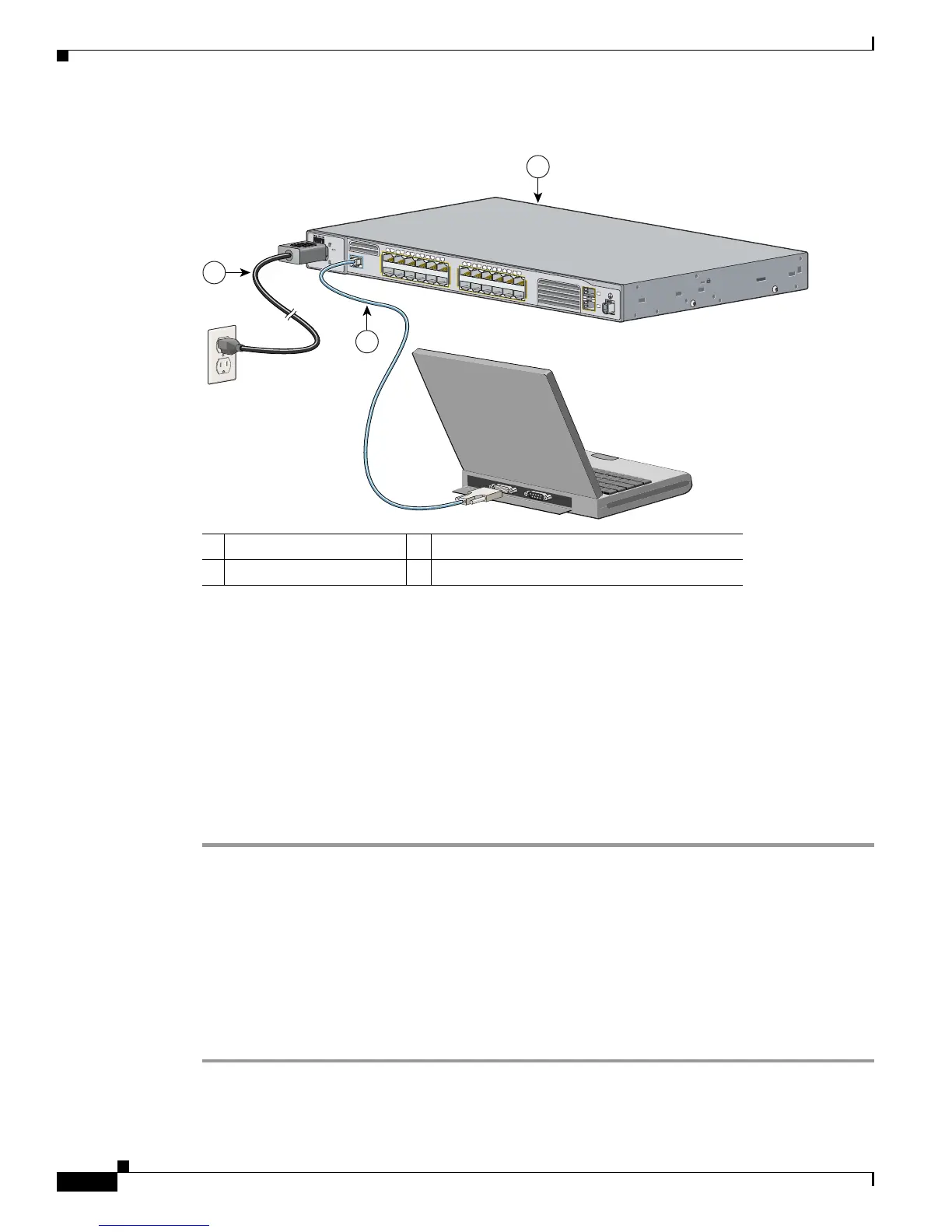
Figure D-3 Connecting the Switch to a PC
See Appendix C, “Connecting to DC Power,” for DC power connection instructions.
Starting the Terminal-Emulation Software
Before you power on the switch, start the terminal emulation session so that you can see the output
display from the power-on self-test (POST).
The terminal-emulation software—frequently a PC application such as Hyperterminal or
ProcommPlus—makes communication between the switch and your PC or terminal possible.
Follow these steps to start a terminal-emulation session:
Step 1 Start the terminal-emulation program if you are using a PC or terminal.
Step 2 Configure the baud rate and character format of the PC or terminal to match these console port default
characteristics:
• 9600 baud
• 8 data bits
• 1 stop bit
• No parity
• None (flow control)
1 Cisco ME switch 3 RJ-45-to-DB-9 adapter cable (user supplied)
2 Power cord
C
i
s
c
o
M
E
2
4
0
0
S
E
R
I
E
S
C
O
N
SO
LE
1
2
3
4
5
6
7
8
9
10
11
12
1
X
2
X
11
X
1
2
X
1
4
1
5
1
6
1
7
1
8
1
9
2
0
2
1
2
2
2
3
2
4
1
3
1
3
X
1
4
X
2
3
X
2
4
X
1
2
S
Y
S
T
E
M
R
A
T
IN
G
1
0
0
-2
4
0
V
~
1
A
-0.
5A
, 5
0
-6
0 H
Z
132699
1
2
3



 To Next Page
 Loading...