1-5
Cisco Wide Area Virtualization Engine 7541, 7571, and 8541 Hardware Installation Guide
Chapter 1 Introducing the Cisco Wide Area Virtualization Engine 7541, 7571, and 8541
Hardware Features
Location of Ports and Connectors
The WAVE appliance supports two Ethernet connectors and two Console ports on the front of the
appliance.
Figure 1-3 shows the back panel ports and connectors.
Warning
To avoid electric shock, do not connect safety extra-low voltage (SELV) circuits to
telephone-network voltage (TNV) circuits. LAN ports contain SELV circuits, and WAN ports
contain TNV circuits. Some LAN and WAN ports both use RJ-45 connectors. Use caution when
connecting cables.
Statement 1021
This section contains the following topics:
• Ethernet Port Connectors
• Console Port Connectors
Ethernet Port Connectors
Connect a Category 3, 4, or 5 unshielded twisted-pair cable to an Ethernet connector. 100BASE-TX and
1000BASE-T Fast Ethernet standards require Category 5 or higher cabling.
The WAVE-7541, WAVE-7571, and WAVE-8541 appliance has two Ethernet connectors that are
attached to the Ethernet controllers (see Figure 1-1 and Figure 1-2). The Ethernet controllers are
integrated on the system board. They provide an interface for connecting to a 10-Mbps, 100-Mbps, or
1-Gbps network and provide full-duplex (FDX) capability, which enables simultaneous transmission and
reception of data on the network. If the Ethernet ports in the server support auto negotiation, the
controllers detect the data-transfer rate (10BASE-T, 100BASE-TX, or 1000BASE-T) and duplex mode
(full duplex or half duplex) of the network and automatically operate at that rate and mode. You do not
have to set any jumpers or configure the controllers.
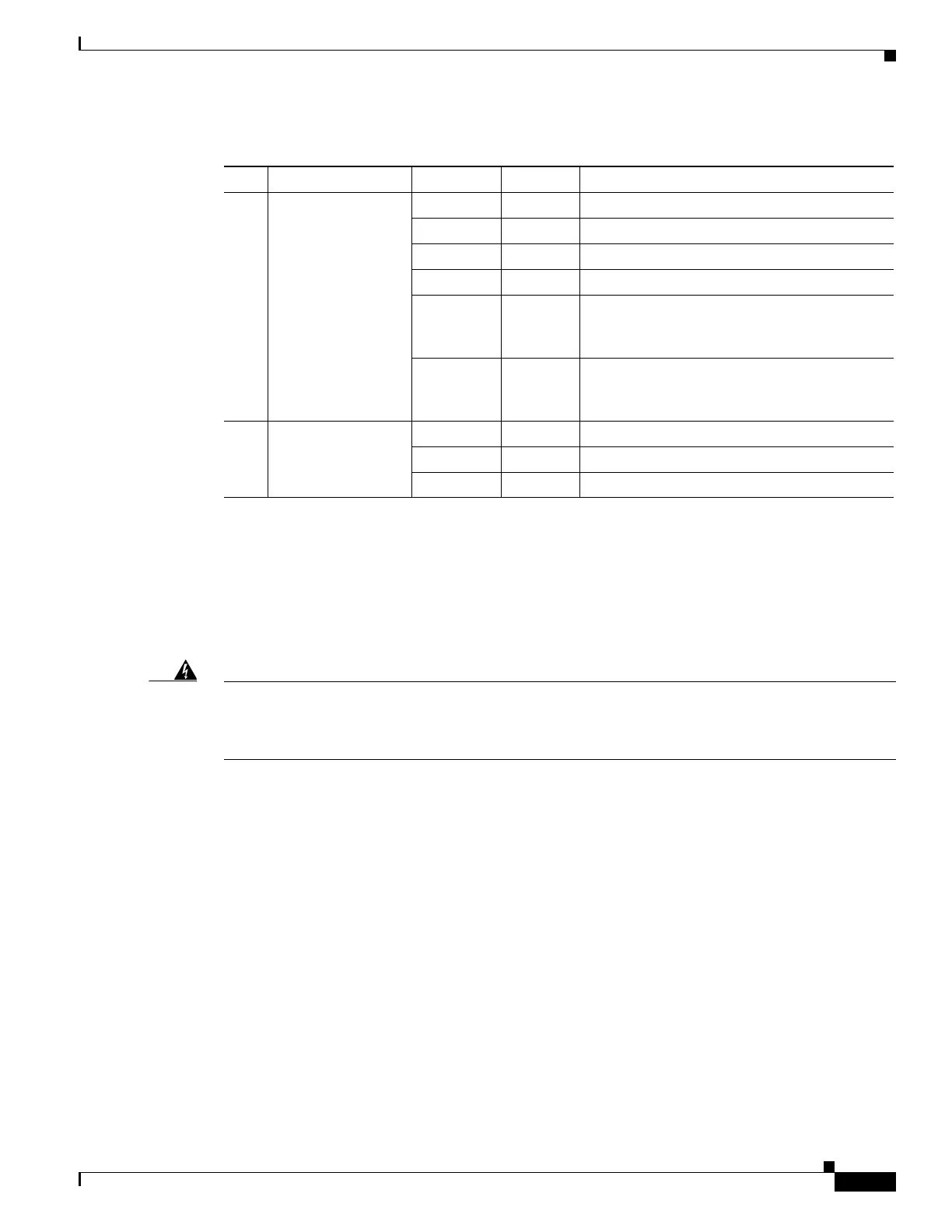
Table 1-2 Back Panel LEDs
LED Color State Description
1, 2 Power supply status — Off No AC power to all power supplies.
Red Blinking No AC power to this power supply.
Green Blinking AC power is present, only standby output on.
Green On Power supply DC outputs on and OK.
Red On Power supply failure. For more information,
see Chapter 6, “Troubleshooting the System
Hardware.”
Red/Green Blinking Power supply warning. For more information,
see Chapter 6, “Troubleshooting the System
Hardware.”
3- 11 Fan status Orange On Alarm.
Orange Blinking Alarm. Fan speed too low.
— Off Normal state.



 To Next Page