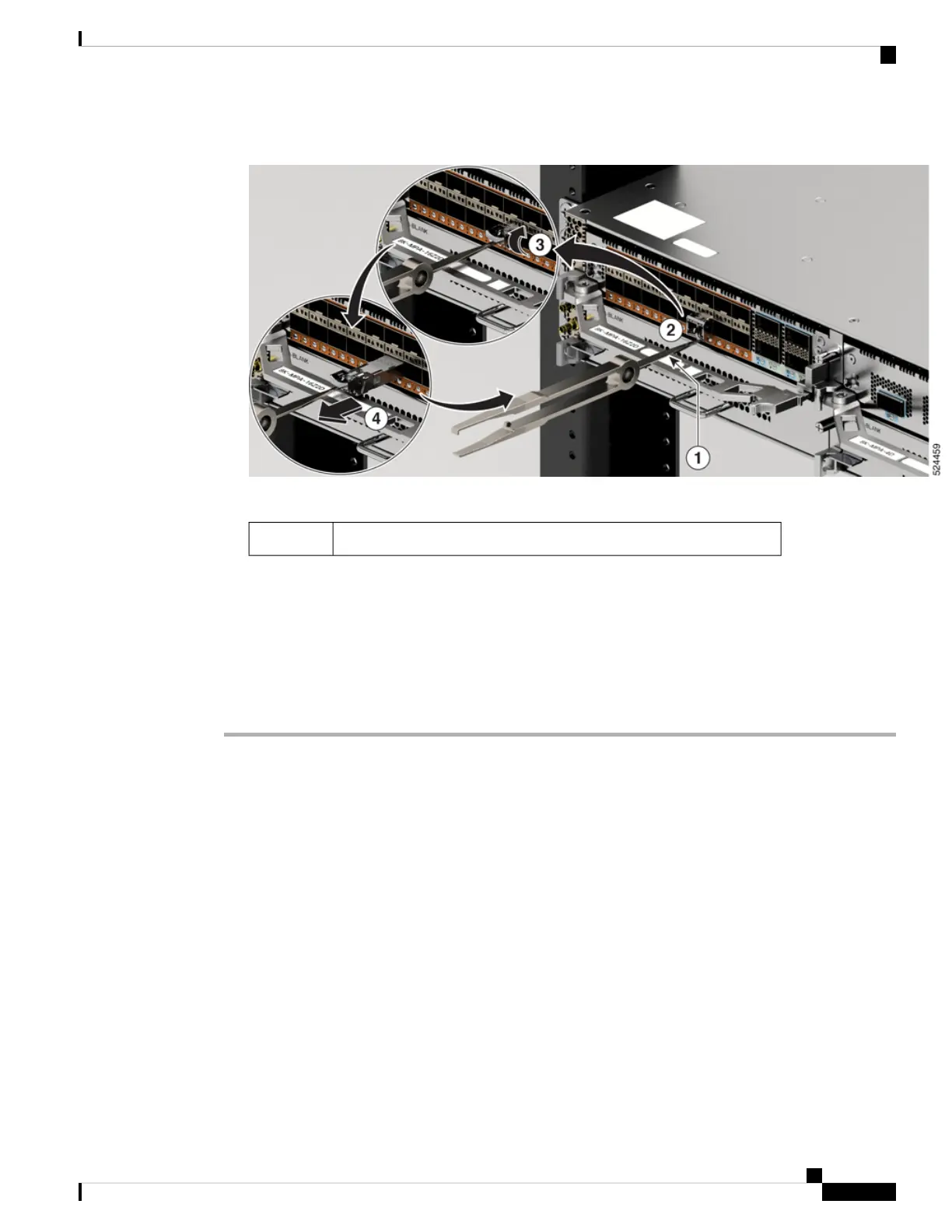
Figure 62: Remove the transceiver from the port
b) Use the front hook to grasp the bale clasp (step 2 in the illustration).
front hook1
c) Open the bale clasp latch (step 3 in the illustration).
d) Use the single hook to grab the open bale clasp (step 4 in the illustration).
e) Remove the transceiver from the port.
f) Place the removed SFP module on an antistatic mat, or immediately place it in a static shielding bag if
you plan to return it to the factory.
g) Protect your line card by inserting a clean SFPmodule cage cover into the optical module cage when there
is no SFP module installed.
Install and Remove QSFP Transceiver Modules
This section provides the installation, cabling, and removal instructions for the Quad Small Form-Factor
Pluggable transceiver modules. Refer to the Cisco Optical Transceiver Handling Guide for additional details
on optical transceivers.
The following figure shows a 400-Gigabit QSFP-DD optical transceiver.
Hardware Installation Guide for Cisco 8700 Series Routers
81
Connect Router to the Network
Install and Remove QSFP Transceiver Modules



 To Next Page