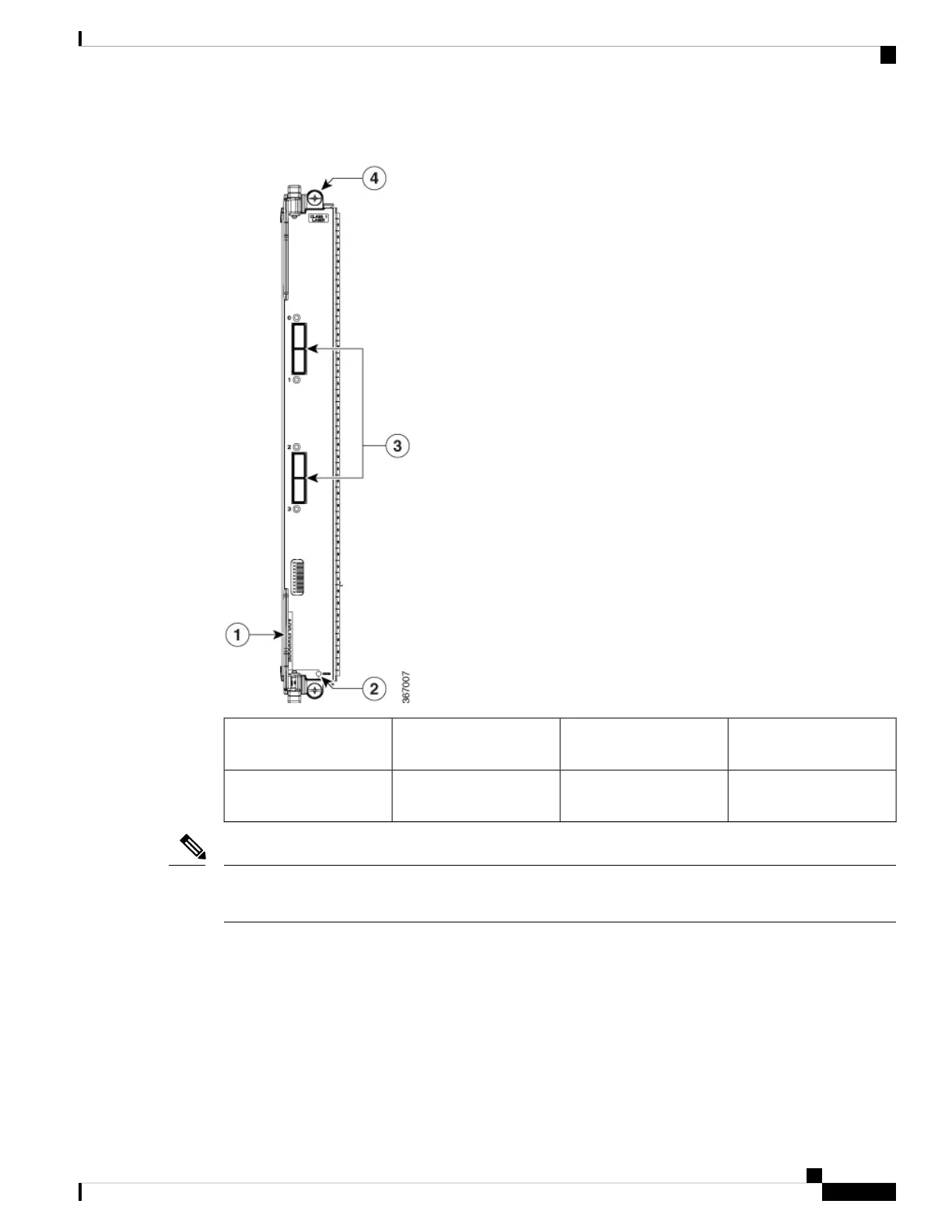
Figure 18: 4-Port 100-Gigabit Ethernet Line Card with QSFP28
Four 100GE QSFP28
connectors
3Ejector lever (one of two)1
Captive installation screw
(one of two)
4Status LED2
If the 4-port 100GE line card is inserted in a chassis, it is important to use filler panels that have two screens
[A9K-LC-FILR-V2]. This ensures optimal cooling and EMI.
Note
12-Port 100-Gigabit Ethernet Line Card with QSFP28
The 12-Port 100-Gigabit Ethernet (GE) line card provides twelve ports for QSFP28 modules that operate at
a rate of 100 Gbps.
Each line card has a single tristate Status LED to display card status. Each QSFP28 port on the line card has
a port status LED visible on the front panel. The LEDs are described in Line Card LEDs, on page 138. The
following figure shows the 12-Port 100-GE line card front panel and LEDs.
Cisco ASR 9000 Series Aggregation Services Router Ethernet Line Card Installation Guide
43
Overview
12-Port 100-Gigabit Ethernet Line Card with QSFP28



 To Next Page