61
Creating Speed Dials on Unused Line Buttons
NOTE This feature must be enabled by your phone administrator.
STEP 1 Press the unused line button and hold down for three seconds. The
Define
Speed Dial window
displays.
STEP 2 Enter the name for the speed dial.
STEP 3 Press the
Down Arrow
key to reach the phone number field. Enter the phone
number and press
Save
.
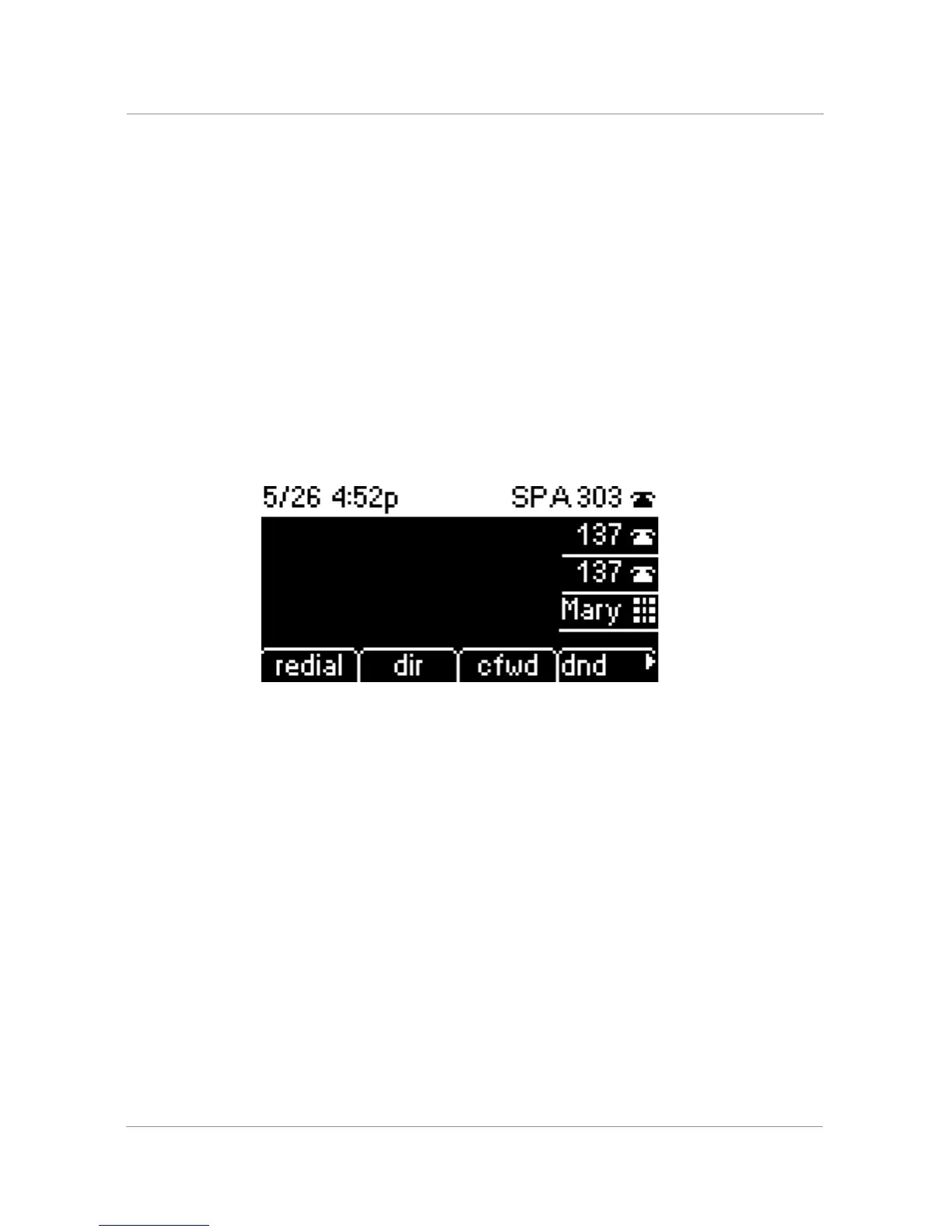
STEP 4 After creating the speed dial, it displays next to the line button and is marked with
a special icon. In the figure below, “Mary” is the configured speed dial.
STEP 5 Press the line button to use the speed dial.
Creating Numerical Speed Dials
STEP 1 Press the Setup button.
STEP 2 Scroll to
Speed Dial
and press the
select
softkey.
STEP 3 For a new speed dial, scroll to select an unused speed dial (marked with Not
Assigned). To edit a previously existing speed dial, select it.
STEP 4 Press the
edit
softkey.
STEP 5 Enter the number to assign to the speed dial and press the
ok
softkey



 To Next Page