14-10
Cisco Catalyst Blade Switch 3020 for HP Software Configuration Guide
OL-8915-03
Chapter 14 Configuring Private VLANs
Configuring Private VLANs
When you associate secondary VLANs with a primary VLAN, note this syntax information:
• The secondary_vlan_list parameter cannot contain spaces. It can contain multiple comma-separated
items. Each item can be a single private-VLAN ID or a hyphenated range of private-VLAN IDs.
• The secondary_vlan_list parameter can contain multiple community VLAN IDs but only one
isolated VLAN ID.
• Enter a secondary_vlan_list, or use the add keyword with a secondary_vlan_list to associate
secondary VLANs with a primary VLAN.
• Use the remove keyword with a secondary_vlan_list to clear the association between secondary
VLANs and a primary VLAN.
• The command does not take effect until you exit VLAN configuration mode.
This example shows how to configure VLAN 20 as a primary VLAN, VLAN 501 as an isolated VLAN,
and VLANs 502 and 503 as community VLANs, to associate them in a private VLAN, and to verify the
configuration:
Switch# configure terminal
Switch(config)# vlan 20
Switch(config-vlan)# private-vlan primary
Switch(config-vlan)# exit
Switch(config)# vlan 501
Switch(config-vlan)# private-vlan isolated
Switch(config-vlan)# exit
Switch(config)# vlan 502
Switch(config-vlan)# private-vlan community
Switch(config-vlan)# exit
Switch(config)# vlan 503
Switch(config-vlan)# private-vlan community
Switch(config-vlan)# exit
Switch(config)# vlan 20
Switch(config-vlan)# private-vlan association 501-503
Switch(config-vlan)# end
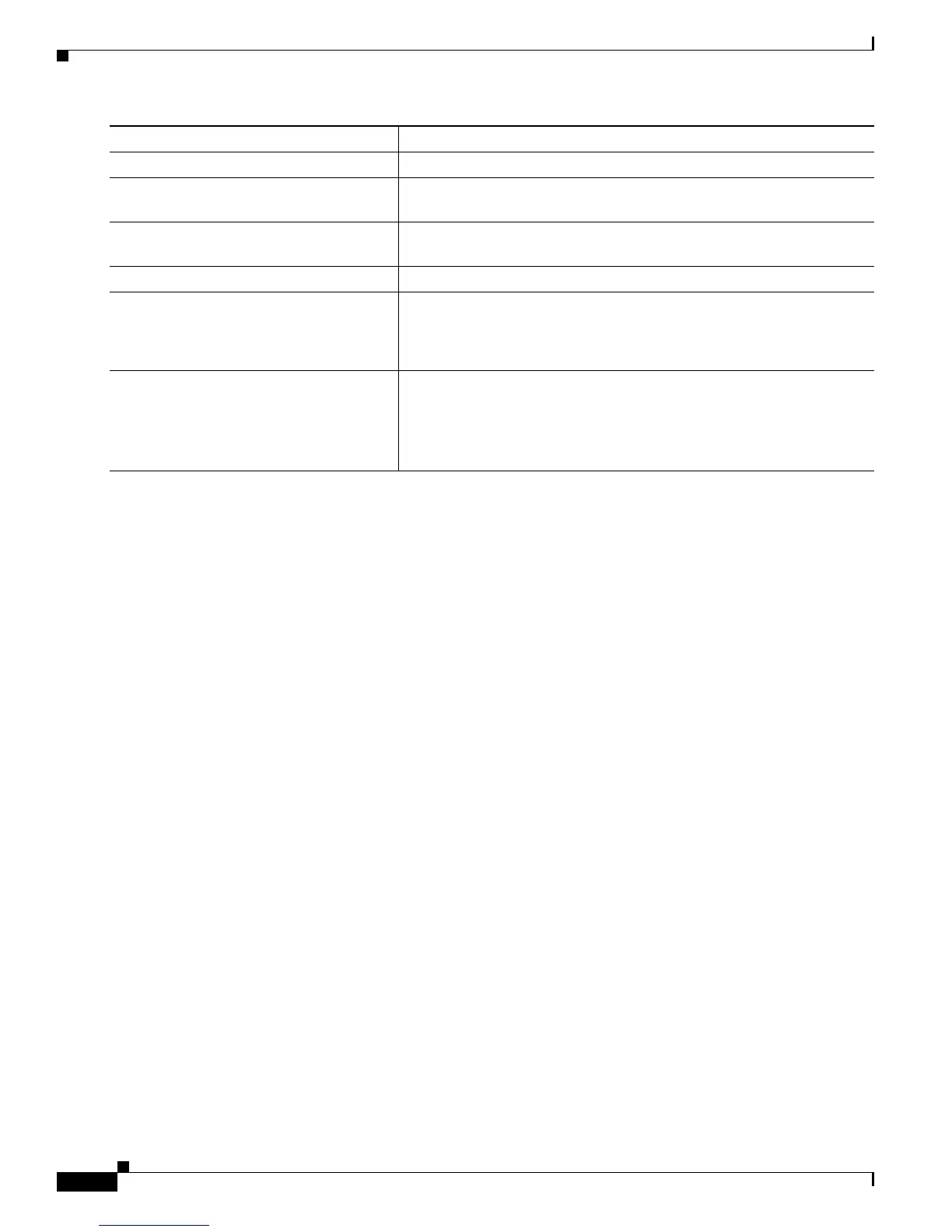
Step 11
exit Return to global configuration mode.
Step 12
vlan vlan-id Enter VLAN configuration mode for the primary VLAN designated in
Step 2.
Step 13
private-vlan association [add | remove]
secondary_vlan_list
Associate the secondary VLANs with the primary VLAN.
Step 14
end Return to privileged EXEC mode.
Step 15
show vlan private-vlan [type]
or
show interfaces status
Verify the configuration.
Step 16
copy running-config startup config Save your entries in the switch startup configuration file. To save the
private-VLAN configuration, you need to save the VTP transparent
mode configuration and private-VLAN configuration in the switch
startup configuration file. Otherwise, if the switch resets, it defaults to
VTP server mode, which does not support private VLANs.
Command Purpose













 To Next Page