EasyManua.ls Logo

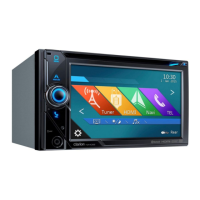
Clarion NX605 - User Manual

Clarion NX605
175 pages
Print Icon
To Next Page IconTo Next Page
Loading...
Owner’s manual
DVD MULTIMEDIA STATION WITH BUILT-IN NAVIGATION & 6.2-INCH TOUCH PANEL CONTROL
NX605

Table of Contents

Other manuals for Clarion NX605

Questions and Answers

  • A
    Alfred AlexanderSep 8, 2025
    Why does my Clarion NX605 screen flicker?
    • S
      Susan LevineSep 8, 2025
      If your Clarion GPS screen flickers, use electrical components (cellphones, wireless radios, minus ion generators, etc.) that generate electrical noise as far away from the unit as possible.
  • M
    Mary HernandezAug 23, 2025
    What to do if Clarion NX605 GPS camera image is poor?
    • D
      David YorkAug 23, 2025
      If the Clarion GPS camera image is poor, lightly wipe the front lens cover with a soft cloth moistened with water.
  • A
    Amy RochaAug 25, 2025
    What to do if Clarion NX605 screen is not displayed?
    • C
      Connie PeckAug 25, 2025
      If the Clarion GPS screen is not displayed, try pressing the rotary volume knob to redisplay it. If that doesn't work, the fuse might be blown, so consult with your dealer.
  • J
    Juan SweeneyAug 26, 2025
    Why is my Clarion GPS showing the wrong location?
    • A
      adamsnancyAug 26, 2025
      If your Clarion GPS own vehicle is out of position and other electrical components are attached, move those electrical components away from the unit and the GPS antenna wire.
  • R
    Regina WatkinsAug 27, 2025
    How to fix Clarion NX605 GPS skipping sound?
    • P
      Paula WallaceAug 28, 2025
      If the sound from your Clarion GPS is skipping and contains noise, the disc might be dirty. Try wiping it with a dry cloth. If that doesn't work, replace it with an unscratched disc.
  • C
    Cassidy KnightSep 22, 2025
    How to check Clarion NX605 GPS MP3/WMA skipping?
    • A
      Alexander HardingSep 22, 2025
      If MP3/WMA skipping occurs on your Clarion GPS, play the file on a personal computer to see if skipping occurs there as well.
  • W
    williamskatherineSep 16, 2025
    Why buttons sometimes do not react immediately after the unit is started up Clarion NX605?
    • S
      Steven RuizSep 16, 2025
      If buttons sometimes do not react immediately after the Clarion GPS unit is started up, wait a while before retrying the operation.
  • D
    Dr. Cody BrownSep 18, 2025
    Why some menus cannot be operated while driving Clarion NX605?
    • L
      Lori WilliamsSep 18, 2025
      If some menus cannot be operated while driving with your Clarion GPS, stop the vehicle in a safe place and apply the parking brake before doing any operations.
  • J
    Jessica NealSep 7, 2025
    How to insert microSD card into Clarion NX605 GPS?
    • G
      garyramirezSep 7, 2025
      If you cannot insert the microSD card into your Clarion GPS, insert it into the loading slot with its label surface face up.
  • F
    fcarlsonSep 4, 2025
    How to display rear camera guidelines on Clarion NX605?
    • D
      Dylan OwensSep 4, 2025
      If the guidelines of the rear camera on your Clarion GPS are not displayed, touch the screen when the vehicle is stopped, and then touch 'Guideline Display'.

Clarion NX605 Specifications

General IconGeneral
Display Size6.2 inches
Resolution800 x 480 pixels
GPS NavigationYes
BluetoothYes
Audio Output4 x 50W
TouchscreenYes
USBYes
DVD PlayerYes
USB Port1
SD Card SlotYes
AM/FM RadioYes
Rear View Camera InputYes
Steering Wheel Control CompatibilityYes
Compatible withiPhone, iPod
Video Playback FormatsWMV
Audio Playback FormatsMP3, WMA

Related product manuals