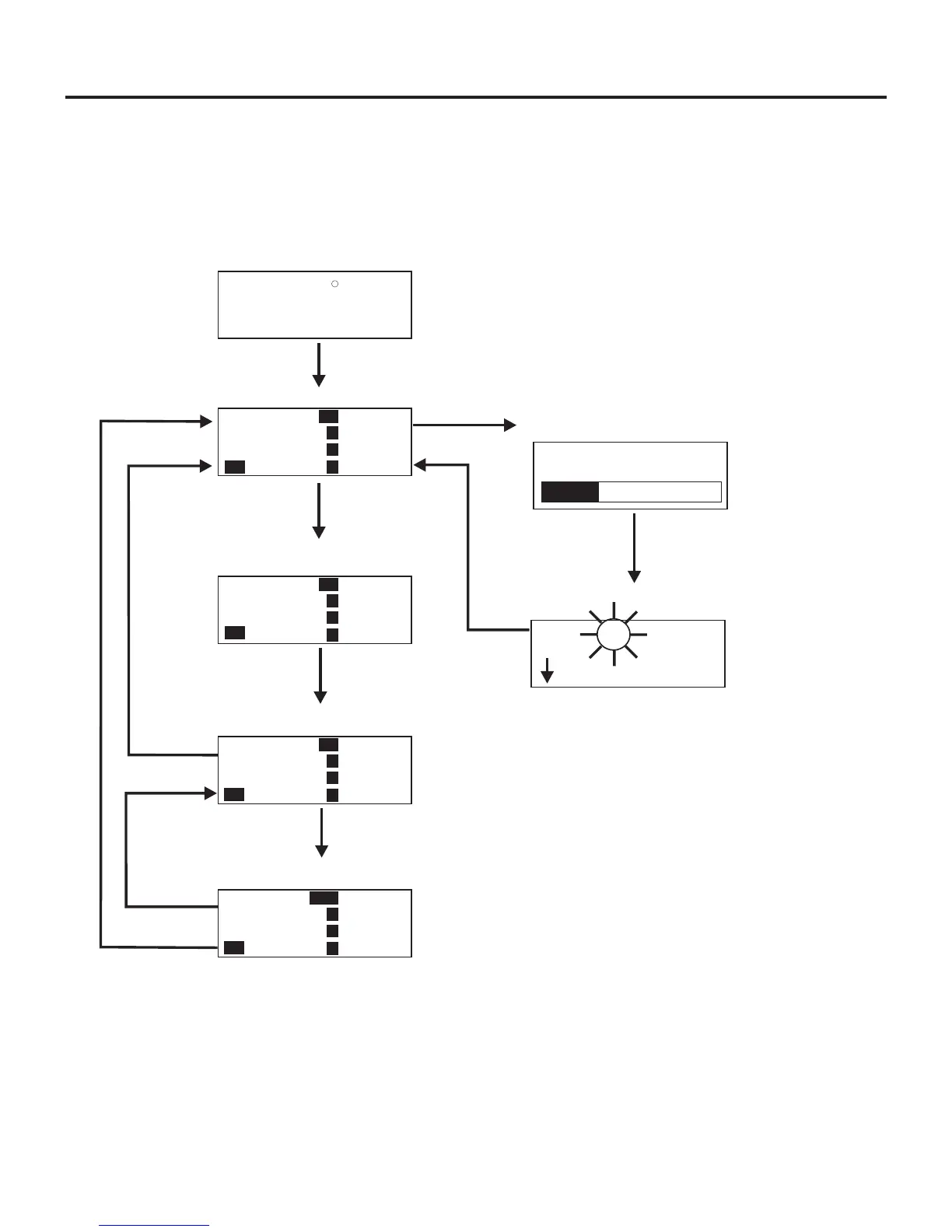
WBS-670 Menu Structure
Main Screen Flowchart
The following contains the base station menu structure and
references the pages in which further detail of that menu may
be found.
6-4
Clear-Com
Operating Screen - Pg. 6-5
Power-Up Screen - Pg. 6-5
Group/Channel Select Screen - Pg. 6-6
[MENU]
Group/Frequency Select Screen - Pg. 6-7
[MENU]
Frequency Edit Screen - Pg. 6-8
[MENU]
(User-Programmed Only)
[MENU]
Action
[MENU]
No Action
[MENU]
+
[SET]
Scan
Scan Start-up/Search Screen - Pg. 6-9
[MENU]
or
[SET]
Scan Result Screen - Pg. 6-9
[MENU]
S
Group 25u
4
R1
Tx
Tx
Tx
2
3
On
Tx
Group 25u
4
R1
Ch 01
Ch 02
Ch 03
Ch 04
2
3
Group 25u
4
R1
705.150
565.350
707.850
710.100
715.300
2
3
Group 25u
Freq Edit
4
Ch1
705.150
565.350
707.850
710.100
715.300
2
3
2
Group 03A
OK?=[SET]
Next
R
C60001
01 05
02 06
03
04 08
no
t
x
On
Tx
Tx
Tx
B40001
Other Special Key Sequences:
Lockout ........................6-10
Copy ..........................6-10
1st Use Default ..................6-10
Factory Default ..................6-10
NOTE: Pressing [MENU] within a screen after action
has occurred escapes from that action and places the
user at the current screen. Any editing that had been
done since [SET] had been pressed is aborted.
Page







 To Next Page