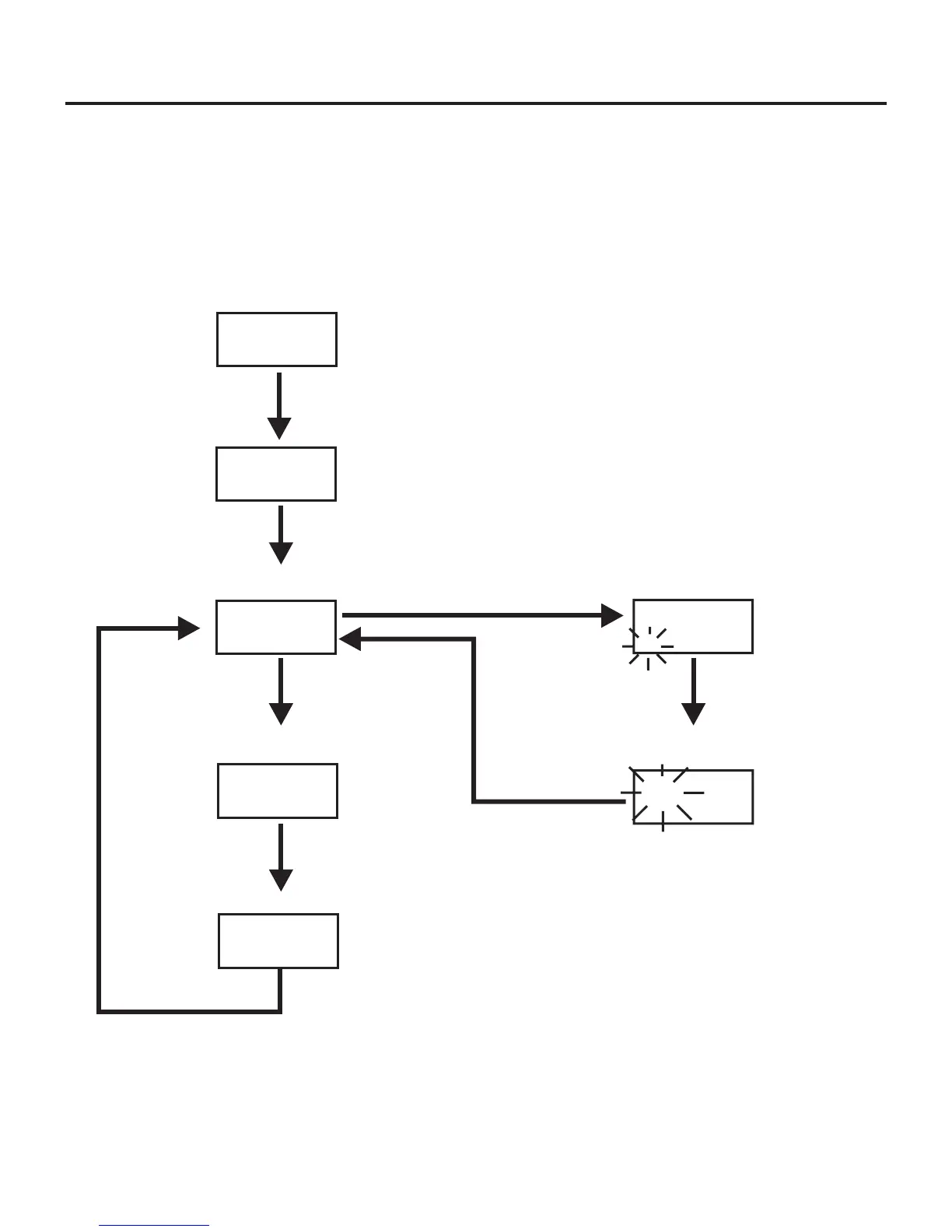
WTR-670 Menu Structure
Beltpack Menu Structure
6-12
[MENU]
S20001
C60001
03A 01
Power-Up Screen - Pg. 6-13
Group/Channel Screen - Pg. 6-14
GP CH
[MENU]
704.200
Transmit Screen - Pg. 6-15
TX
[MENU]
570.300
R1
Receive Screen - Pg. 6-16
Clr Scn
GP
04A Scn
GP
[MENU]
+
[SET]
Scan Search Screen - Pg. 6-17
Scan Result Screen - Pg. 6-17
[MENU]
or
[SET]
The following contains the main beltpack menu structure and refer
-
ences the pages in which further detail of that menu may be found.
All beltpack features and special key sequences can only be done
from the group/channel screen.
Beltpack Feature Enable/Disable Menus:
Talk Button Latching/Non-Latching...........6-18
Other Special Key Sequences:
Lockout ................................6-18
1
st
Use Default............................6-18
Factory Default ..........................6-18
NOTE: Pressing [MENU] within a screen after action has occurred escapes
from that action and places the user at the current screen. Any editing that
had been done since [SET] had been pressed is aborted.
Page
Page






 To Next Page