Group / Frequency Select
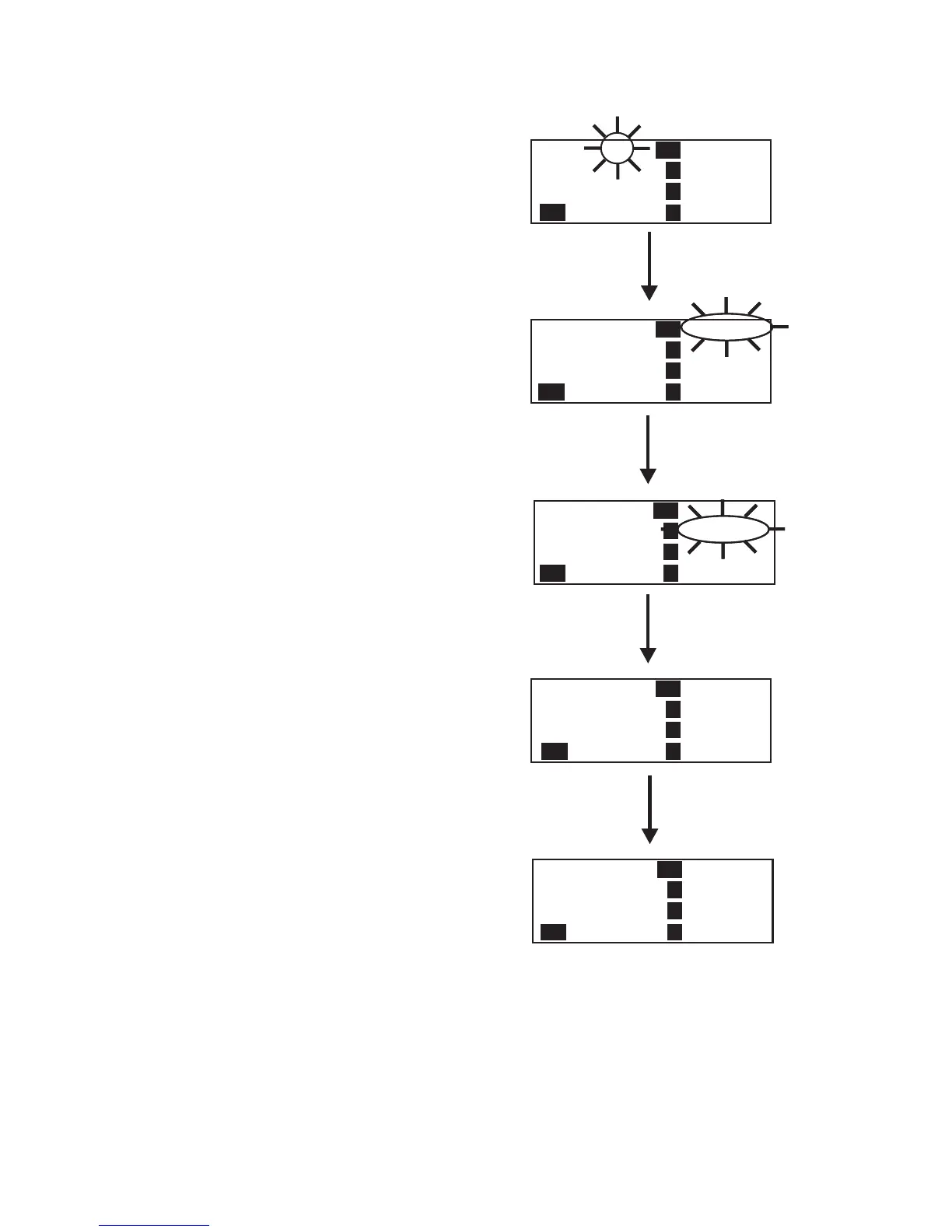
The Group/Frequency select screen allows a user to set the
group and select from a pre-determined number of frequencies
on each receiver. Each frequency displayed on the right half of
the screen corresponds to a channel number in the
Group/Channel Screen.
•
Press [MENU] twice to go to the Group / Frequency Se
-
lect screen from the operating screen. Hit [SET] to start
the group number flashing.
•
Press the [UP] / [DOWN] arrows to change the group
number. The frequencies listed will reflect what is cur
-
rently in that group. Hitting [SET] will select the group
and start the selecting of predetermined frequencies
within that group. The R1 frequency will start flashing.
NOTE: The group number sets the transmit frequencies
of factory defined groups and these are not editable. In
user-programmed groups these are editable from the fre
-
quency edit screen.
•
Pressing the [UP] / [DOWN] arrows will change the fre-
quency of “R1” to the pre-defined frequencies available.
Hitting [SET] will accept the change and start you editing
the next channel. If you had not hit the arrow keys when
the frequency was flashing, but instead hit [SET], you
would have skipped to the next frequency to edit.
•
After the last receive frequency is decided upon, hitting
[SET] will save that last frequency and start you over at
the beginning of the group/frequency select screen with
nothing flashing.
•
Pressing [MENU] will take you to the operating screen if
this is a factory-defined group. If within a user pro
-
grammed group, you will be taken to the frequency edit
screen. NOTE: Hitting [MENU] after activity has oc
-
curred within the screen will return to the group/fre
-
quency edit screen with nothing flashing. Any change that
had been done before the last [SET] was pressed will be
aborted.
6-7
Group 15
T1
4
R1
715.000
569.700
716.700
719.700
721.600
Group / Frequency Select
2
3
T1
Group 14
T1
4
R1
713.200
563.100
716.100
718.600
721.600
2
3
Group 14
T1
4
R1
563.100
2
3
Group 14
T1
4
R1
563.100
2
3
[UP] / [DOWN]
[SET]
[UP] / [DOWN]
[SET] (Last Rx Changed)
[UP] / [DOWN]
[SET]
716.100
718.600
721.600
704.200
704.700
708.300
709.500
704.200
Group 14
T1
4
R1
On
2
3
T1
Tx
[MENU]
Tx
Tx
no tx
END
no tx
Tx
Tx
Tx
Tx





 To Next Page