ClonerAlliance ViewPro User Manual
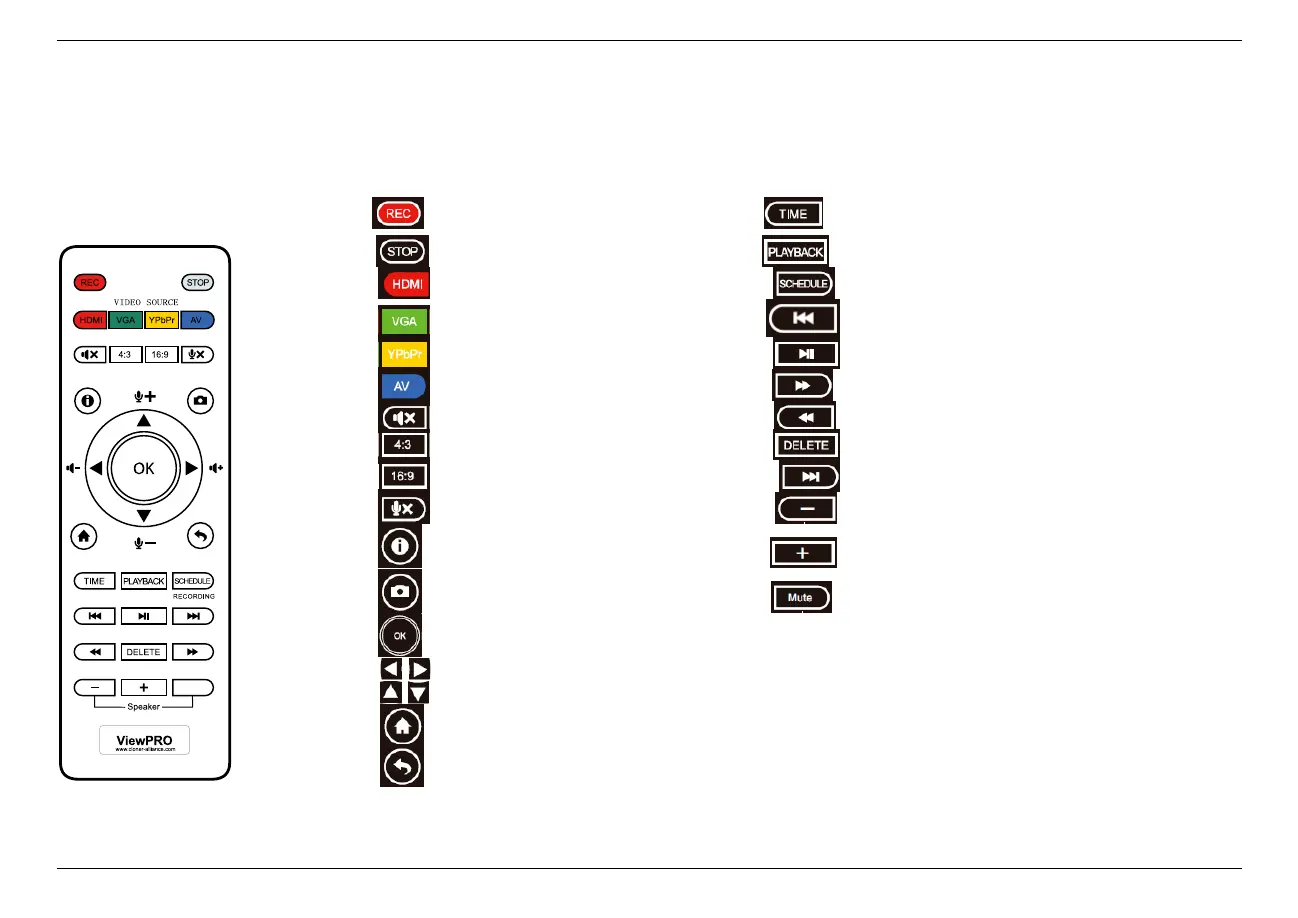
1.4 Remote Diagram
Start recording. Set the system time
Stop recording. Play back the contents in the storage device
Select HDMI as the input signal. Schedule the recording tasks
Select VGA as the input signal. Back to the previous file
Select YPbPr as the input signal. Start or pause playing
Select AV as the input signal. Fast forward
Mute. Fast backward
Switch to the aspect ratio of 4:3. Delete the selected files
Switch to the aspect ratio of 16:9. Go to the next file
Microphone mute. Volume down the speaker
Show information. Volume up the speaker
Capture an image. Speaker mute
OK button or full screen while playing back files.
Adjust the volume of the source video.
Adjust the volume of MIC input.
Show the main menu.
Back to the previous interface.
1.4. Remote Diagram 7
Tips: The remote control is powered by 2 AAA batteries which are not included and need to be purchased independently.



 To Next Page