Page | 13
Accessport Features & Functionality
Gauges
The Accessport can read sensor data from the factory ECU and display it
as an on-screen gauge. This feature allows the Accessport to function as an auxiliary gauge displaying
boost, RPM, temperature, or any number of other parameters available in the factory ECU.
The Accessport can also record sensor data from the factory ECU while you drive. With the ability to
store multiple sessions, the Accessport can function as a complete engine datalogger and diagnostic
tool. To begin datalogging, press the [OK] button while in the Gauges function. While the Accessport is
recording a datalog, a single light blue light will scroll in the shift light. To stop datalogging, press the
[OK] button again. To view the results of your datalog sessions, simply connect the Accessport to your
PC and retrieve the results using the AP Manager software. Data Log recordings are stored in a .csv
(Comma Separated Values) format and are easily viewed using any spreadsheet application.
When you first select the Gauges function you will be defaulted to the Change Gauge Layout list so you
can select which layout you prefer.
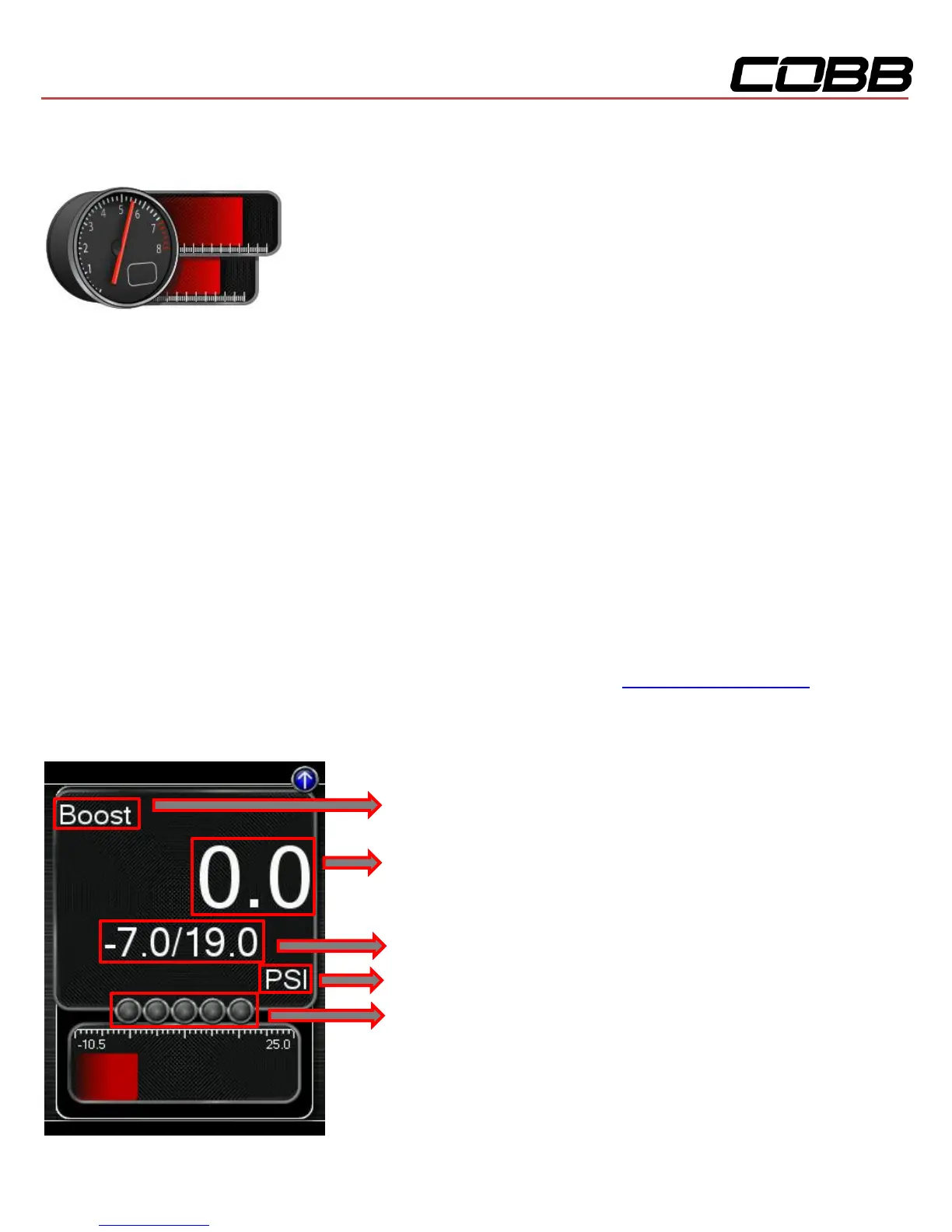
Currently Selected Monitor
U Current Monitor value
Minimum/Maximum value since watching this Monitor
Unit of measurement
Shift light and datalogging indicator


 To Next Page