DIGIMINI EMEA/APAC/AUSTRALIA REPEATERS
PRODUCT DESCRIPTION AND USER’S MANUAL
Cobham Wireless – Coverage Date: 11-Oct-15 www.cobham.com/wireless
Document number: 00030UMCD Rev. 5.0
Page |6-3
6.1.3 Connection to an Ethernet Network
NOTE: This is not relevant for installations with DMCU.
Units without DMCU can be upgraded, by purchasing the appropriate license file, to support some
basic remote management options through connection to an Ethernet network.
To configure for connection to the Ethernet Network
1. Purchase and upload the appropriate license file according to section 6.1.1. The relevant tabs will
be updated and become available.
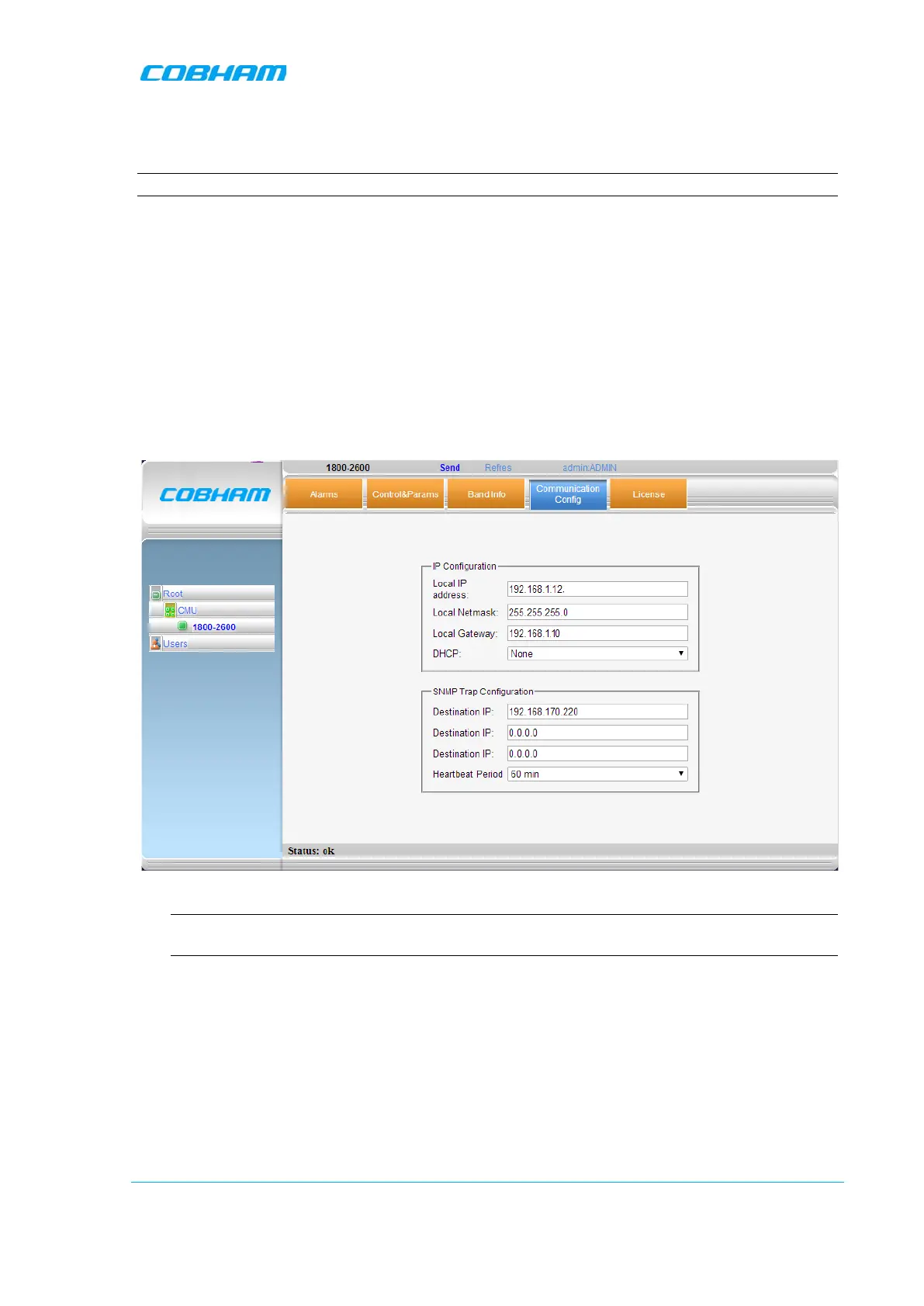
2. To configure the unit for connection to the Ethernet network:
• Click the Communication Config tab.
• Set the IP Configuration parameters:
• Set DHCP to None.
• Configure the Local IP Address, Local Netmask and Local Gateway parameters.
3. You can configure up to three destination addresses to which traps will be sent.
NOTE: By default, a trap will be sent if a Heartbeat signal is not detected for 60 minutes. The
heartbeat period may be modified or disabled (set to ‘0’).
4. Click Send.
5. Connect the unit Ethernet port to the network.



 To Next Page