Settings
32 Chapter 2: Operation 98-135323-H
If no functional switch is connected
1
to the SAILOR 6282 AIS Transponder you
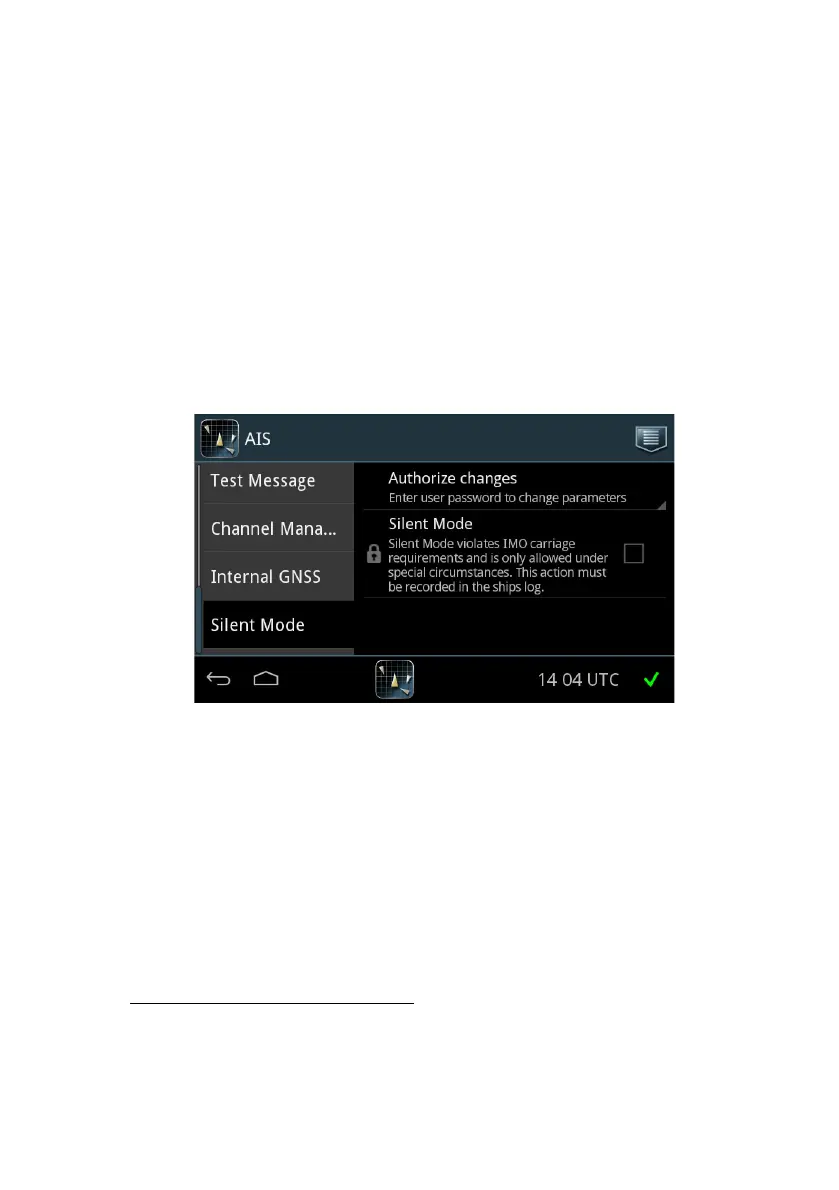
can activate Silent Mode in a menu on the SAILOR 6004 Control Panel.
A warning appears in a popup window on the SAILOR 6004 Control Panel and an
alarm (TX disabled) is logged
2
. The popup window will be repeated every twelfth
hour as a reminder that the Silent Mode is still active. The Silent Mode is active
after power interruption until it is manually disabled.
The SAILOR 6282 AIS Transponder cannot acknowledge received addressed
messages in Silent Mode because all transmit activity is disabled in Silent Mode.
Therefore the sender will retransmit the message several times and the SAILOR
6282 AIS Transponder will display all retransmitted messages.
To enable Silent Mode do as follows:
3. Unlock the page by tapping Authorize changes and entering the user-level
password.
4. Tap the check box to enable Silent Mode.
5. Tap the popup window Safety alarm to acknowledge Silent Mode.
6. Tap the arrow in the bottom left corner to return to the ship list.
1. In the Service Interface, the IO settings for the functional switch must be set
to Not Used or Blue Sign.
2. Only with external switch for Silent Mode.
Figure 25: Settings – Silent Mode














 To Next Page