14
Connecting a VCR
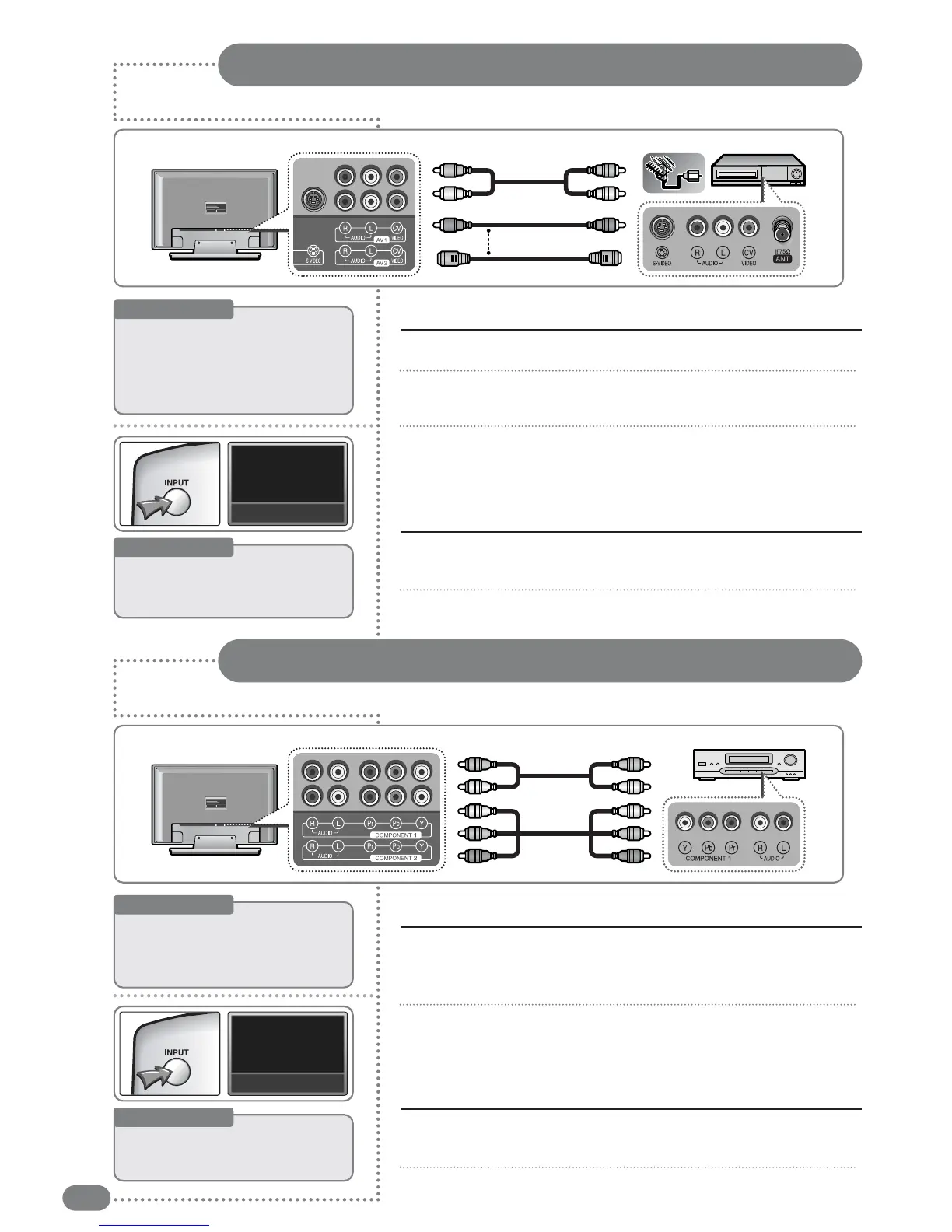
Connect the antenna cable to the Antenna input of the rear panel of the VCR.
Use the video cable to connect the [AV1 video input] or [AV2 video input] (yellow)
terminal at the back of the TV to the [video Output] (Yellow) of the VCR.
Use the sound cable to connect the [AV1 sound input left / right] or [AV2
sound input left / right] (white/red) terminal at the back of the TV to the
[sound output] (white/red) of the VCR.
1
2
3
Connecting the video / sound cables
Turn on the TV and press the [INPUT] button, then select <AV1> or <AV2>.
If <external input> mode is not selected, check your video connection.
Turn on the VCR and press the play button.
1
2
Watching a VCR
External devices may have different terminals for the same functions.
Useful Tips
☛
If
there
is
a
terminal
called
[S-Video
Output],
connect
the
TV
[S-Video
Input]
terminal
to
the
VCR
[S-video
output]
terminal.
Connect
the
sound
cable
to
the
[Video2
/
S-Video
Input
left
/
right]
(white
/
red).
Useful Tips
☛
WWhheenn
ccoonnnneeccttiinngg
aa
TTVV
aanndd
VVCCRR
wwiitthh
aann
SS--VViiddeeoo
ccaabbllee,,
pprreessss
tthhee
[[IINNPPUUTT]]
bbuuttttoonn
ttoo
sseelleecctt
<<SS--VVIIDDEEOO>>..
VIDEO1
Connecting a DVD Player
Use the component video cable to connect the [
COMPONENT 1 video input
]
or [COMPONENT 2 video input Y, Pb, Pr] (Green/Blue/Red) terminal at the
back of the TV to the [Component output] on the DVD player.
Use the sound cable to connect the [COMPONENT1 sound input left/right] or
the [COMPONENT2 sound input left/right] (white/red) input terminal to the
[sound output] (white/red) output terminal of the DVD player.
1
2
Connecting to a DVD player
Turn on the TV, press the [INPUT] button, then select <
COMPONENT 1
>
or <
COMPONENT 2
>.
(If <component> mode is not selected, check if the component connectors are connected.)
Turn on the DVD player and press the play button on the DVD player.
1
2
Viewing a DVD
External devices may have different connecting terminals.
Useful Tips
☛
CCoommppoonneenntt
oouuttppuutt
tteerrmmiinnaallss
mmaayy
bbee
llaabbeelleedd
eeiitthheerr
""YYUUVV""
oorr
""YY,,
PPbb//CCbb,,
PPrr//CCrr""..
☛
IIff
tthhee
DDTTVV
rreecceeiivveerr
ssuuppppoorrttss
DDVVII,,
iitt
mmaayy
bbee
ccoonnnneecctteedd
vviiaa
aann
HHDDMMII
oorr
DDVVII
ccaabbllee
iinnsstteeaadd
ooff
aa
ccoommppoonneenntt
ccaabbllee..
Useful Tips
☛
When
connecting
the
[TV]
and
the
[DVD]
with
the
HDMI
cable,
press
the
[INPUT]
button
and
select
<HDMI>.
HDMI
Rear of the TV
VCR
or
Sound Cable
Video Cable
S-Video Connector
Rear of the TV
DVD
Audio Cable
Component Cable


 To Next Page