21
ENGLISH
Checking the strength of the digital signal
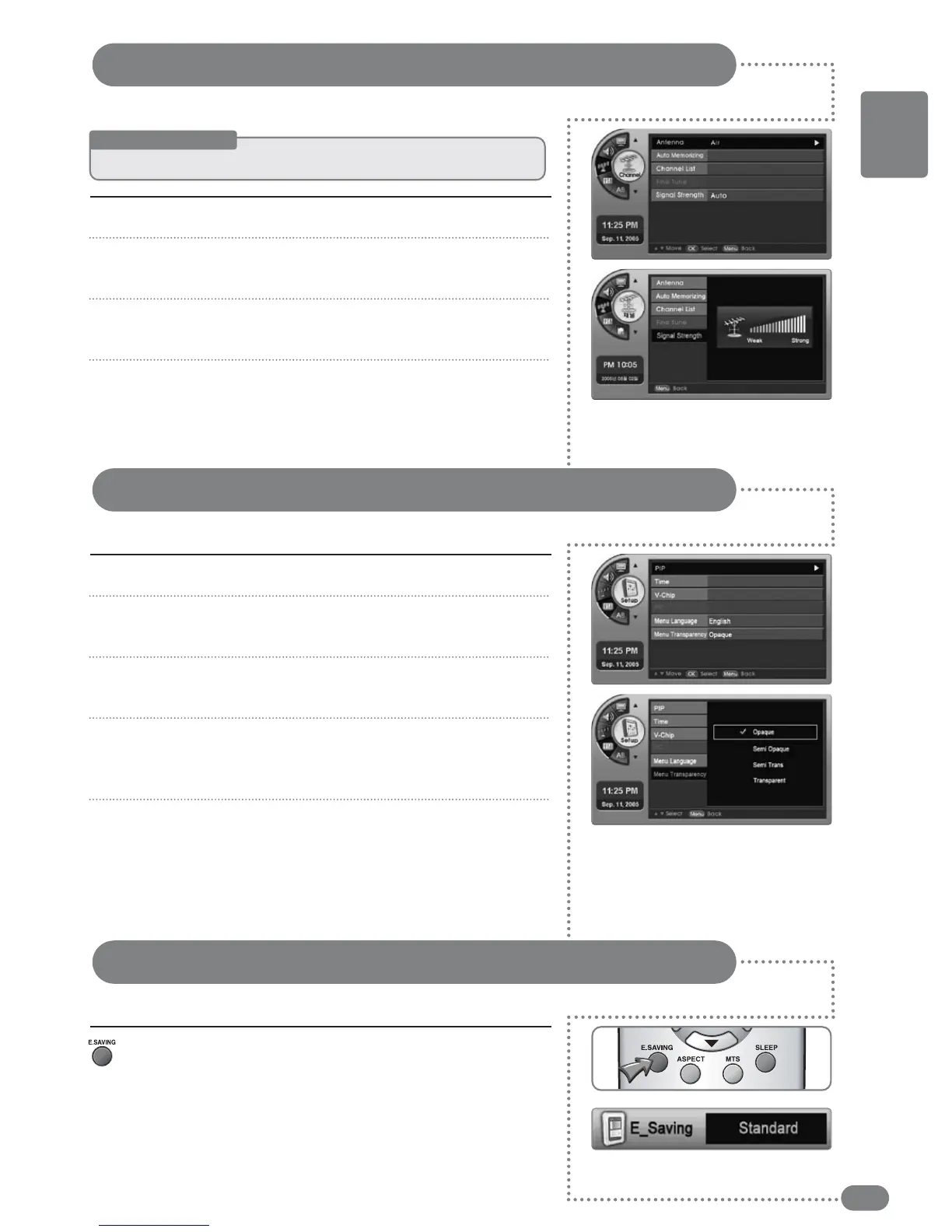
This shows the current digital signal strength of a channel.
Press [MENU]. -The menu will appear.
Press [
] to move to <Channel>, then press [OK].
-The <Channel> menu will appear.
Press [
] to move to <Signal Strength>, then press [OK].
-The reception sensitivity will be shown in the menu.
Press the [EXIT] button to exit the menu.
1
2
3
4
Press [MENU]. -The menu will appear.
Press [
] to move to <Setup>, then press [OK].
-The <Setup> menu will appear.
Press
[
]
to move to <Menu Transparency>, then press [OK].
- <Menu Transparency> will be selected.
Press [
] to select the transparency, then press [OK].
-There are 4 options in menu transparency: <Opaque>,
<Semi Opaque>, <Semi Trans> and <Transparent>.
Press [EXIT] to exit the menu.
1
2
3
4
5
Menu Transparency Settings
Menu Transparency sets the background transparency of the menu.
Press [E.SAVING].
-
Each time [E.SAVING] is pressed, <Standard> and <Saving>
modes are switched. <Saving> mode conserves power.
Power Saving Mode Settings
Before Starting
☛
Keep
the
digital
TV
receiving
mode
as
is.


 To Next Page