26
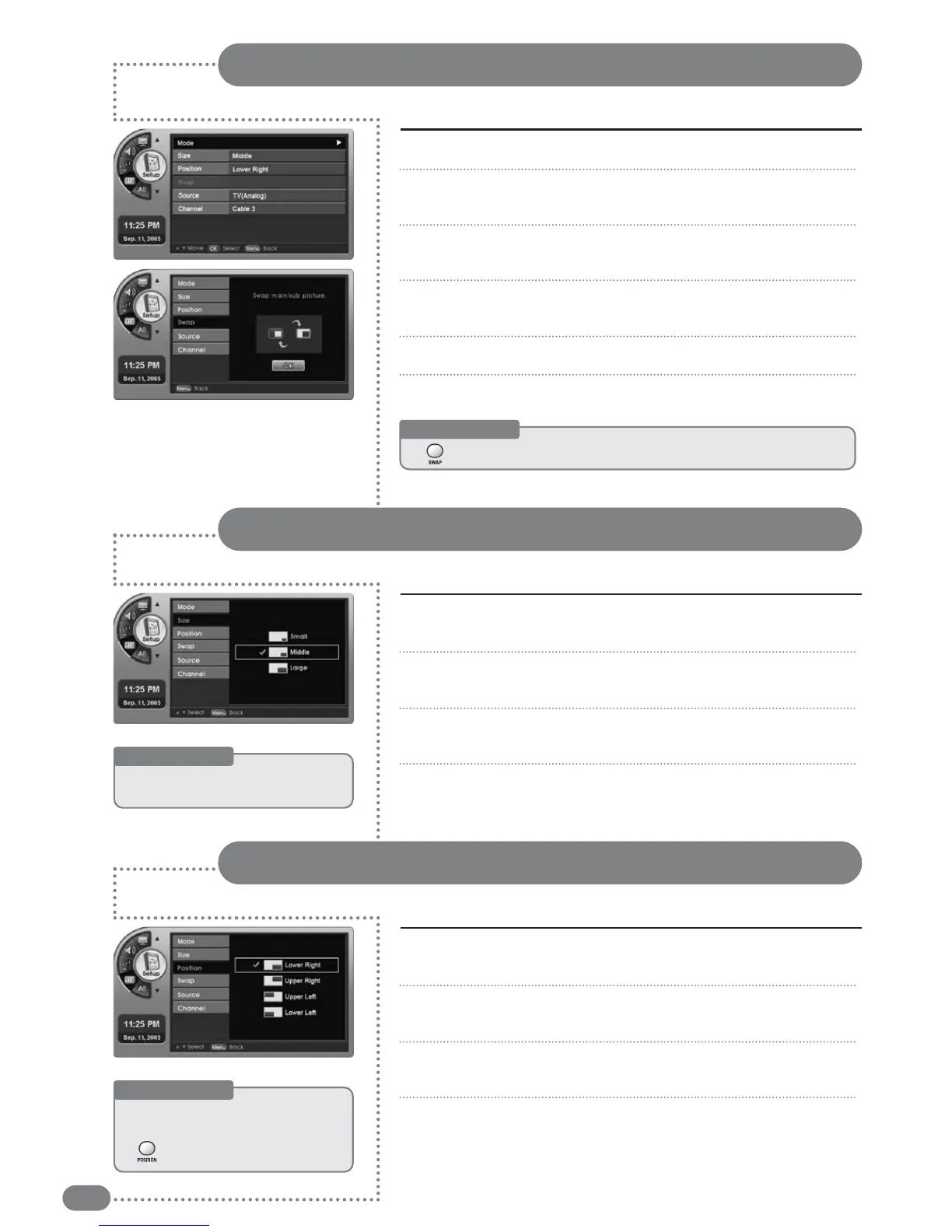
You can switch the main and Sub-Screen with each other.
Switching the Main and Sub-Screen
Press [MENU]. -The menu will appear.
Press [
] to move to <Setup>, then press [OK].
-The <Setup> Menu will appear.
Press [
] to move to <PIP>, then press [OK].
-The <PIP> Menu will appear.
Press [
] to move to <Swap>, then press [OK].
-The <Swap> Menu will appear.
Press [OK]. -Each press will toggle the screens.
Press [EXIT] to exit the menu.
1
2
3
4
5
6
Useful Tips
☛
[[SSWWAAPP]]
ccaann
aallssoo
bbee
uusseedd
ttoo
sswwiittcchh
tthhee
ssccrreeeennss..
You can adjust the size of the Sub-Screen.
Adjusting the Sub-Screen Size
Press [
] to move to <PIP>, select [OK].
-The <PIP> Menu will appear.
Press [
] to move to <Size>, then press [OK].
-The <Size> Menu will appear.
Press [
] to select the size of the Sub-Screen.
-The size of the Sub-Screen will be selected.
Press [EXIT] to exit the menu.
3
4
5
6
Press [
] to move to <PIP>, then press [OK].
-The <PIP> Menu will appear.
Press [
] to move to <Position>, then press [OK].
-The <Position> Menu will appear.
Press [
] to select the size of the Sub-Screen.
-The size of the Sub-Screen will be selected.
Press [EXIT] to exit the menu.
3
4
5
6
Useful Tips
☛
Adjusting
the
Sub-Screen
size
can
only
be
done
in
PIP
mode.
You can adjust the position of the Sub-Screen (all 4 corners).
Adjusting the Sub-Screen Position
Useful Tips
☛
AAddjjuussttiinngg
tthhee
ppoossiittiioonn
ooff
tthhee
SSuubb--SSccrreeeenn
ccaann
oonnllyy
bbee
ddoonnee
iinn
PPIIPP
mmooddee..
☛
TThhee
[[PPOOSSIITTIIOONN]]
ccaann
aallssoo
ttoogggglleedd..


 To Next Page