18
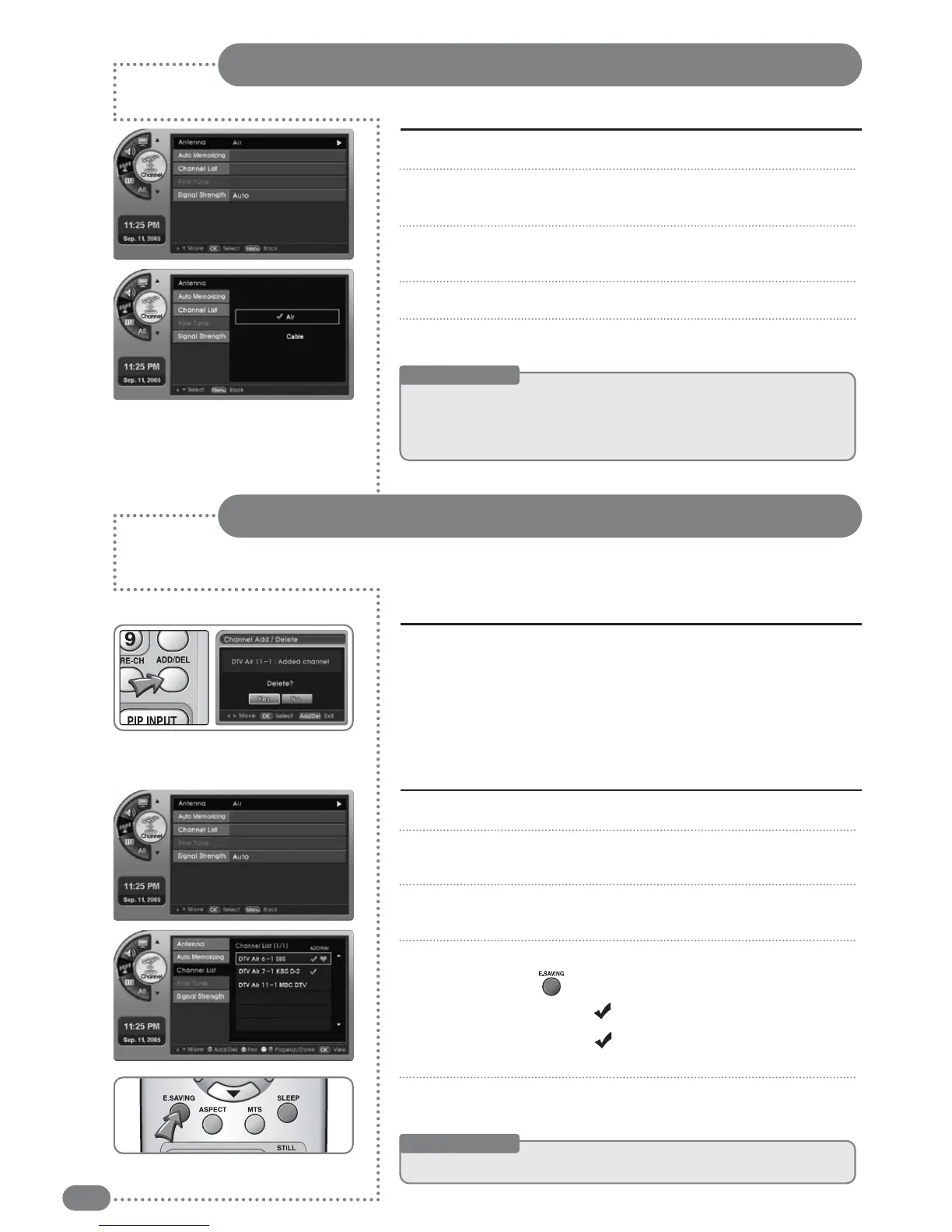
Press [MENU]. -The menu will appear.
Press [
] and move to <Channel>, then press [OK].
-The <Channel> menu will appear.
Press [
] to move to <Antenna>, then press [OK].
-The <Antenna> menu will appear.
Press [
] to select Air or Cable.
Press [EXIT] to exit the menu.
1
2
3
4
5
Antenna Settings
Useful Tips
☛
AAnn
aaiirr
ssiiggnnaall
iiss
ttrraannssmmiitttteedd
vviiaa
VVHHFF//UUHHFF
oovveerr
tthhee
aaiirr..
AAnnaalloogg
iiss
NNTTSSCC,,
wwhhiillee
ddiiggiittaall
iiss
AATTSSCC
wwiitthh
aa
VVSSBB
mmoodduullaatteedd
ssiiggnnaall..
☛
AA
ccaabbllee
ssiiggnnaall
iiss
aa
ccaabbllee--ttrraannssmmiitttteedd
ssiiggnnaall..
AAnnaalloogg
iiss
NNTTSSCC,,
wwhhiillee
ddiiggiittaall
iiss
SSCCTTEE
wwiitthh
aa
QQAAMM
mmoodduullaatteedd
ssiiggnnaall..
Useful Tips
☛
TToo
ccoonnffiirrmm
tthhee
aaddddeedd
cchhaannnneell
aafftteerr
tthhee
mmeennuu
ddiissaappppeeaarrss,,
pprreessss
[[CCHHAANNNNEELL]]..
Adding or Removing Channels
After memorizing the channels, you may add more channels not added due to a weak signal,
or you may remove unwanted channels.
Press the number of the channel to add or delete, then press
the [ADD
/
DEL] button.
■
For example, to add a channel, press the number of the channel,
then press [ADD
/
DEL].
■
When the [ADD
/
DEL] menu appears, press [OK] to either add or remove.
1
Adding or deleting the current channel
Press [MENU]. -The menu will appear.
Press [
] to move to <Channel>, then press [OK].
-The <Channel> menu will appear.
Press [
] to move to <Channel List>, then press [OK].
-The <Channel List> menu will appear.
Press
[
]
to move to the channel you wish to add and then
press the Red [ ] Button.
-If the channel has the mark, the channel is added.
-Press it again and the will disappear and the memorized
channel is removed.
Press the [EXIT] button to exit the menu.
1
2
3
4
5
Adding or deleting all memorized channels


 To Next Page