32
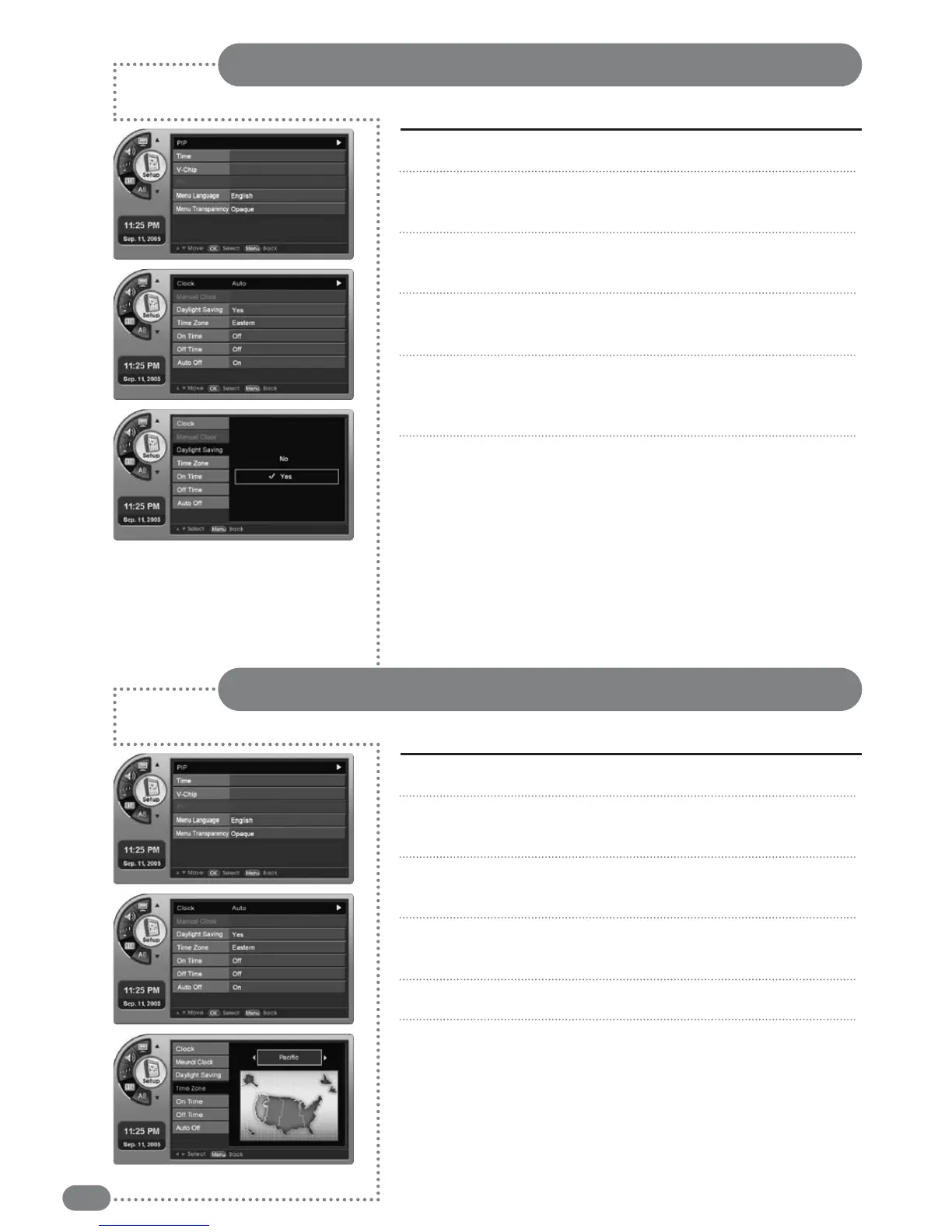
Users can select Daylight Saving.
Time and Date Settings
Press [MENU]. -The menu will appear.
Press [
] to move to <Setup>, then press [OK].
-The <Setup> Menu will appear.
Press [
] to move to <Time>, then press [OK].
-The <Time> Menu will appear.
Press [
] to move to <Daylight Saving>, then press [OK].
-The <Daylight Saving> Menu will appear.
Press [
] to move to <Yes>, then press [OK].
-Select <Yes> for Daylight Saving, and <NO> to cancel
Daylight Saving.
Press [EXIT] to exit the menu.
1
2
3
4
5
6
Users can select the time zones.
Time Zone Settings
Press [MENU]. -The menu will appear.
Press [
] to move to <Setup>, then press [OK].
-The <Setup> Menu will appear.
Press [
] to move to <Time>, then press [OK].
-The <Time> Menu will appear.
Press [
] to move to <Time Zone>, then select [OK].
-The <Time Zone> Menu will appear.
Press [
] to move to your local area, then press [OK].
Press [EXIT] to exit the menu.
1
2
3
4
5
6


 To Next Page