15
ENGLISH
DVD
(Home Theater)
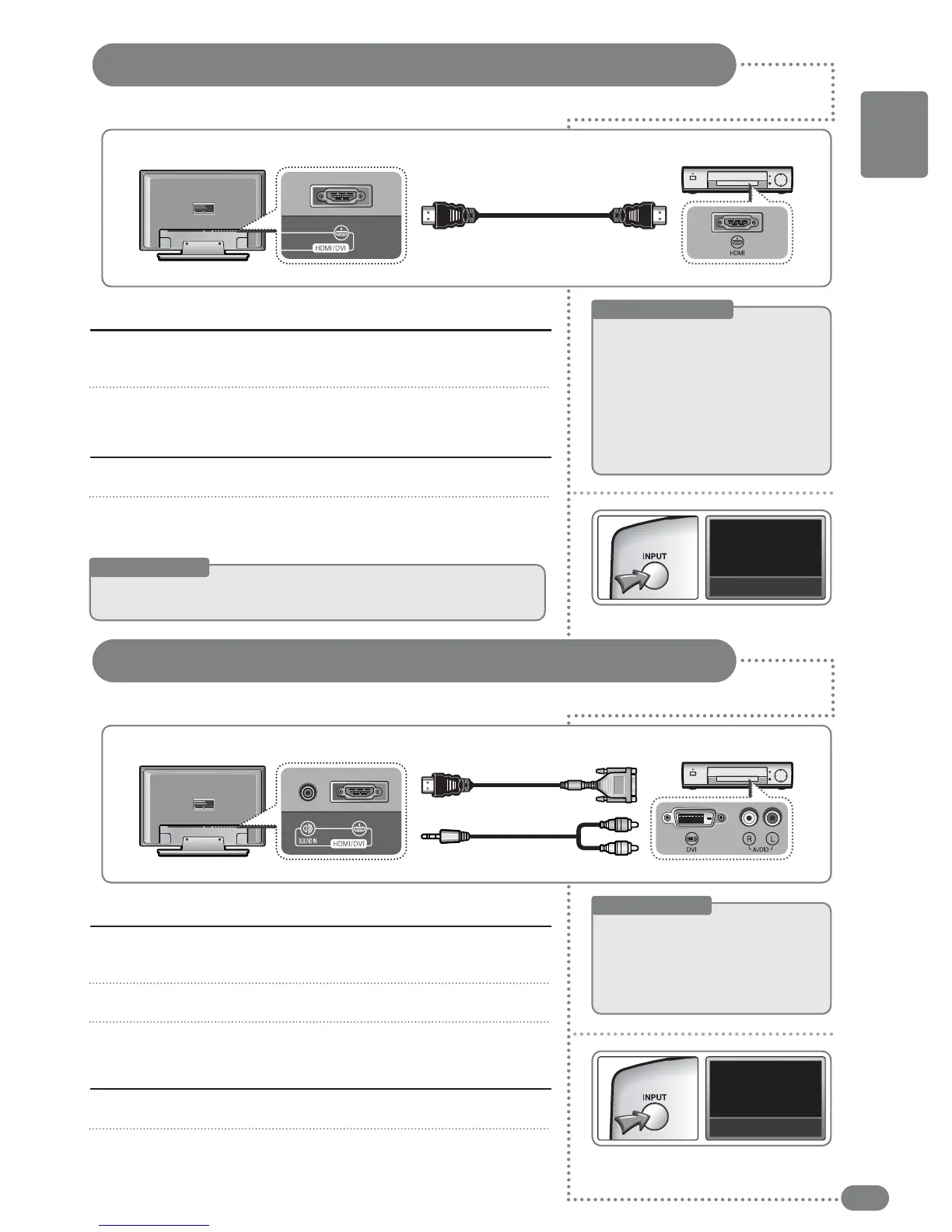
Connect the [HDMI/DVI input] terminal at the back of the TV and the
[HDMI] terminal of the external device.
Connect the TV and the external device after all other connections are done.
1
2
Turn on the TV and press [INPUT], then select <HDMI>.
Place a DVD title into an external device connected via HDMI and
press play.
1
2
Watching HDMI
Connecting an HDMI Connection
Useful Tips
☛
You
can
watch
by
connecting
AV
devices
such
as
a
set-top-box,
a
DVD
player,
an
AV
receiver,
or
DTV
that
supports
the
HDMI
connection.
HDMI
Connecting via HDMI
Rear of the TV
What is HDMI ?
☛
HDMI
((HHiigghh--DDeeffiinniittiioonn
MMuullttiimmeeddiiaa
IInntteerrffaaccee))
::
A next generation interface that connects the
digital
audio
and
video
signals
using
only
one
cable
without
compression.
The
sound
signal
also carries multi-channel (
55::11 CChhaannnneell
) so that
iitt
iisspprrooppeerrllyy
ccaalllleedd
aa
mmuullttiimmeeddiiaa
iinntteerrffaaccee
rraatthheerr
than
a
video
terminal.
The
difference
between
HDMI and DVI is that the size is smaller; HDCP
has
an
embedded
cipher
function
and
supports
multi
channel
audio.
HDMI Connector
DVD
(Home Theater)
Connect the [HDMI/DVI Input] terminal and the [DVI] output terminal
of the external device.
Connect the [DVI Audio input] using the DVI audio cable
(sold separately)
.
After this is completed, turn on the power of the TV and the external device.
1
2
3
Turn on the TV and press [INPUT], then select <HDMI>.
Operate the external device connected via DVI.
1
2
Watching via the DVI connector
Connecting a DVI Connection
HDMI
Connecting via DVI
Rear of the TV
Useful Tips
☛
When
connecting
equipment
using
a
DVI
connection
cable,
use
a
DVI-HDMI
gender
(
ssoolldd
sseeppaarraatteellyy
)
or
on
one
side
HDMI
other
side
DVI
type
of
connection
cable
(
HHDDMMII//
DDVVII
ccoonnnneeccttiinngg
ccaabbllee
--
nnoott
iinncclluuddeedd
iinn
ppaacckkeett
--
ssoolldd
sseeppaarraatteellyy
)
HDMI/DVI Connector
DVI Sound Cable


 To Next Page