38
The Digital Caption function operates for digital channels.
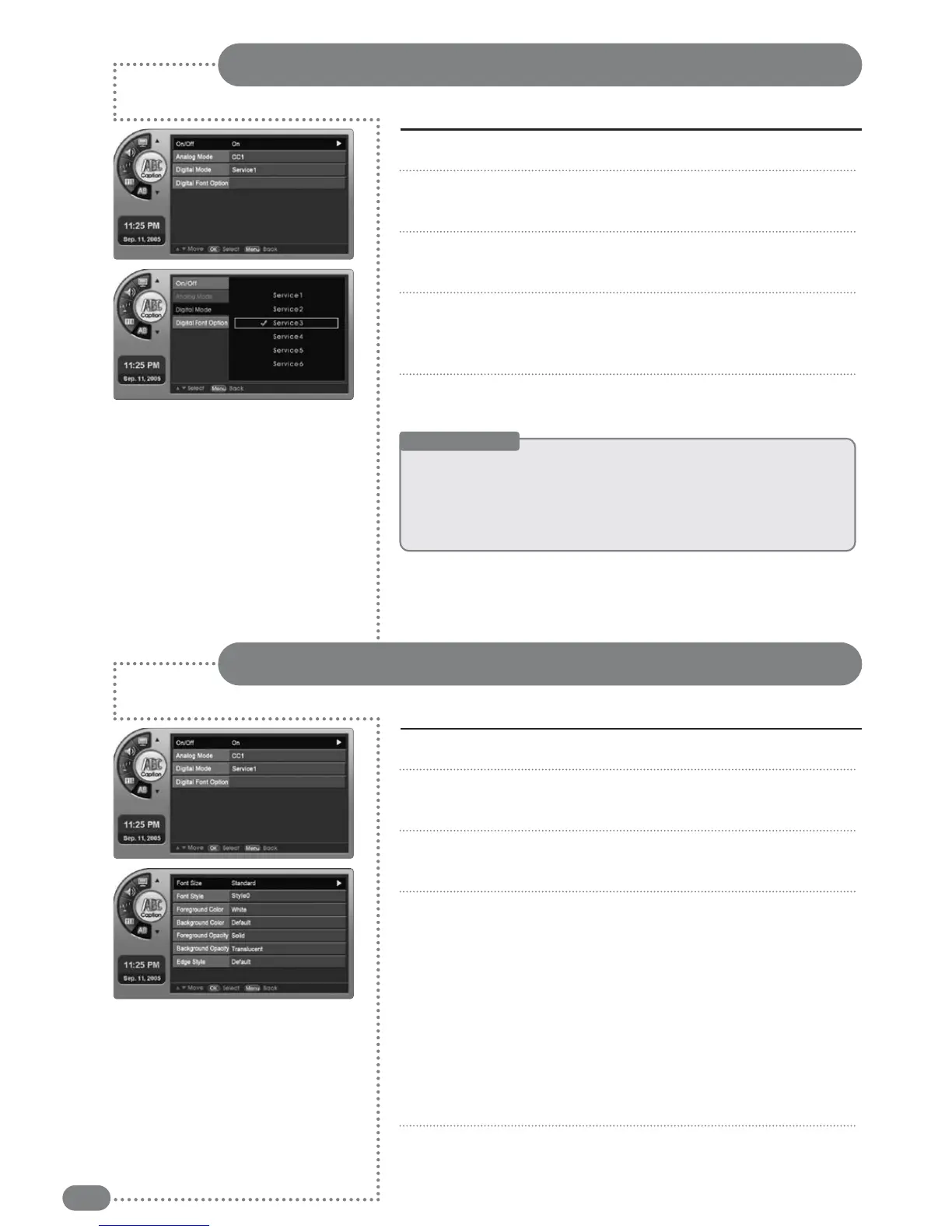
Digital Mode
Press [MENU]. -The menu will appear.
Press [
] to move to <Caption>, then press [OK].
-The <Caption> Menu will appear.
Press [
] to move to <Digital Mode>, then press [OK].
-The <Digital Mode> Menu will appear.
Press
[
]
to move to <Service1~Service6>, then press [OK].
-Digital Caption may be set.
-Selecting <Off> will cancel Digital Captions.
Press [EXIT] to exit the menu.
1
2
3
4
5
Useful Tips
☛
If
the
broadcasting
station
or
videotape
does
not
provide
subtitles,
there
are
no
viewing
captions.
☛
Alternate
method
to
the
above
method:
Simply
press
the
<CAPTION>
button
on
the
remote
control.
☛
The
availability
of
captions
depends
on
the
particular
program
being
broadcast.
Digital Font Options
Press [MENU]. -The menu will appear.
Press [
] to move to <Caption>, then press [OK].
-The <Caption> Menu will appear.
Press
[
]
to move to <Digital Font Option>, then press [OK].
-The <Digital Font Option> Menu will appear.
Press
[
]
to select <
Size~Edge Style
>, select the font type
mode, then press [OK].
■
Size:
Adjust the digital caption font size to default, small, standard
or large.
■
Style:
Either default or style0 through style7 can be selected.
■
Background
/
Foreground Color
:
Either default or from white to
cyan can be selected.
■
Background
/
Foreground Opacity
: Either default or Solid to
Flashing can be selected.
■
Edge Style: Either default or none to Right Drop Shadow.
Press [EXIT] to exit the menu.
1
2
3
4
5


 To Next Page