31
ENGLISH
Automatic Time Settings
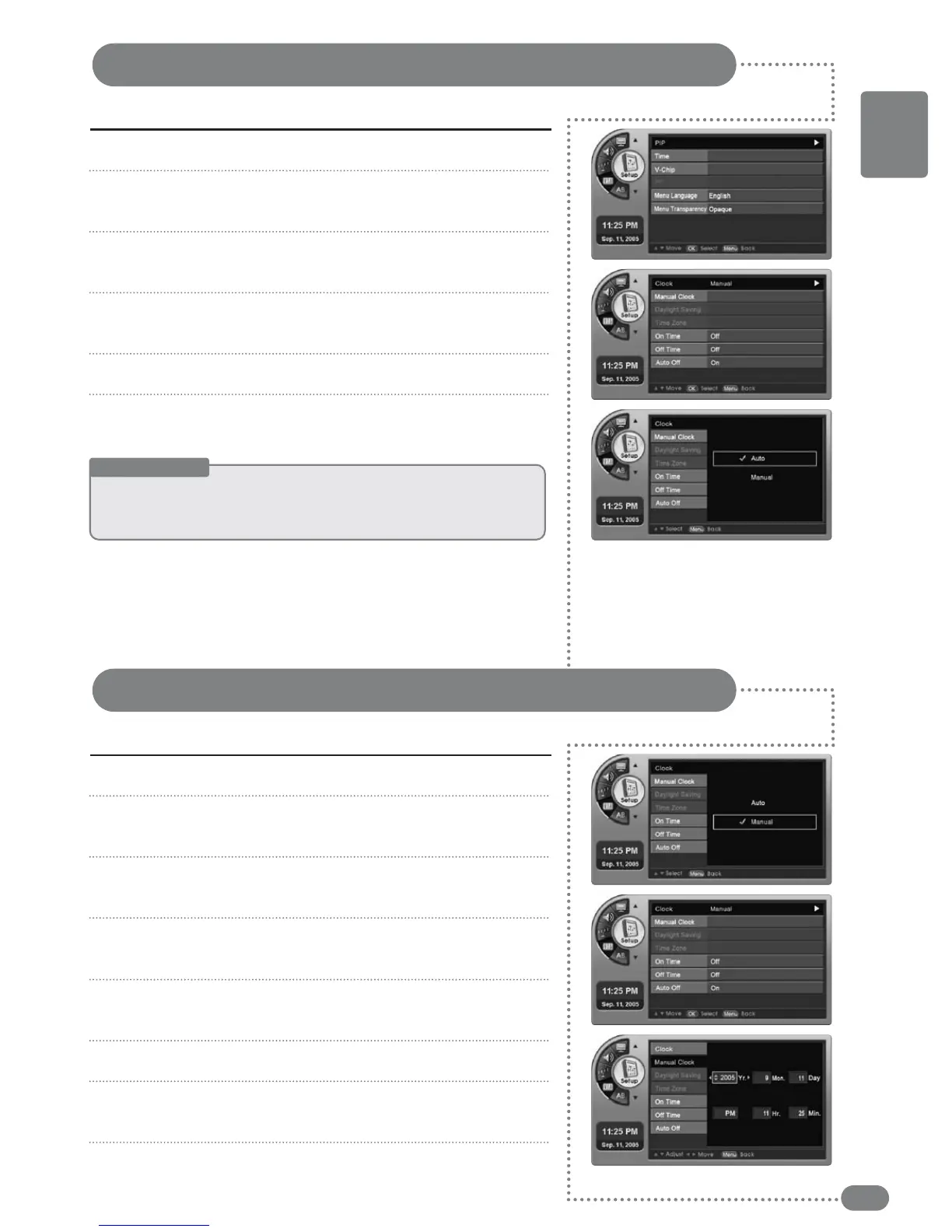
The auto time setting will receive time information from the digital broadcast station.
Press [MENU]. -The menu will appear.
Press [
] to move to <Setup>, then press [OK].
-The <Setup> Menu will appear.
Press [
] to move to <Time>, then press [OK].
-The <Time> Menu will appear.
Press [
] to move to <Clock>, then press [OK].
-The <Clock> Menu will appear.
Press [
] to select <Auto>.
Press [EXIT] to exit the menu.
1
2
3
4
5
6
Manual Time Settings
Setting the year, month, day, hours and minutes can be done by pressing the numeric buttons.
Press [MENU]. -The menu will appear.
Press [
] to move to <Setup>, then press [OK].
-The <Setup> Menu will appear.
Press [
] to move to <Time>, then press [OK].
-The <Time> Menu will appear.
Press [
] to move to <Clock>, then press [OK].
-The <Clock> Menu will appear.
Press [
] to move to <Manual>, then press [OK].
-The <Manual Clock> item can be selected.
Press [
] to move to <Manual Clock>, then press [OK].
Press [
], [¥] to change the year, month, day, am/pm,
hours and minutes.
Press [EXIT] to exit the menu.
1
2
3
4
5
6
7
8
Useful Tips
☛
TThhee
ttiimmee
wwiillll
bbee
sseett
aauuttoommaattiiccaallllyy
bbyy
tthhee
ddiiggiittaall
bbrrooaaddccaassttiinngg
iinnffoorrmmaattiioonn..
☛
TThheerree mmaayy bbee aa sslliigghhtt eerrrroorr iinn tthhee ttiimmee ddeeppeennddiinngg oonn tthhee bbrrooaaddccaasstt ssttaattiioonn..
☛
PPrreessssiinngg
[[IINNFFOO]]
wwiillll
sshhooww
tthhee
ccuurrrreenntt
ttiimmee..


 To Next Page