EasyManua.ls Logo

Codan 2110 - The Channel Screen

Codan 2110
89 pages
Print Icon
To Next Page IconTo Next Page
To Previous Page IconTo Previous Page
Loading...
The front panel
28 2110 SSB Transceiver Getting Started Guide
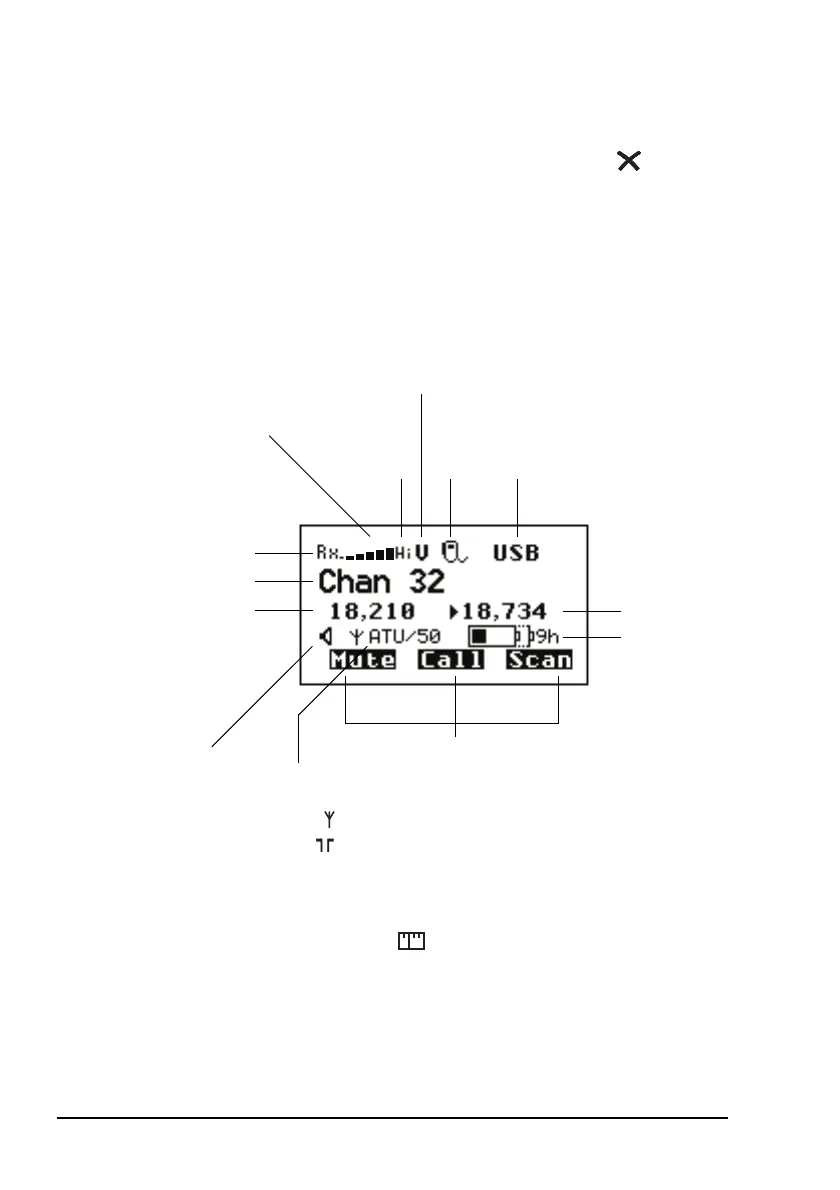
The channel screen
The channel screen is displayed when you press or VIEW.
Figure 4: The channel screen in the Channel List
When the transceiver is scanning, the call type icon is replaced
by the scanning icon and the channel information is
replaced by Scanning.
soft function keys
antenna
battery status
indicator
Tx power
indicator
(Hi/Lo)
channel name
call
Rx freq (kHz)
Rx/Tx indicator
mute type
indicator
internal speaker
signal
strength
(V/S,
type
icon
highlighted
when mute
is on)
mode
indicator
Tx freq (kHz)
(not shown if Tx/Rx
are the same)
icon (shown when
speaker enabled)
(internal
50 ohm )
selection icon

Other manuals for Codan 2110

Related product manuals