15
SECTION 4: MAINTENANCE
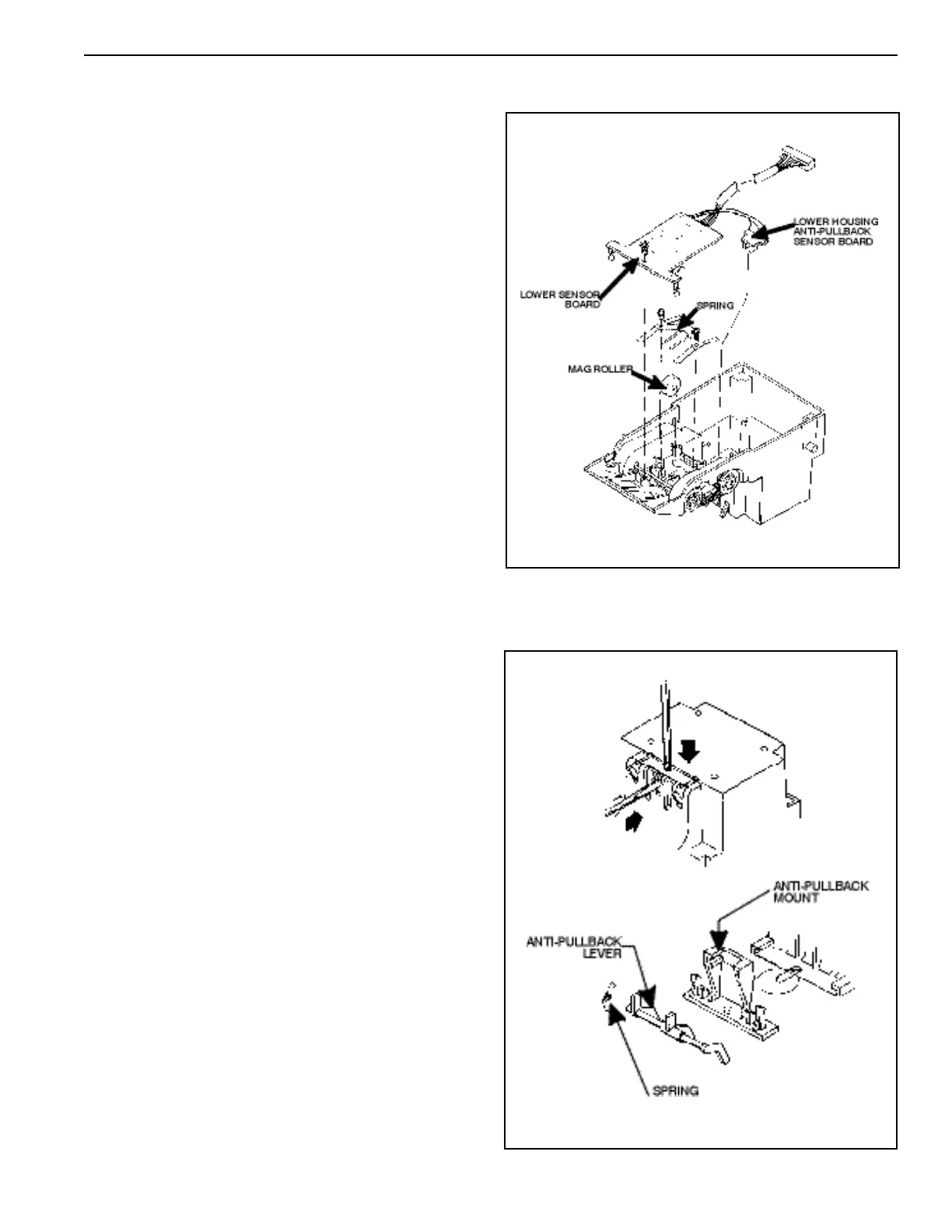
Removing the Mag Roller and Spring
(see Figure 18)
Remove the two Phillips screws that secure the mag roller
spring and remove the spring and roller.
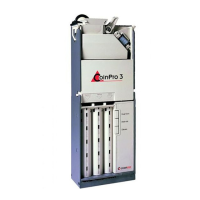
Removing the Lower Housing
Anti-Pullback Lever and Spring
(see Figure 19)
Using a small drift or Phillips screwdriver, depress the
locking tab in the small hole in top of the lower housing.
At the same time, insert a small standard blade screw-
driver into the center slot and push the anti-pullback
assembly back out of the retaining tabs. Remove the anti-
pullback lever from its mount by releasing the locking
tabs. Pay close attention to the placement of the spring to
assure its correct position on reassembly.
Removing the Lower Sensor Board
(see Figure 18)
Remove the Phillips screw that secures the sensor board
to the lower housing, unsnap the lower housing anti-
pullback sensor board and remove the lower sensor
board.
NOTE: Earlier units may have the anti-pullback sensor
board glued into place.
Figure 18
Figure 19



 To Next Page