16
SECTION 4: MAINTENANCE
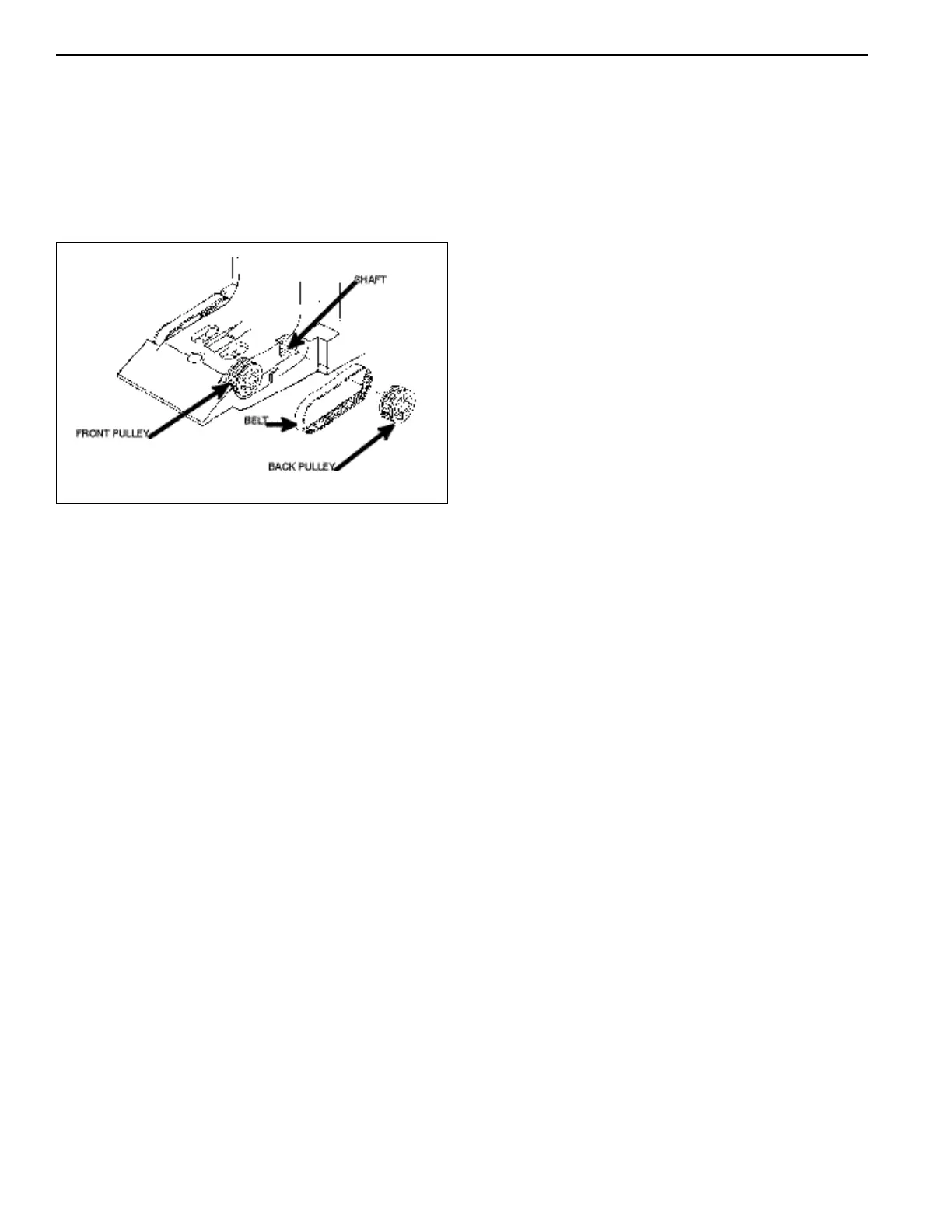
Removing the Lower Housing Belts and
Pulleys (see Figure 20)
Slide either the front or back pulley off its shaft to free
the belt for removal.
Figure 20
BA30 CLEANING MAINTENANCE
PROCEDURE
NOTE: Petroleum-based cleaners and freon-based
propellants can damage plastic and some electronic
components. Scouring pads and stiff brushes may harm
the protective coating on the circuit boards and can mar
the plastic. These items should never be used when
cleaning the BA30 bill acceptor.
The BA30 should be cleaned every 20,000 bills or every
two years (or as needed, depending on the environmental
conditions of the location). Dust can be removed with a
soft brush or cloth or it can be blown out using com-
pressed air.
Procedure
1. Disconnect power from the bill acceptor.
2. Remove the bill box and use a soft cloth to wipe any
dust from around the intermediate frame and stacker
plate.
3. Remove the lower housing.
4. Using compressed air or a soft brush, blow or brush
the dust off of the optic sensors and out of the
recessed sensor openings.
5. Remove dust from around the belts and pulleys on
the lower housing and the sensors on the upper
sensor board. The upper sensors are located directly
above the lower housing sensors when the lower
housing is installed.
6. The bill path can be further cleaned of any dirt or oil
by using a soft cloth moistened with a mild soap and
water solution.
7. Clean the magnetic head with a cotton swab and
isopropyl alcohol.
8. Blow the dust out of the encoder wheel and its
sensor. (It may be necessary to extend the stacker
plate to access the encoder wheel. This can be done
by supplying power to the unit momentarily so the
stacker plate extends outward.)
9. Remove dust from the transport belt areas and any
other places of build up.
10. Once the lower housing is dry, place it back into the
mainframe making sure the tab on the bottom locks
into place.
11. Remount the bill box.
12. Apply power and insert bills to verify the unit is
functioning properly.



 To Next Page