EasyManua.ls Logo

Colortrac L36ei - Troubleshooting Guide; Error Code Reference

Colortrac L36ei
92 pages
Print Icon
To Next Page IconTo Next Page
To Previous Page IconTo Previous Page
Loading...
Version 1.00 82 Global Scanning UK Ltd © 2018
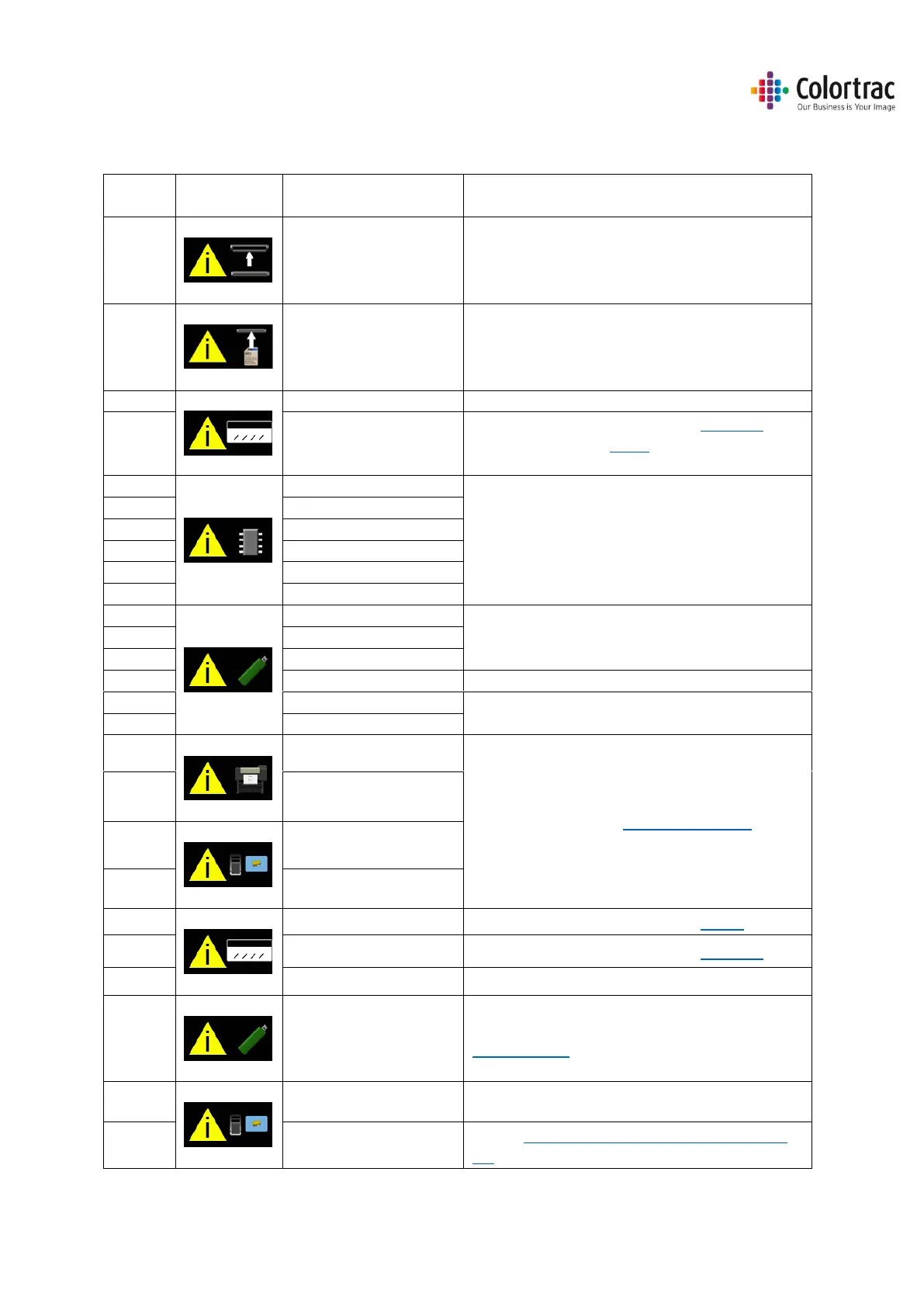
Troubleshooting
Error Codes
Error
Code
Symbol
Message
User Actions
Scanner open
Close the scanner
No Document loaded
Load a document
1
Invalid Model
Power cycle. If problem persists, call service.
2
Calibration required
Power cycle. If problem persists, Calibrate.
If problem persists, Stitch.
If problem persists, call service.
3
Memory: Not Mounted
Power cycle. If problem persists, call service.
4
Memory: Cannot read
5
Memory: Cannot write
6
Memory: Full
7
Memory: Unformatted
8
Memory: Not Closed
9
USB: Not Mounted
Retry USB stick, or try another one.
(Format = Fat32, 128GB max).
10
USB: Cannot read
11
USB: Cannot write
12
USB: Full
Delete files, or try another USB stick.
13
USB: Cannot Delete
Retry USB stick, or try another one.
(Format = Fat32, 128GB max).
14
USB: Not Closed
15
Printer Not Found
See Troubleshooting: Operational Errors.
16
Printer Error
17
PC Not Found
18
PC Error
19
Stitch Error
Power cycle. If problem persists, Stitch.
20
Normalise Error
Power cycle. If problem persists, Calibrate.
21
LED Calibration Error
Power cycle. If problem persists, call service.
22
Firmware Error
Power cycle. If problem persists,
load firmware
23
Mid-scan Stop Error
24
Plus Pc Not Found
Ensure the ScanApp Lei is running on the Plus
PC.

Table of Contents