18
S1 S2
S1 S2
2
7
3
ON
1 2 3 4 6 75 8
=
1
= 3
+1
= 4
+1
= 5
+1
= 2
+1
1
4 5
6
8
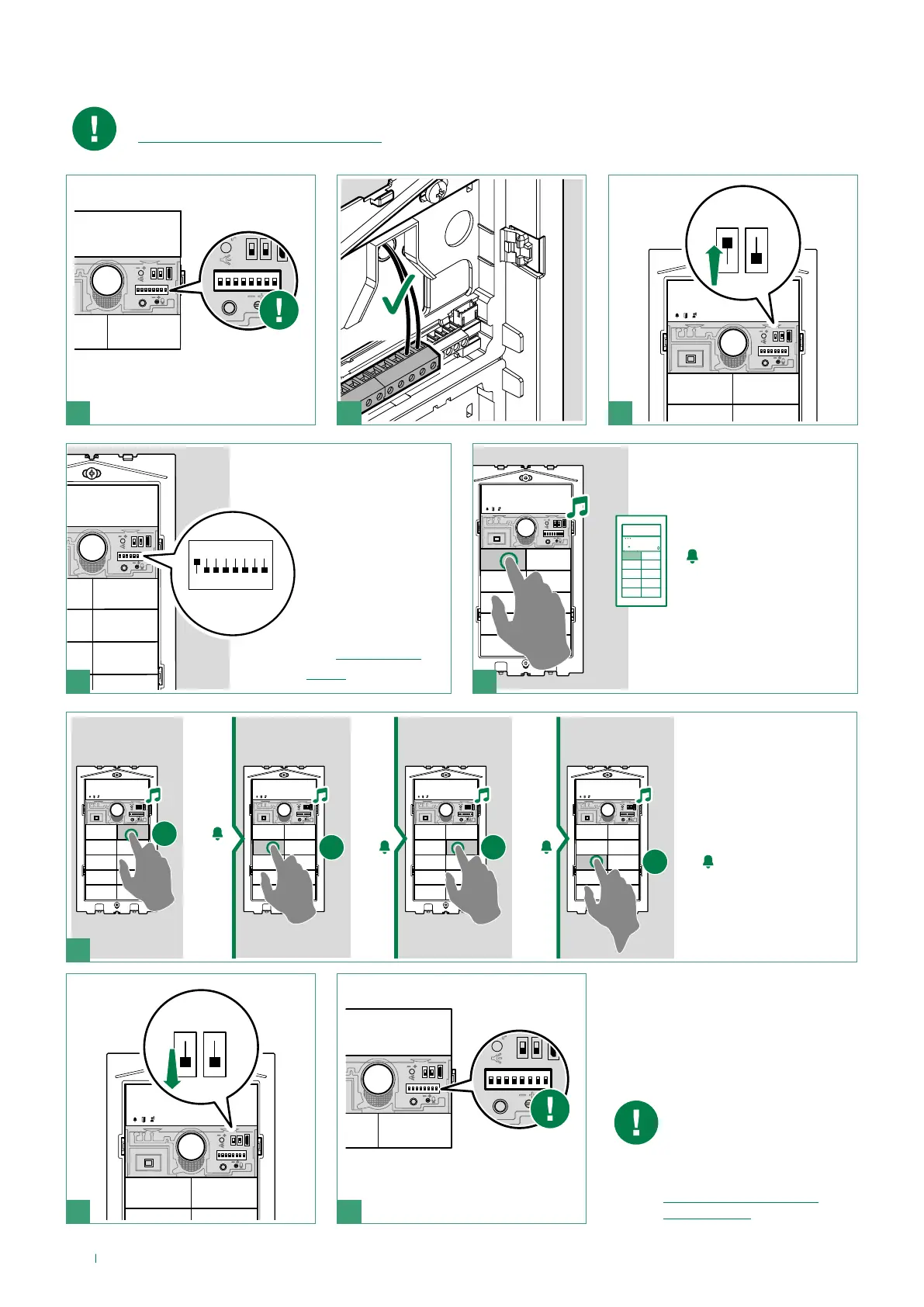
Smart programming of consecutive addresses
Make sure the button configuration (single/dual) is correct before proceeding with programming (see
“Configure button type (single/dual)”)
When programming is
complete, make sure the
button configuration is
correct (single/dual), see
“Configure button type
(single/dual)”)
Take note of the DIP-switch
settings
example:
code 1
Set the address of the
apartment you wish
to call (for example:1)
using the DIP-
switches
(see “Addressing
table” )
Press the button you
want to associate with
the call address set
using the DIP-switches
Press the following
buttons to assign
consecutive
addresses.
Reset the configuration of the
DIP-switches



 To Next Page