23
2
cod. 159
1
21
4
S1 S2
5 6
S1 S2
3
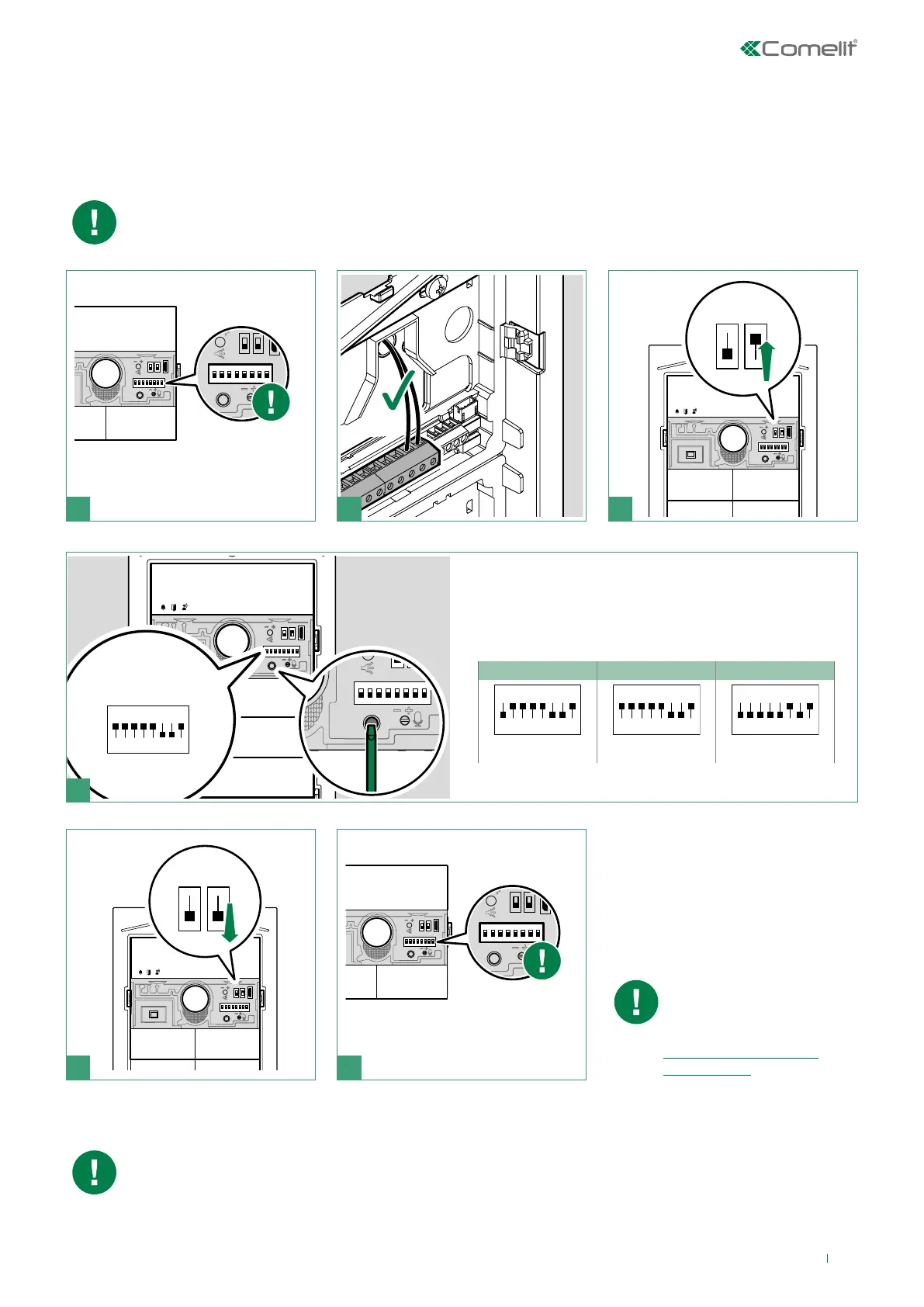
Twilight sensor
Button backlighting management
The twilight sensor is in AUTO mode by default: the button LEDs light up at night and switch off during the
day. To change the setting to ON (LEDs always on) or OFF (LEDs always off), proceed as follows:
NOTE: when the OFF and AUTO lighting modes are active, every time the entrance panel is powered, the
buttons light up for the duration of the start-up phase (10 seconds maximum).
In AUTO mode the twilight sensor checks the ambient light level every 9 minutes; if the measured values
exceed the specified minimum/maximum thresholds, it is activated/deactivated accordingly.
When programming is
complete, make sure the
button configuration is
correct (single/dual), see
“Configure button type
(single/dual)”)
Take note of the DIP-switch
settings
example:
Set the desired backlighting mode (OFF, ON or AUTO) and
press the confirm button.
Reset the configuration of the
DIP-switches
OFF ON
AUTO (default)
ON
1 2 3 4 6 75 8
ON
1 2 3 4 6 75 8
ON
1 2 3 4 6 75 8



 To Next Page