3.4
Checking the system pressure
The system pressure needs to be checked and the water system needs to be
replenished from time to time, because the air pockets that were initially in the
system are transported around and gradually emptied out. The first few days after
installation, the pressure should be checked daily.
•
Adapt to the habit of always checking the pressure at least every time
the air filter is changed or cleaned and each time the radiators or floor
heating coils are aerated.
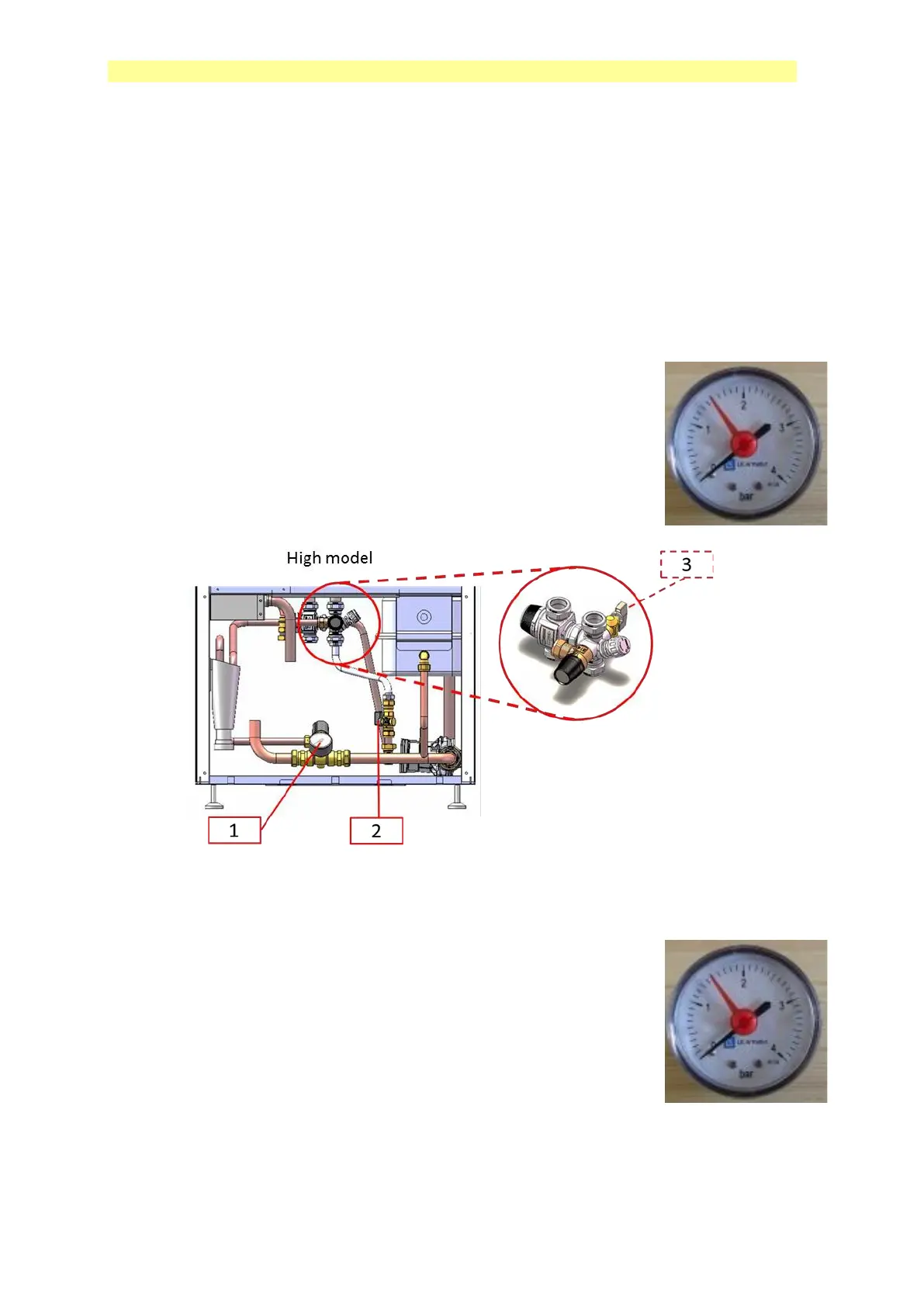
3.4.1 High model:
•
Remove the large front cover.
•
Check the pressure, the black indicator on the manometer (1)
should show 1.0-1.5 bar.
•
If necessary, open the filling valves (2 and 3).
•
Close both filling valves when the pressure gauge shows
desired value.
•
Put the front cover in place.
3.4.2 Low model:
•
Remove the front cover.
•
Check the pressure, the black indicator on the manometer
should show 1,0-1,5 bar.
•
If necessary, open the filling valve (which is mounted by
your installer, and is normally located at at the hot water tank)
•
Close both filling valves when the pressure gauge shows
desired value.
•
Put the front cover in place.



 To Next Page