The UV room factor value is normally set at 2.0° C for underfloor heating and 3.0° C
for radiator heating. The room factor determines how much the indoor temperature
affects the flow temperature and is usually left at default value.
11.11
External mixing valve control.
An external mixing valve (shunt valve) can be
controlled when external water tank with external
heat source is used, it can be solar
collector system, water-jacketed stove or the like.
This function is described in a separate document
that is provided via ComfortZone's website.
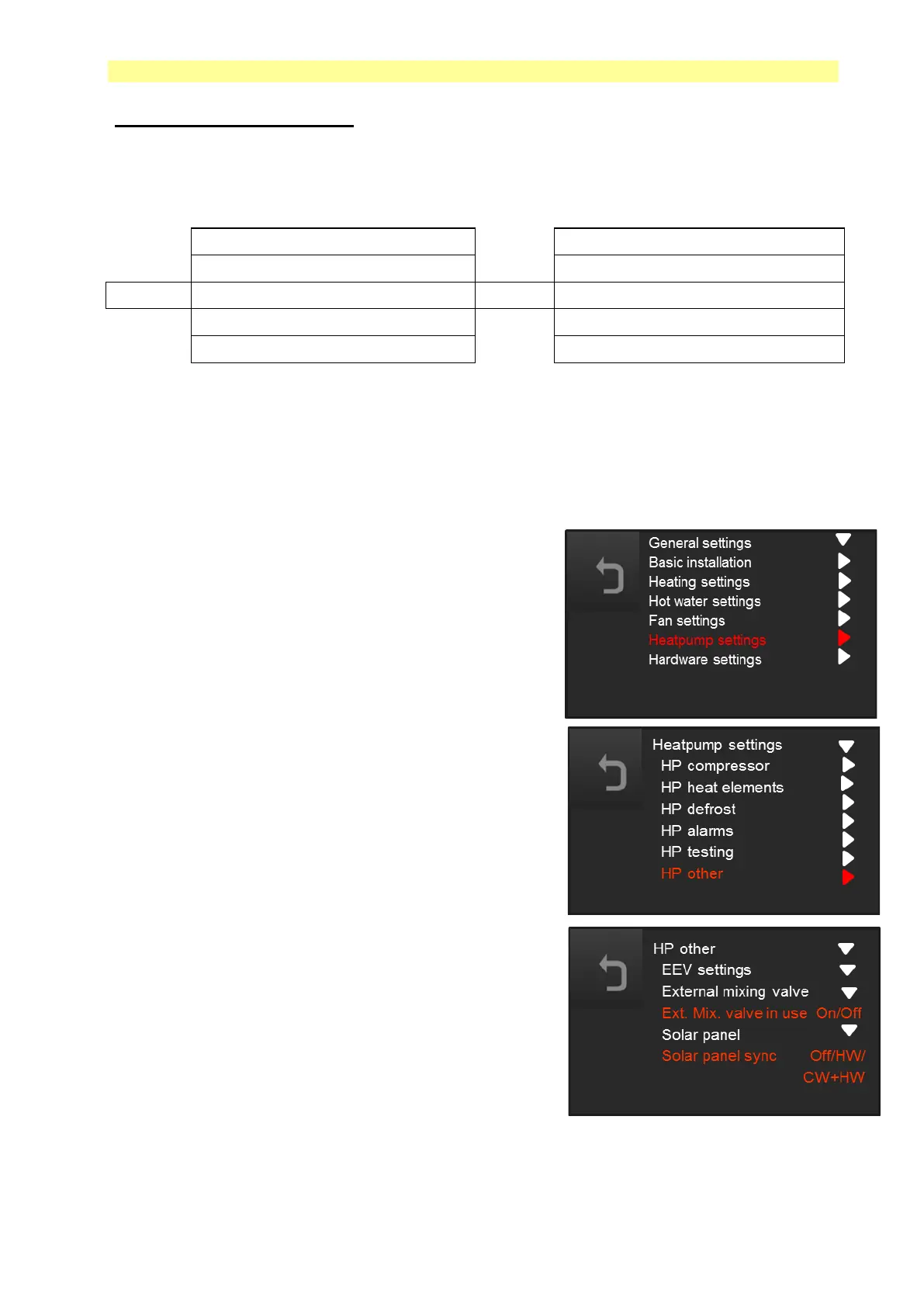
Go to "Advanced settings" / "General settings"
press the button for 5 seconds. Proceed to
"Heat pump settings" / "HP Other" / "External -
mixing valve in use".
“External mixing valve” is set to Off position when.
Delivered, If you want to connect the
external mixing valve, set the function to On.
11.12
Synchronization with solar
panels.
There is a possibility to synchronize solar panels
with the function "Solar panel".
This function is described in a separate
document that is provided via ComfortZone's website.
Go to "Advanced settings" / "General settings"
press the button for 5 seconds. Proceed to
"Heatpump settings" / "HP Other" / "Solar panel sync."
"Solar panel sync" is in the Off position when delivered.
If you want to connect the solar panel synchronization set the function to HW or
CW+HW.



 To Next Page