Network Functions G8-S0/G3-S0-I
18 1.1/1010
Configure the Block Numbers
Block Numbers
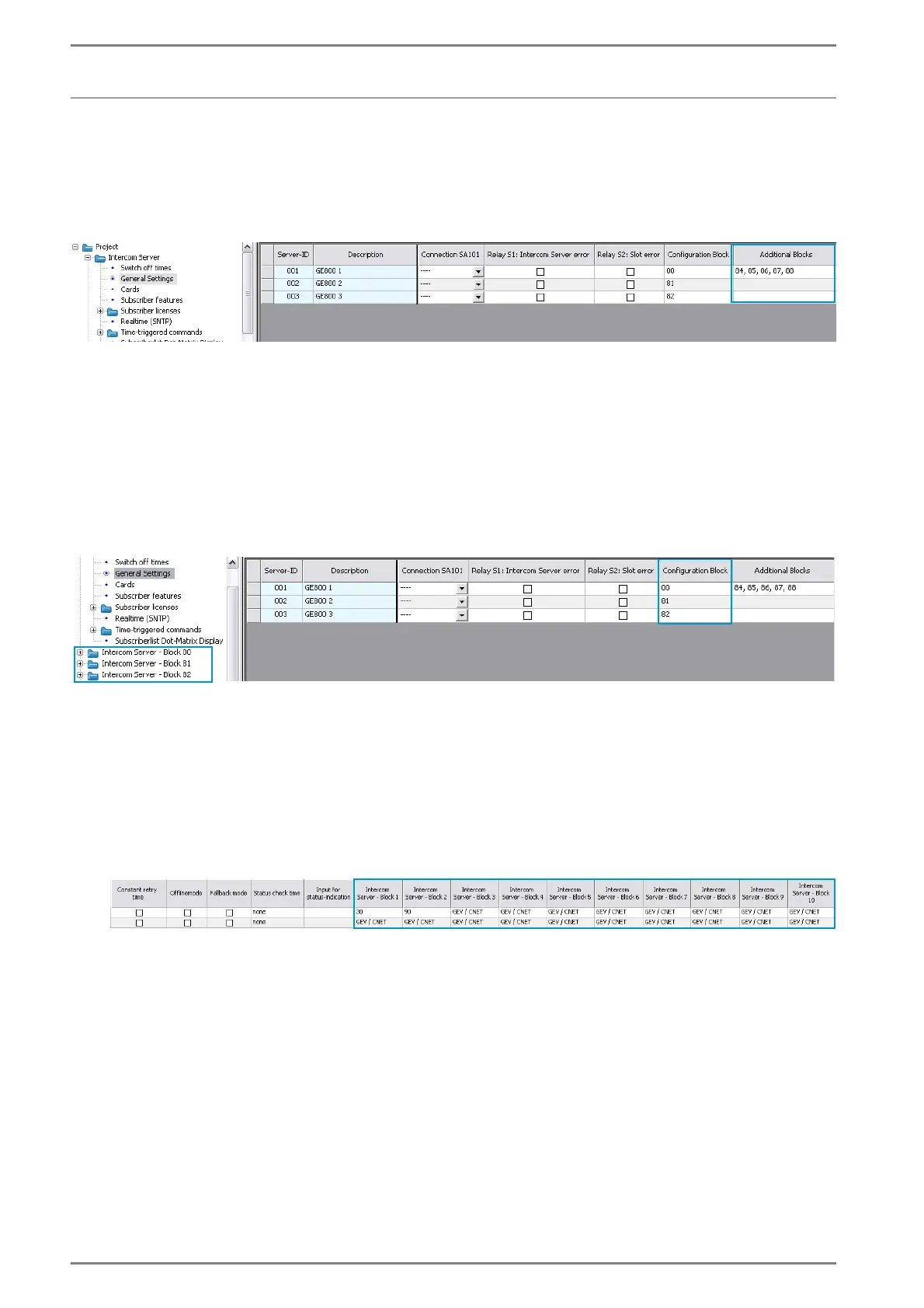
Intercom Server > General Settings
Here the block numbers for all Intercom Server housings are entered. Several block numbers (a maxi-
mum of 6 per housing) are entered in the fields Additional Blocks.
Configuration Blocks
In a configuration block certain definitions can be made for all Intercom Servers in this block (e.g.
switch-off times, waiting signals, hierarchy levels etc.).
In standard all Intercom Servers are contained in “Configuration Block 0”. The settings for this confi-
guration block can be found at Intercom Server Block 00.
It is possible to define a separate configuration block for each Intercom Server. For each defined con-
figuration block an own folder is created in CCT:
Define the connections
For each connection over a G8-S0 / G3-S0-I it must be defined, which Intercom Server blocks shall be
reached over this interface.
Network > S0-Connections
In the fields Intercom Server - Block 1 to Intercom Server - Block 10 the block numbers of all
Intercom Servers connected over this interface are entered.













 To Next Page