Telephone Interface G8-S0/G3-S0-I
24 1.1/1010
Speech Control
A conversation between a telephone and an Intercom station can be held in duplex, full duplex
(standard) or simplex.
Operation Simplex at Telephone
Pressing the button “*” toggles talk/listen modes
(press * = talk, press * a 2nd time = listen)
If the button “*” on the telephone is not pressed a 2nd time, the Intercom station will be switched
through after a configurable time.
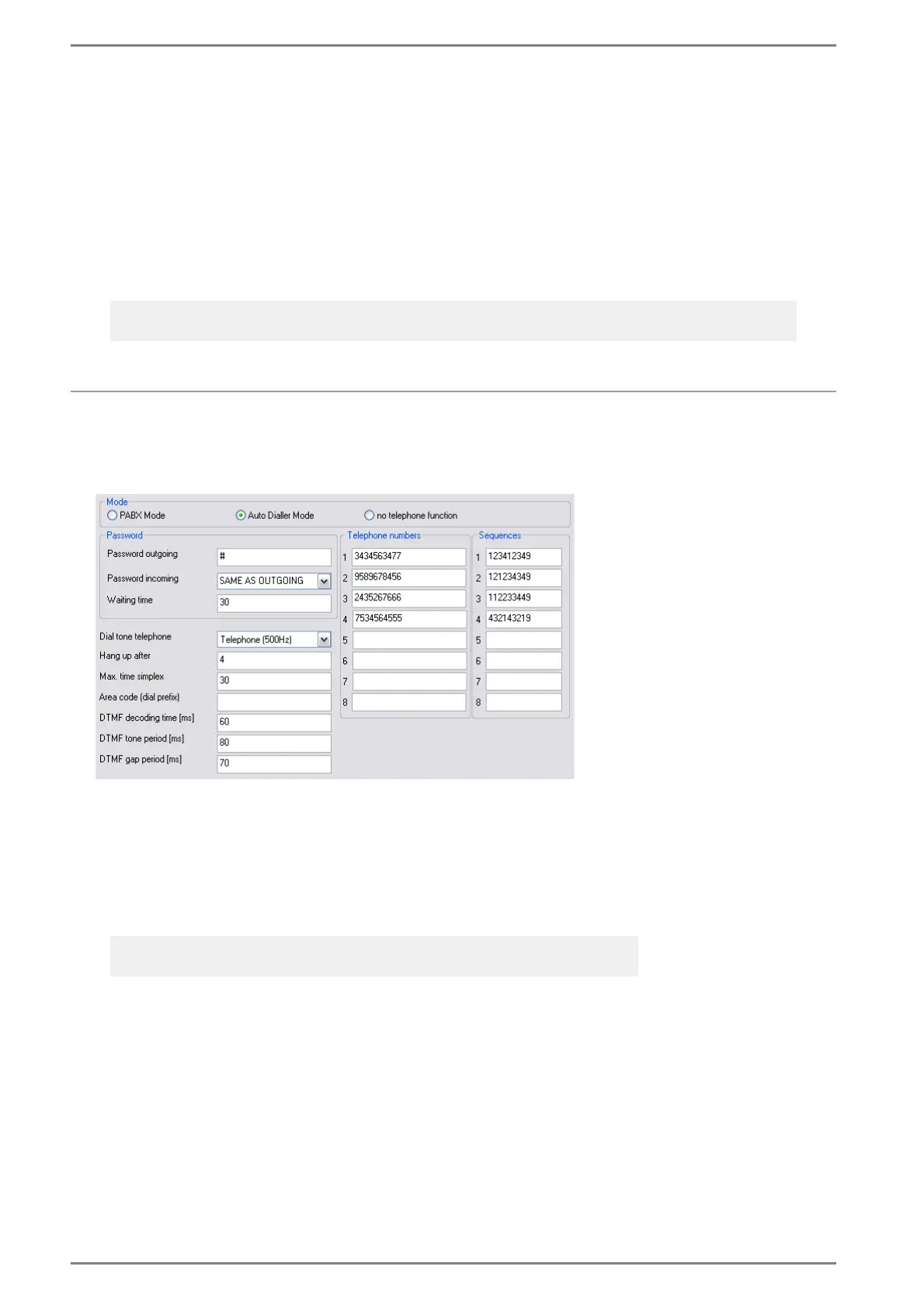
Configuration CCT 800 – Auto Dialler Mode
Password, Switch-off Times
Interfaces > S0 > Number S0 Line
At Mode select the radio button Auto Dialler Mode.
At Password outgoing the 1- to 4-digit code is entered, with which the call shall be taken over at
the telephone.
At Password incoming the 1- to 4-digit code is entered, which shall be entered at the telephone
when calling to an Intercom subscriber (or selection of “Same as outgoing”).
At Waiting Time the time is entered, after which the next telephone number of the sequence is
dialled (if the call is not accepted).
At Dial tone telephone the dial tone at the telephone can be selected or deactivated.
At Hang up after the time is entered, after which the connection between telephone interface and
telephone net is cancelled, after cancelling the respective conversation (with “#” or X).
At Max. time simplex the time can be defined, after which a simplex conversation switches back if
the button “*” is not pressed at the telephone a 2nd time (* = talk, * another time = listen). The
speech control is switched back to the mode selected at “Intercom Server” – “Switch off times“, in
the combo-box “Release T-key“.
Note:
For configuration of the several speech modes, see current version of the manual “PRO 800”.
Entries < “10” = Minutes (e.g. an entry of “5” is detected as “5 minutes”)
Entries ≥ “10” = Seconds (e.g. an entry of “12” is detected as “12 seconds”)













 To Next Page