G8-S0/G3-S0-I Start Up S0 Network
1.1/1010 11
Installation
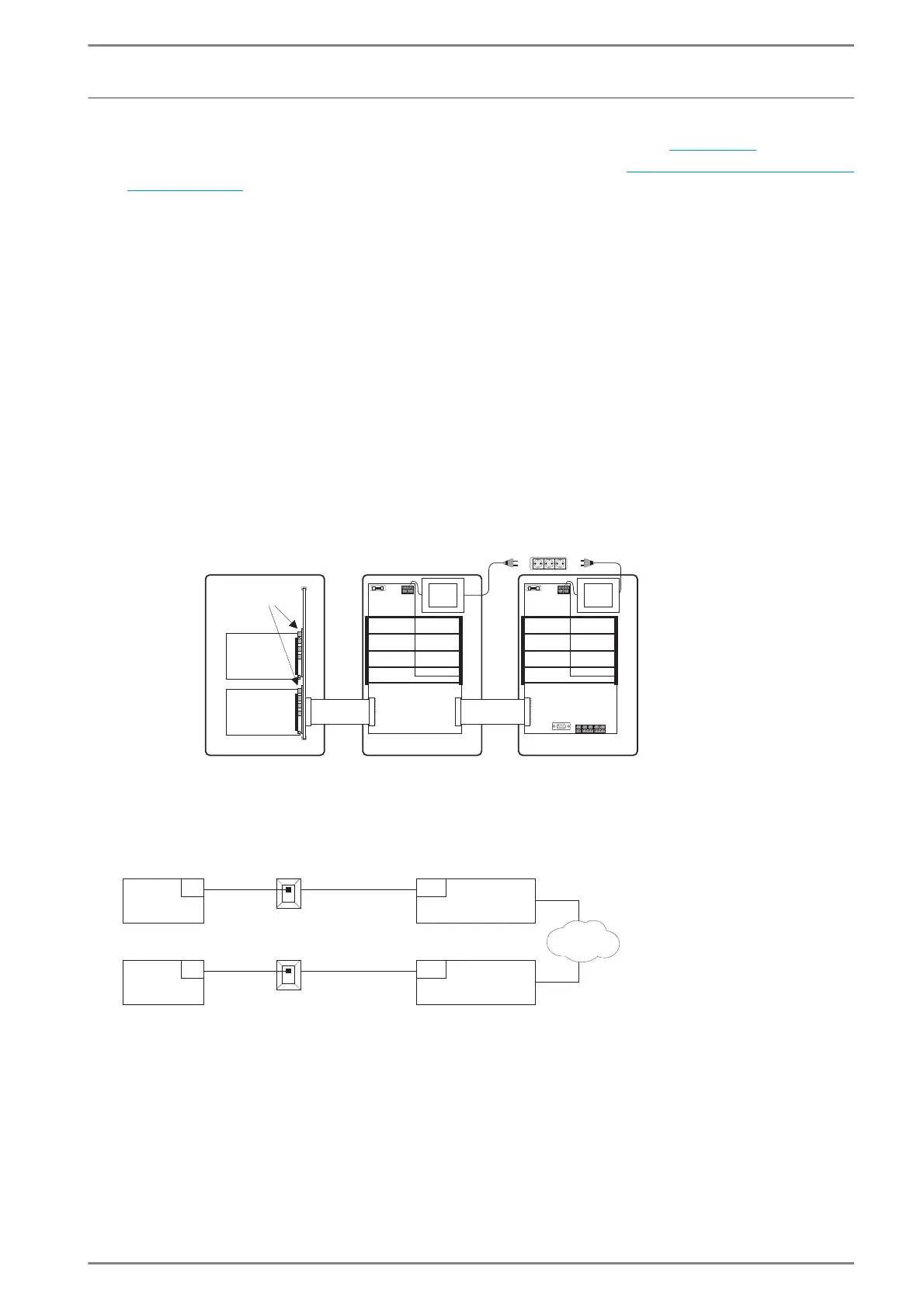
For installation of the G8-S0/G3-S0-I, the installation board
G8A-C
is used see page 12.
The ISDN Basic Rate Interface is installed by your Telecom provider, see ”
The ISDN Basic Rate Inter-
face” on page 8. With the “Point-to-multipoint configuration“ up to 7 additional equipments can be
connected. Please notice, that the G8-S0/G3-S0-I can not be operated at the same time as another
equipment at the S0 bus, because it requires both B-channels.
G8-S0
In an Intercom Server GE 800, the G8-S0 can be installed in the slots 1 to 14.
In each housing GE 800 a maximum of 7 G8-S0 can be used.
G3-S0-I
For a Intercom Server GE 300 an interface housing GEI 300 has to be used (one GEI 300 per
GE 300, the GEI 300 offers place for two interface cards).
The interface housing GEI 300 is connected to the expansion plug of the GE 300, or, if an expansion
housing GEZ 300 is connected there, to the expansion plug of the GEZ 300.
With a GE 300 a maximum of two G3-S0-I can be used.
Block diagram
GE 300GEZ 300GEI 300
G8A-C
G3-S0-I
G3-S0-I
Slot 11
Slot 12
(“Slot n+1“)
(“Slot n“)
ISDN
S0
S0
4
/
4
/
4
/
4
/
S0 Bus, max. 150 m
(492 ft)
S0 Bus, max. 150 m
S0
S0
RJ45 (IAE)
RJ45 (IAE)
max. 10 m
max. 10 m
(33 ft)
GE 300
GE 800
GE 300
GE 800
Network termination
Network termination
NT
NT
(33 ft)
(492 ft)













 To Next Page