The TraceCase is a compact and portable contactless spy tool designed for NFC (Near Field Communication) transactions under real-life conditions. It allows for discreet tracing of NFC interactions and provides powerful analytical software for debugging and optimal performance. The device is available in three main versions: TraceCase, TraceCase Fit, and TraceCase Fit 2, each offering slightly different form factors and functionalities to suit various testing scenarios.
Function Description
The TraceCase series of devices are primarily used for monitoring and analyzing NFC communication. They are designed to capture and record NFC transaction data, which can then be analyzed using accompanying software. This makes them invaluable tools for developers, testers, and engineers working with NFC-enabled devices, particularly in areas like access control, public transport, and mobile payment. The devices support real-time tracing and allow for detailed examination of NFC protocols and signals.
TraceCase
The standard TraceCase is a small and handy contactless spy tool for NFC. It connects to external antennas for monitoring.
- Components: Rechargeable battery, micro-USB cable, and various antenna types (Antenna-M-Type 04, 05, 06, 07).
- Software: TraceCase App (for smartphones), TraceCase Viewer (for host computers), and TraceCase Toolbox (for remote tracing on a host computer).
- Connectivity: Wi-Fi (IEEE 802.11 b/g/n; 2.4 GHz) for communication with a smartphone or host computer.
TraceCase Fit
The TraceCase Fit is a customized test solution designed to be hidden in a smartphone case. It is available for iPhone 8/Pro, iPhone X, iPhone 11, iPhone 11 Pro Max, and Samsung S8.
- Components: Device integrated into a smartphone case, rechargeable battery, micro-USB cable.
- Software: TraceCase App (for smartphones), TraceCase Viewer (for host computers), and TraceCase Toolbox (for remote tracing on a host computer).
- Connectivity: Wi-Fi (IEEE 802.11 b/g/n; 2.4 GHz) for communication with a smartphone or host computer.
TraceCase Fit 2
The TraceCase Fit 2 is also a customized test solution hidden in a very compact smartphone case. It is designed for iPhone 11 and allows the use of the volume, mute, and power buttons of the smartphone as well as the camera. Additionally, the case has fitting holes so that the original loudspeakers can be used.
- Components: Device integrated into a smartphone case, micro-USB cable. The battery is non-removable.
- Software: TraceCase App (for smartphones), TraceCase Viewer (for host computers), and TraceCase Toolbox (for remote tracing on a host computer).
- Connectivity: Wi-Fi (IEEE 802.11 b/g/n; 2.4 GHz) for communication with a smartphone or host computer.
Important Technical Specifications
Dimensions & Weight:
- TraceCase: Approx. 94 x 58 x 14 mm; Weight: 75 g
- TraceCase Fit: Dimensions depending on smartphone type; Weight: ~130 g, depending on smartphone type
- TraceCase Fit 2: Dimensions depending on smartphone type; Weight: <95 g, depending on smartphone type
Power Supply & Battery Life:
- TraceCase & TraceCase Fit: Rechargeable battery: 3.7 V, 1,100 mAh; Up to 6 hours of battery life.
- TraceCase Fit 2: Rechargeable battery (not removable): 3.7 V, 1,000 mAh; Up to 5.75 hours of battery life.
Interfaces:
- TraceCase: 1 MCX antenna connector, 1 micro-USB (for recharge), Wi-Fi (IEEE 802.11 b/g/n; 2.4 GHz).
- TraceCase Fit & TraceCase Fit 2: 1 micro-USB (for recharge), Wi-Fi (IEEE 802.11 b/g/n; 2.4 GHz).
Sampling Times (Common to all models):
- ADC sample rate: 54.24 MHz
- ADC time base accuracy: Frequency tolerance: ±1.00 ppm; Frequency stability: ±0.50 ppm; Aging: ±1 ppm max over 1 yr @ 25°C
- Analog Scope Recording: Up to 8192 k samples; Envelope sample rate: 13.56 MHz (1/fc) to 424 kHz (32/fc); Recording length: 0.6–20 s (depending on envelope sample rate).
- Digital Recording: 2 Mbit communication data.
- Sampling Amplitude: 14 bit ADC + 45 dB dynamic range; Analog Scope: 21 bit resolution.
- Monitoring Antenna Scaling:
- Antenna Type 04: 0.0000244 (A/m) / bit (up to 39 A/m)
- Antenna Type 05: 0.0000144 (A/m) / bit (up to 23 A/m)
- Antenna Type 06: 0.0000144 (A/m) / bit (up to 23 A/m)
Antenna Specifications (for TraceCase):
- Antenna-M-Type 04: Passive antenna, 1 turn, 115 mm x 55 mm, Antenna area: ≈ 576 mm², Cable length: approx. 85 cm.
- Antenna-M-Type 05: Passive antenna, 4 turns, ≈ 24 mm x 10 mm, Antenna area: ≈ 240 mm², Cable length: approx. 85 cm.
- Antenna-M-Type 06: Passive antenna, 4 turns, ≈ 24 mm x 10 mm, Antenna area: ≈ 240 mm², Cable length: approx. 85 cm.
- Antenna-M-Type 07: Passive antenna, 4 turns, ≈ 36.8 mm x 32 mm, Antenna area: ≈ 660 mm², Cable length: approx. 150 cm.
Usage Features
Device Status LED:
The device status is indicated by an LED.
- Yellow flash (1 s on, 1 s off): TraceCase is switched off, no tracing.
- Short periodic pulse (0.05 s on, 2 s off): Active trace (spy mode).
- Error code (number of quick flashes): Indicates an error code.
- Green: Battery is being recharged. This LED is directly connected to the charge controller. If the USB port supplies more power than needed by the device and if the USB voltage is stable, then the LED lights constantly until charging is finished. However, in some cases, the following phenomena can occur:
- Green flash (irregular, approx. 1 Hz): This can occur when using lousy USB cables.
- Green flash (flicker, more than 1 Hz): This can occur when the charging voltage varies a lot, for example, during the transition from charging with maximum power to charging with minimum power to charging end voltage. Consequently, this often occurs when charging at the PC, not when using dedicated chargers.
Operation:
- Charging: Charge the battery for at least six hours before first use.
- Inserting/Removing the Battery (TraceCase & TraceCase Fit): Carefully insert the battery as indicated to avoid damage to contacts or the battery itself.
- Switching On/Off:
- TraceCase: Push the button to switch on. Push the button for more than 5 seconds to switch off. The LED starts to flash very quickly and TraceCase shuts down.
- TraceCase Fit: Push the button located at the left or right side of TraceCase Fit (depending on smartphone type) to switch on. Push the button for more than 5 seconds to switch off.
- TraceCase Fit 2: Push the button to switch on. Push the button for more than 5 seconds to switch off.
- Tracing:
- TraceCase: When TraceCase is switched off, push the button to switch it on. Plug the antenna cable into the TraceCase socket and place the antenna on the device under test. Push the button shortly (approx. 3–5 s) to start tracing. Push the button shortly again (also 3–5 s) to stop tracing. After stopping, you can immediately start another session.
- TraceCase Fit: Insert the smartphone into TraceCase Fit. Switch on TraceCase Fit by pushing the button. Go to the Wi-Fi settings of your smartphone and connect to the Wi-Fi network of TraceCase Fit. Start the TraceCase App on your smartphone. If the TraceCase Fit status is 'Ready', then tap the START TRACING button on your smartphone and place the antenna on the NFC device. Tap STOP (TRACING) on your smartphone to end the monitoring session. The data is transferred from the TraceCase Fit hardware to the smartphone. To save battery power, push the TraceCase Fit button for more than 5 s to switch it off. On the smartphone, enter the session details into the screen that is automatically displayed afterwards. On TraceCase Home, tap SAVED SESSIONS and select the desired session. Share the session data.
- TraceCase Fit 2: Insert/remove the smartphone as indicated. Pay attention to the angle when inserting/removing the smartphone to avoid damage. Switch on TraceCase Fit 2 by pushing the button. Go to the Wi-Fi settings of your smartphone and connect to the Wi-Fi network of TraceCase Fit 2. Start the TraceCase App on your smartphone. If the TraceCase Fit 2 status is 'Ready', then tap the START TRACING button on your smartphone and place the antenna on the NFC device. Tap STOP (TRACING) on your smartphone to end the monitoring session. The data is transferred from the TraceCase Fit 2 hardware to the smartphone. To save battery power, push the TraceCase Fit 2 button for more than 5 s to switch it off. On the smartphone, enter the session details into the screen that is automatically displayed afterwards. On TraceCase Home, tap SAVED SESSIONS and select the desired session. Share the session data.
TraceCase Web Interface:
The TraceCase Web Interface is used for configuring and managing the device via a web browser on a PC or smartphone.
- Access: Connect to the TraceCase device via WLAN. In access point mode, the default IP address of the TraceCase device is 192.168.200.1. In client mode, the TraceCase device obtains its IP address from the DHCP server.
- Features: Recorder page (tracing, measuring field strength, manual trigger, digital settings, analog settings), WLAN page (MAC address, SSID, password, network address, WLAN Access Point/Client), Help Texts, Status Bar (upload/download file, Wi-Fi connection status, battery level).
Maintenance Features
- General Safety: The device is intended for recording wireless communication between two NFC devices or cards. It must be used according to the instructions to avoid damage or injury. Any other or additional use is not in accordance with the intended use.
- Cleaning: Only clean the device with a brush or a dry, soft cloth. Never insert any foreign objects into the device.
- Battery: Do not charge the battery while tracing. The charger may cause electromagnetic interference that can lead to a distortion of the traced signals.
- Replacement Parts: Replacement parts must meet the technical requirements specified by COMPRION. Make sure only to use original replacement parts.
- End-of-Life Treatment: The device falls under the scope of the European directive 2002/96/EC (WEEE) and should be disposed of properly. Do not dispose of the equipment with unsorted household waste. Contact your local COMPRION importer or COMPRION directly to get information on the take-back procedure. The WEEE symbol (crossed-out wheeled bin) indicates that the product must not be disposed of as unsorted municipal waste.

 Need help?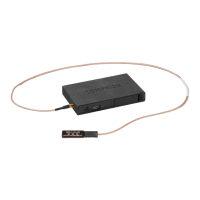

 To Next Page
 General