3.3 TraceCase Fit
22
•
•
•
•
•
•
3.3 TraceCase Fit
3.3.1 Inserting and Charging the Battery
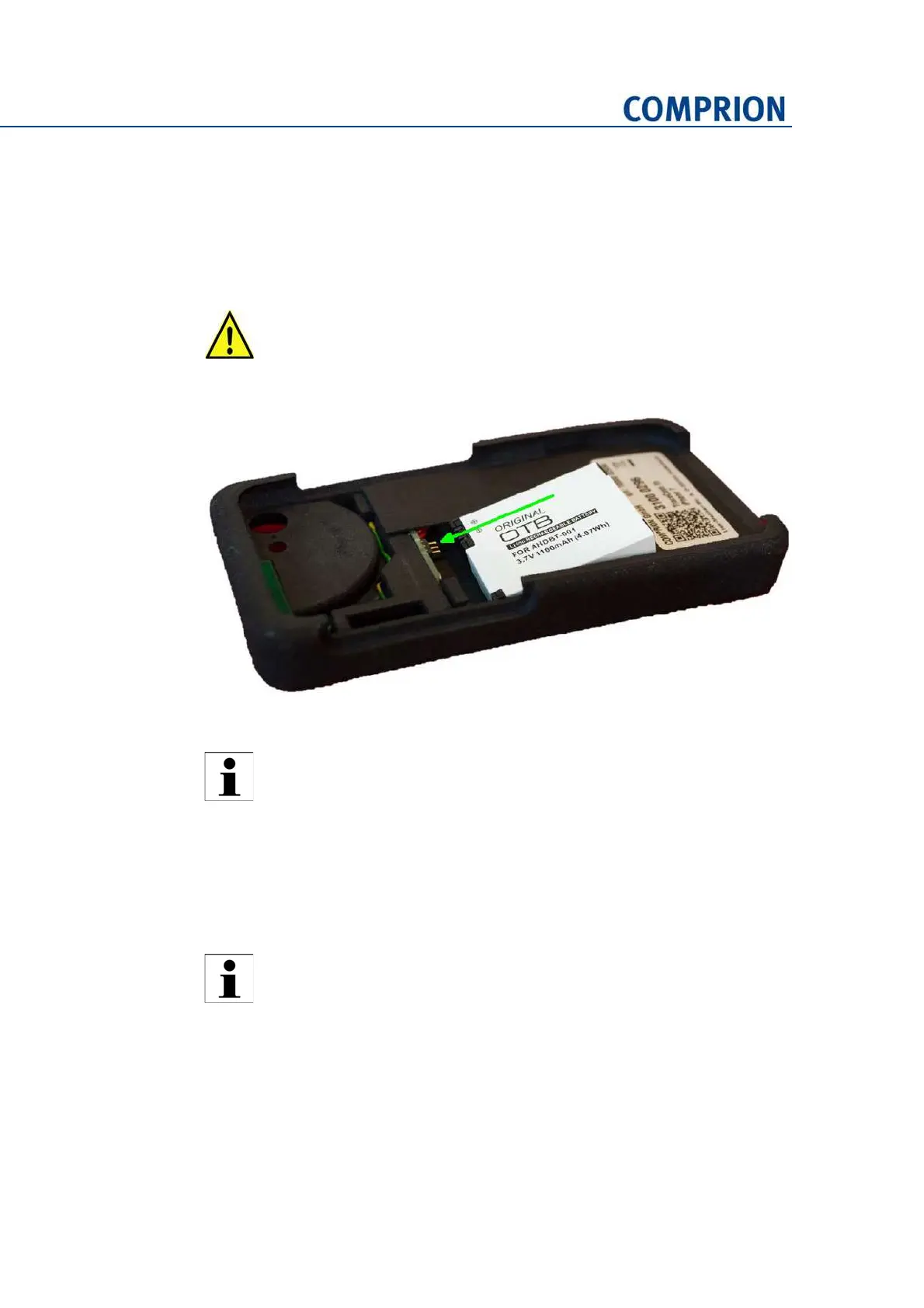
► Insert the battery as indicated in the following photo:
Figure 3-19 Battery insertion (view of TraceCase Fit without smartphone)
► Use the micro‐USB cable to charge the battery at least for six hours before first use.
3.3.2 Switching on/off
► To switch TraceCase Fit on, push the button.
► To switch TraceCase Fit off, push the button for more than 5 s. Then, the LED starts
to flash very quickly and TraceCase Fit shuts down.
3.3.3 Tracing
► Insert the smartphone into TraceCase Fit.
► Switch on TraceCase Fit by pushing the button.
Make sure to insert the battery as indicated in the photo! Otherwise, you can
cause damage to the contacts or even the battery itself!
Do not charge the battery while tracing. The charger may cause electromag‐
netic interference that can lead to a distortion of the traced signals.
The button is located at the left or right side of TraceCase Fit depending on
the type of the smartphone.


 To Next Page