2-8
Compro IP55 / 60 / 70 Network Camera
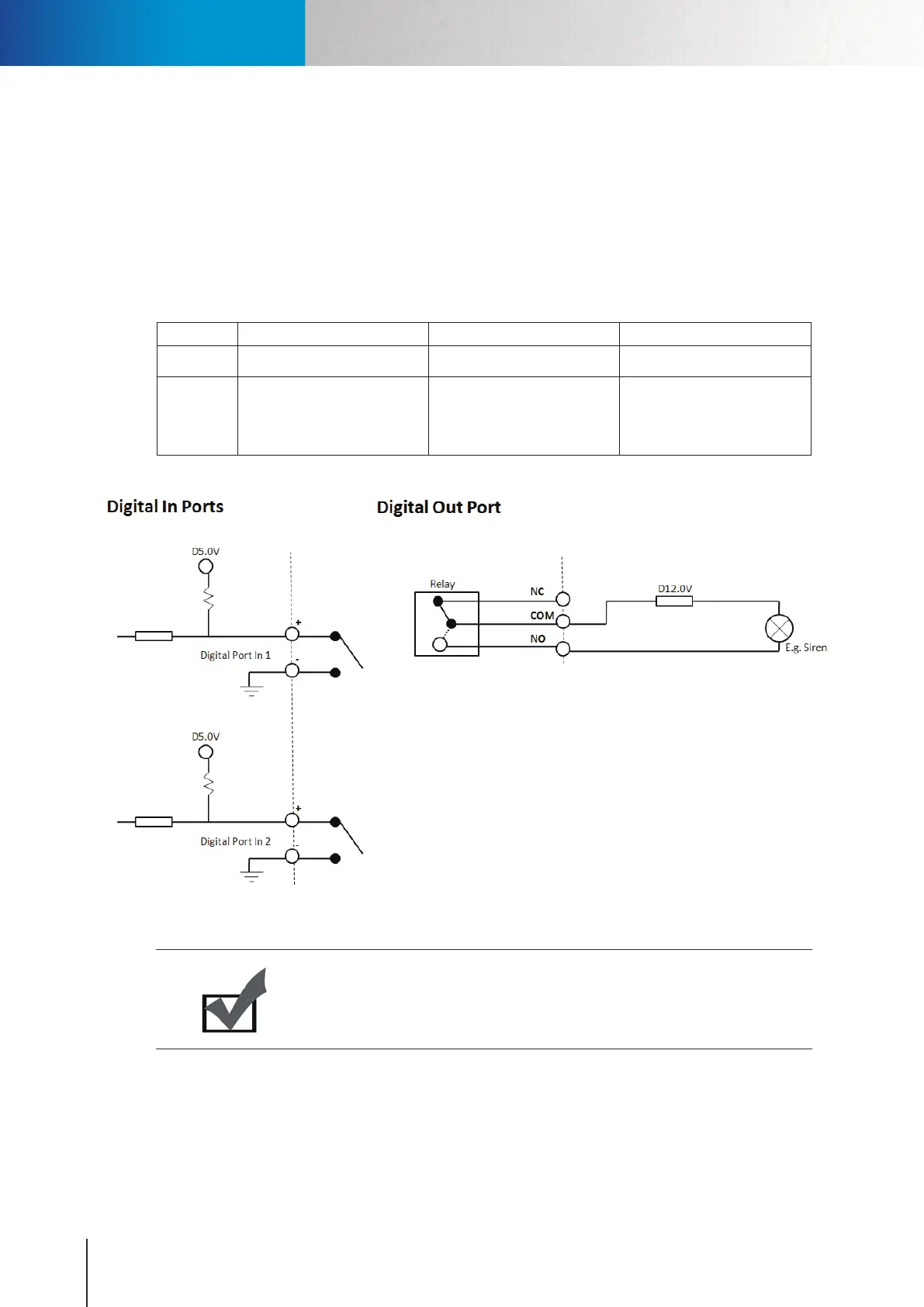
Digital I/O Connector Block
The I/O connector on the back of the camera provides a central interface between your home security system
and various output devices.
The two digital inputs are normally used with security sensors, e.g. passive infrared sensors (PIR), smoke
detectors, door/window sensors, etc. They work by detecting a change in the state of open and closed circuit.
You can check the status of the circuit in [Setup] > [Event Setup] > [I/O Status].
The output port is normally used to trigger external audio or visual indicators, e.g. sirens or strobe lights, etc.
Pin Name Specications Note
1 – 4
Digital Input Ports 1 & 2
Max 5VDC, 60mA
Floating, TTL
5 - 7 Digital Output Port
Max 24V DC, 1A or
Max 125V AC, 1A
You can only use either
the Normally Open (NO) or
Normally Closed (NC) at any
given time.
Table 2-2. Buttons in recording history
Figure 2-6. Front and rear view
Note:
The above output scenario is where the siren will only sound when the input has
been triggered. Should you wish to use the opposite way in which the output device
keeps staying on until the input has been triggered, please use NC.
IP55/60/70
IP55/60/70
Digital I/O Connector Block



 To Next Page